
 (1)
(1)
Official Supplier
As official and authorized distributors, we supply you with legitimate licenses directly from 200+ software publishers.
See all our Brands.
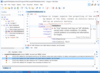
Release Notes: Model Context Protocol Integration- Oxygen AI Positron can connect to Model Context Protocol (MCP) ... review changes in the visual file comparison tool. AI-based DITA conversion and analysis actions can ... Models and Connectors- Oxygen AI Positron now supports a broader range of OpenAI models (including ... Read more Show more results from this product
Release Notes: replace-selection-based-on-image-analysis- Uses details obtained from the referenced DITA XML images when performing the action prompt. ... the AI to regenerate another answer. With OpenAI, you can also decide which engine model to employ when ... Choose Between AI Models- The AI model used for each particular action or chat session can now be easily ... Read more
Release Notes: added via Model Context Protocol or provided in the chat mode definition), giving you more control ... sent to the AI so that it better understands the document. Updated Model Context Protocol Library- ... The Model Context Protocol SDK that is bundled with AI Positron 8.1 has been updated to contain the latest ... Read more

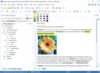
Release Notes: Model Context Protocol Integration- Oxygen AI Positron can connect to Model Context Protocol (MCP) ... review changes in the visual file comparison tool. AI-based DITA conversion and analysis actions can ... provide visual context. Expanded AI Models and Connectors- Oxygen AI Positron now supports a broader range ... Read more Show more results from this product
Release Notes: added via Model Context Protocol or provided in the chat mode definition), giving you more control ... sent to the AI so that it better understands the document. Updated Model Context Protocol Library- ... The Model Context Protocol SDK that is bundled with AI Positron 8.1 has been updated to contain the latest ... Read more
Release Notes: Prompts the user for extra details passed to the action prompt. replace-selection-based-on-image-analysis ... to ask the AI to regenerate another answer. With OpenAI, you can also decide which engine model to employ ... and preferences. Easily Choose Between AI Models- The AI model used for each particular action or chat session can ... Read more
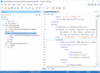
Release Notes: Model Context Protocol Integration- Oxygen AI Positron can connect to Model Context Protocol (MCP) ... review changes in the visual file comparison tool. AI-based DITA conversion and analysis actions can ... Models and Connectors- Oxygen AI Positron now supports a broader range of OpenAI models (including ... Read more Show more results from this product
Release Notes: added via Model Context Protocol or provided in the chat mode definition), giving you more control ... sent to the AI so that it better understands the document. Updated Model Context Protocol Library- ... The Model Context Protocol SDK that is bundled with AI Positron 8.1 has been updated to contain the latest ... Read more
Release Notes: Prompts the user for extra details passed to the action prompt. replace-selection-based-on-image-analysis ... to ask the AI to regenerate another answer. With OpenAI, you can also decide which engine model to employ ... and preferences. Easily Choose Between AI Models- The AI model used for each particular action or chat session can ... Read more
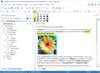
Release Notes: make your WebHelp Responsive output more accessible to AI and Large Language Models (LLMs) by enabling ... The report groups errors by document, provides sortable tables for easier analysis, and includes links ... Read more Show more results from this product
Release Notes: Prompts the user for extra details passed to the action prompt. replace-selection-based-on-image-analysis ... to ask the AI to regenerate another answer. With OpenAI, you can also decide which engine model to employ ... and preferences. Easily Choose Between AI Models- The AI model used for each particular action or chat session can ... Read more
Release Notes: to the AI server, resulting in a faster and more efficient process. Change Default Model- The Oxygen AI ... Positron Assistant preferences page has an option for changing the default model (GPT 3.5 or GPT 4) to use ... for the chat view and for actions that do not explicitly specify a model. Custom AI Actions- In the Oxygen AI ... Read more


Description: This cross-platform Java library is a robust collection of classes and methods that rely on the Document Object Model ... for further analysis and processing. Convert documents to other formats- The API supports a wide range ... Report- Streamline data analysis using powerful Report Generation features. Aspose.Words MailMerge- ... Read more Show more results from this product
Release Notes: generative language models. Expanded Format Support: Added compatibility for Microsoft Works document format. ... Read more
Release Notes: Summarization: Integrated support for document summarization using OpenAI and Google generative language models ... Google's generative language models. Low-Code Document Processing: Introduced new LowCode classes like ... Read more
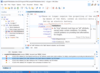
Release Notes: replace-selection-based-on-image-analysis- Uses details obtained from the referenced DITA XML images when performing the action prompt. ... the AI to regenerate another answer. With OpenAI, you can also decide which engine model to employ when ... Choose Between AI Models- The AI model used for each particular action or chat session can now be easily ... Read more Show more results from this product
Release Notes: sortable tables for easier analysis, and includes links to quickly open the validated documents, ... Read more
Release Notes: to the AI server, resulting in a faster and more efficient process. Change Default Model- The Oxygen AI ... Positron Assistant preferences page has an option for changing the default model (GPT 3.5 or GPT 4) to use ... for the chat view and for actions that do not explicitly specify a model. Custom AI Actions- In the Oxygen AI ... Read more
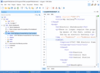
Release Notes: Output- You can now make your WebHelp Responsive output more accessible to AI and Large Language Models ... The report groups errors by document, provides sortable tables for easier analysis, and includes links ... Read more Show more results from this product
Release Notes: Prompts the user for extra details passed to the action prompt. replace-selection-based-on-image-analysis ... to ask the AI to regenerate another answer. With OpenAI, you can also decide which engine model to employ ... and preferences. Easily Choose Between AI Models- The AI model used for each particular action or chat session can ... Read more
Release Notes: to the AI server, resulting in a faster and more efficient process. Change Default Model- The Oxygen AI ... Positron Assistant preferences page has an option for changing the default model (GPT 3.5 or GPT 4) to use ... for the chat view and for actions that do not explicitly specify a model. Custom AI Actions- In the Oxygen AI ... Read more
Description: is a collection of classes and methods that rely on the Document Object Model (DOM), giving developers direct ... then be used for further analysis and processing. Convert documents to other formats- The API supports a wide ... are supported. Aspose.Words Report- Streamline data analysis using powerful Report Generation features. ... Read more Show more results from this product
Release Notes: AI Integration: Added the ability to create an instance of the OpenAi Model class directly. ... Read more
Release Notes: the shadow colors. Advanced Comparison Options: You can now streamline your data analysis workflows ... after SetMapping. Different page margins are reported by AW model and MS Word. Aspose.Words hangs upon ... Read more

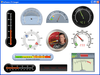
Screenshots: Chart FX for Java also includes 3 specialized data analysis tools: Chart FX Maps, Chart FX Statistical ... Read more Show more results from this product
Description: data analysis tools: Chart FX Maps, Chart FX Statistical and Chart FX Gauges and design time plug-ins ... analysis tools for your end users; these include drill downs, tooltips, drag and drop axis configuration ... 3 specialized data analysis tools: Chart FX Maps, Chart FX Statistical and Chart FX Gauges. Chart FX ... Read more
Screenshots: at the end-user level. Chart FX for Java provides run-time data analysis tools for your end users; these include ... Read more

Description: that are ready for consolidation, analysis, or storage. Recognize scanned images, smartphone photos, screenshots, ... Read more
Tel: (888) 850 9911
Fax: +1 770 250 6199


