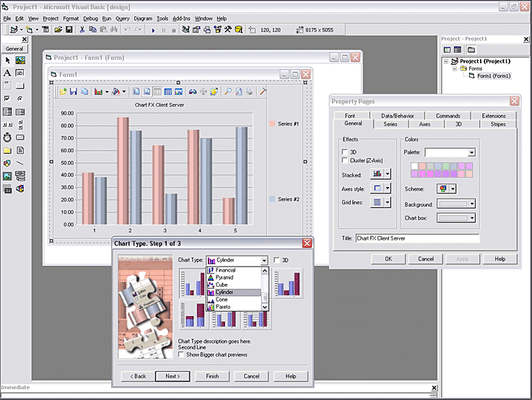
Screenshot Preview

Chart FX Client Server - Summary

by Software FX - Product Type: Component / ActiveX OCX / DLL

Chart FX Client Server is now officially part of Chart FX for COM.
If you require information on upgrading Chart FX Client Server, please visit the page above or Contact Us for pricing and availability.

Summary

Chart FX Client Server by Software FX

URLs: chart-fx-client-server, chart fx client server, chartfxclientserver, software-fx, software fx, softwarefx

Add interactive charts to your client/server applications. Chart FX Client Server leverages all of the features in Software FX's Chart FX for .NET in a product specifically designed for COM desktop developers. Chart FX Client Server harnesses the full GDI+ capabilities of Chart FX for .NET to create strikingly detailed visual effects. Chart FX Client Server is a 100% COM tool, written completely in C++. The .NET Framework is not required in any manner for production. Chart FX Client Server has the same capabilities as Chart FX for .NET because the code has been translated from .NET (C#) to C++. This translation capability allows Software FX to offer a homogeneous product base with the same features.


Chart FX Client Server is Easy to Code & Integrate

Software FX strive to provide customers with the easiest, yet most advanced ways of integrating charting into their application with minimal development. To facilitate this process even more, Chart FX Client Server provides interactive Tutorial and Samples; an interactive programmer’s guide that will get you accustomed with Chart FX Client Server through hundreds of samples and comprehensive explanations.

Chart FX Client Server Enhanced User Interface

Chart FX Client Server provides end-user chart customization through intuitive menus, dialogs and toolbars. Through its enhanced interface, users can export the charts to a variety of formats, as well as store changes to a particular chart for future sessions, maximizing the usability and readability of your application’s charts at the end-user level.

Menus & Dialog Boxes - Provides the end-user with an extensive method to customize a chart to their needs

Multiple Export Formats - Exporting in different formats, including Binary, Metafile and Bitmap

Chart Save/Recall - Changes made by an end-user to a particular chart are easily stored and applied in future sessions

Toolbar - Intuitive buttons serve as shortcuts for the most used features by the end-users. The toolbar can be customized to meet specific needs

Chart FX Client Server Visual Attributes

With over 20 different chart types, customizable legends, ready-to-use color palettes, multiple and customizable axes, per-marker attributes, gridlines, background images and border objects, Chart FX Client Server allows you to create some of the most visually appealing charts in just minutes. In addition, Chart FX Client Server provides advanced visual features, including anti-aliasing, smoothness, alpha-transparencies, gradients, and many more.

Multiple Gallery Types - 20 different chart types, from the widely used Bar, Line, Area, Pie & Scatter, to those required by more demanding needs, such as Open-Hi-Lo-Close, Candlestick, Radar, Surface and Contour. Different galleries can be combined within the same chart

Grid Lines - Highly customizable horizontal and vertical grid lines, including interlaced grid lines

Borders - Select from standard (flat, raised, sunken, etc.) or artistic borders (embossed, embedded, riveted, etc.) for more dynamic charts

2D/3D - Most charts can be viewed in 2D or 3D, and rotated to specific angles and perspectives

Color Palettes - Apply desired color to almost any object of the chart or choose from predefined palettes

Constant Lines & Stripes - Apply color and display either horizontal or vertical. Text may be added to constant lines

Point Labels - Show the value of each marker. Font, color, position and angle can be changed universally or individually for each marker

Background Images - Add images, such as a company logo or any other preferred image, to the background of the chart

Legends - Series and/or points legends can be shown in different positions: stacked (customizable, left, top, right, bottom, near, center, far, spread) or floating anywhere in the chart

Gradients - Add gradients to the chart's main and/or inside background or to each series for an improved look

Multiple Axes - Full support for unlimited X and Y axes

Multiple Panes - Chart FX allows you to render multiple panes within the same chart. You can compare multiple unrelated entities which share an X axis, all on the same chart

Titles - Supports multiple texts for the chart and each axis. Each title can have its own font and color, for an enhanced look

Antialiasing/Smoothing - Apply smoothness to the chart, text and/or chart markers

Chart FX Client Server Data Analysis

Chart FX Client Server places an impressive array of data analysis tools at your disposal. Chart FX provides tools such as OLAP, highlighting, statistical analysis, axis sections, conditional attributes and more.

Highlighting - Charts highlight individual series and data editor columns as they're moused over, highlighting individual points on your charts

Per-Marker Attributes - Marker attributes can be changed individually, which provides ample control over a chart's look

Conditional Attributes - Marker attributes can be changed automatically, based on a given condition. Simply setup your conditions at design time or code it as complex as you need it

Axis Sections - Apply specific labels, fonts, colors, grids and backgrounds to particular sections of your axes

Chart FX Client Server Chart Population

Chart FX supports a vast variety of data population methods, including, passing data directly through the API, Resultset Binding, XML Files, Collections, Arrays, Arrays of Arrays, Text Files and Crosstab.

New API - Chart FX has streamlined its API to allow the developer a smooth transition across multiple platforms and projects

DataBinding to a ResultSet - Chart FX Client Server supports direct databinding to a ResultSet

Flexible Data Sources - Chart FX Client Server can populate charts using a variety of methods including XML files, collections, arrays, nested arrays and text files

Priority Support Program

Owners of any Chart FX product may sign up for a full one year subscription of direct phone and e-mail contact with Software FX technical support staff.

Chart FX Client Server Upgrade FAQ

Q: What do I get by upgrading to the new version 6.2?

A: There are many aspects in which Chart FX Client Server 6.2 improves the previous version 5.1. It includes all the features in the award-winning Chart FX for .NET 6.2, adapted specifically for COM development. The most important aspects improved are:

Visual Appearance: By taking full advantage of GDI+, you can create astonishing charts with Chart FX Client Server 6.2 including anti-aliasing, alpha-transparency, gradients, artistic borders, new color palettes and much more

Data Analysis: Chart FX Client Server 6.2 incorporates useful features that help your customer analyze their data, such as Highlighting of different elements on mouse hovering, setting attributes per-point as well as per-series, definition of attributes that are applied automatically based on a given condition of the data, definition of Axis Sections, etc.

Axis Handling: This new version supports unlimited X and Y axis, as well as multiple chart panes. A new “Smart Label” feature is now available for date axes, which enhances the labels for date/time data

Enhanced Performance: The performance has been increased up to 6 times faster, depending on the chart options you select

Ease of Use: Using Chart FX Client Server 6.2 is easier than ever, with the addition of the Resource Center. The Resource Center groups all the documentation resources in a single tool, making it very accessible to find the information you’re looking for, whether it’s a sample, a Programmer’s Guide explanation, an API reference or Online Resources

Q: I see Chart FX Client Server 6.2 has the same capabilities as Chart FX for .Net 6.2 product. Is this a native COM tool or a wrapping of the .NET version?

A: Chart FX Client Server 6.2 is a 100% COM tool, written completely in C++. The .Net framework is NOT required in any manner for production. It has the same capabilities as the .NET version because the code has been translated from .NET (C#) to C++. This translation capability allows the offering of a homogeneous product base with the same features, including the extensions.

Q: Is the new version 100% compatible with the previous version?

A: Almost all the features existing in Chart FX Client Server 5.1 exist in the 6.2 version. However, due to the enormous amount of new features and enhancements, part of the API has changed.

Q: Are there differences in the licensing scheme of Chart FX Client Server 6.2, compared to the previous versions?

A: No. The licensing scheme remains the same. You will need one license for each developer using Chart FX Client Server 6.2 and is royalty-free for redistribution with your application. Certain restrictions apply to the free redistribution, so please check the license agreement.

Q: If I upgrade to Chart FX Client Server 6.2, do I get a free upgrade to Chart FX for .NET later in case I decide to move my development to such platform?

A: No. Although the functionality of the COM and .NET products is practically the same, COM and .NET are two separate platforms with specific products and licensing schemes. In case you want to migrate to .NET later, you will need to purchase Chart FX for .NET separately.

Q: I see there are a number of extensions in the .NET product. Will these extensions be available for COM as well? If so, when will they be available?

A: Yes, Software FX plan to migrate the extensions to the COM platform, so they will be compatible with Chart FX Client Server 6.2 and Chart FX Internet 6.2. The extensions for COM are expected between the first and second quarter of 2006.

What's New in Chart FX Client Server 6.2?

Chart FX Client Server 6.2 includes an extensive array of new features and enhancements driven by requests made by customers. This release leverages all of the features in the highly renowned Chart FX for .NET in a product specifically designed for COM developers.

Chart FX Client Server Visualization

Extensive use of GDI+

Transparency

Gradients

Decorative borders

Background Images

Shading and Antialiasing

Chart FX Client Server Productivity

Improved Performance

New Chart FX Resource Center with code in VB

Uniform API

Chart FX Client Server Flexibility

Multiple Panes

Multiple Axes

Multiple Titles

Per-Point Attributes

Axis Sections

Highlighting

Add interactive charts to your client/server applications.

Evals & Downloads: Read the Chart FX for COM Help Files, Download the Chart FX for COM V6.2 evaluation on to your computer - Expires after 30 days

Operating System for Deployment: Windows XP, Windows 2000, Windows 98, Windows NT 4.0, Windows 95

Architecture of Product: 32Bit, Compaq Alpha (DEC)

Product Type: Component

Component Type: ActiveX OCX, DLL

General: Internet Enhanced, Includes Digital Signature, Marked as Safe for Scripting, Marked as Safe for Initialization, OCX96 Compatible, Supports Component Categories, Supports Apartment Model Threading, Supports Free Threading

Compatible Containers: Microsoft Visual Studio 6.0, Microsoft Visual Studio 97, Microsoft Visual Basic 6.0, Microsoft Visual Basic 5.0, Microsoft Visual C++ 6.0, Microsoft Visual C++ 5.0, Microsoft Visual FoxPro 6.0, C++Builder 4, C++Builder 3, Delphi 5.0, Delphi 4.0

Product Class: User Interface Components

Keywords: chartfx client, chartfx client server, chart fx 98, chartfx asp, softwarefx chartfx, chartfx activex, chart fx client, chartfx control

Software FX softwarefx ChartFX Chart FX

Chart Charting Charts Graph Graphing Graphs

Product Search

Enter search words:

Award Award