Screenshot Preview

Codejock Xtreme Syntax Edit Visual C++ MFC - Summary

by Codejock Software - Product Type: Component / DLL / VC++ Class Library / Static Link Library

Summary

Codejock Xtreme Syntax Edit Visual C++ MFC by Codejock Software

URLs: codejock-xtreme-syntaxedit-visualc, codejock xtreme syntaxedit visualc, codejockxtremesyntaxeditvisualc, codejock

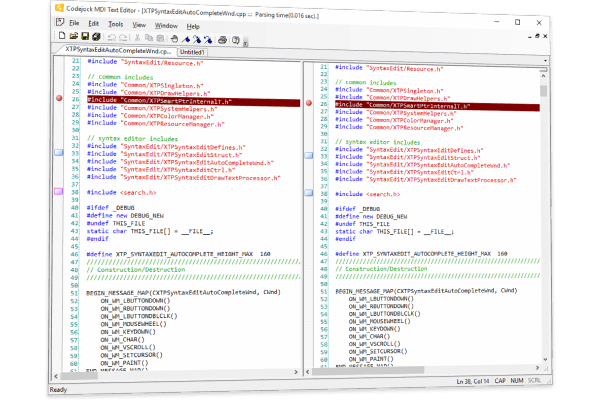
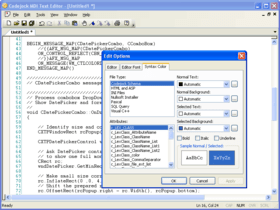
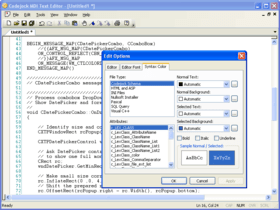
Visual Studio .NET style code editor control. Xtreme SyntaxEdit Visual Studio .NET style Syntax Editor Control provides your users with a highly sophisticated text editor control that supports advanced features such as text block grouping, syntax colorization, line numbers, font type, pre-defined color schemes, book marks, break points, Intellisense help and many more advanced features. INI file based syntax colorization allows you to specify specific colorization rules for your text documents. For example, you can specify a different set of colors to be used for cpp, h, html, asp, etc files. Color rules can be applied to specific words or groups of words and phrases.

Text Block Grouping - Visual Studio .NET style text block grouping allows you to easily organize a document of text into blocks of text that can be hidden with the click of a button. Hidden blocks of text can have a message stating what has been hidden for view. This allows you to minimize the clutter of vary large text documents.

Bookmarks - Bookmarks allow you to place a "bookmark" at any position in your text document. You can later cycle through all of your bookmarks to easily return to positions of interest in your document.

Breakpoints - Visual Studio style breakpoints allow you to place a "breakpoint" at any position in your text document. This can be used for many different reasons, for example, if you have a code compiler you could use these breakpoints to indicate where code execution will "break" and wait for user interaction.

Visual Studio .NET Style Intellisense Help - Using various configuration files such as a C++ configuration file you can add intellisense to the syntax editor. Using the configuration file you can specify which "keywords" will use the intellisense feature. To active intellisense press Ctrl + Space anytime during editing.

Line Numbers - Line numbers allow you to easily see how many lines are in a text document as well as serve reference to the position you are at in the document. You can use these numbers to communicate points of interest in a document.

Syntax Colorization - INI file based syntax colorization allows you to specify specific colorization rules for your text documents. For example, you can specify a different set of colors to be used for cpp, h, html, asp, etc files. Color rules can be applied to specific words or groups of words and phrases.

Visual Studio .NET style code editor control.

Pricing: Codejock Xtreme SyntaxEdit 2011 Vol 2 V15.2.1 Visual C++ with 30 Days Subscription 1 Developer License, Codejock Xtreme SyntaxEdit 2011 Vol 2 V15.2.1 Visual C++ with 30 Days Subscription 4 Developer License, Codejock Xtreme SyntaxEdit 2011 Vol 2 V15.2.1 Visual C++ with 30 Days Subscription 8 Developer License, Codejock Xtreme SyntaxEdit 2011 Vol 2 V15.2.1 Visual C++ with 30 Days Subscription 1 Site Wide License (Allows Unlimited Developers at a Single Physical Address), Codejock Xtreme SyntaxEdit 2011 Vol 2 V15.2.1 Visual C++ with 1 Year Subscription 1 Developer License, Codejock Xtreme SyntaxEdit 2011 Vol 2 V15.2.1 Visual C++ with 1 Year Subscription 4 Developer License, Codejock Xtreme SyntaxEdit 2011 Vol 2 V15.2.1 Visual C++ with 1 Year Subscription 8 Developer License, Codejock Xtreme SyntaxEdit 2011 Vol 2 V15.2.1 Visual C++ with 1 Year Subscription 1 Site Wide License (Allows Unlimited Developers at a Single Physical Address), Codejock Xtreme SyntaxEdit Visual C++ - Subscription Renewal 1 Developer License, Codejock Xtreme SyntaxEdit Visual C++ - Subscription Renewal 4 Developer License, Codejock Xtreme SyntaxEdit Visual C++ - Subscription Renewal 8 Developer License, Codejock Xtreme SyntaxEdit Visual C++ - Subscription Renewal 1 Site Wide License (Allows Unlimited Developers at a Single Physical Address)

Evals & Downloads: Read the Xtreme Toolkit Professional MFC help file, Browse the Codejock Xtreme Toolkit Professional License Agreement, Download the Xtreme Toolkit Professional for MFC 2011 Vol 2 V15.2.1 evaluation on to your computer - Expires After 30 Days

Operating System for Deployment: Windows 7, Windows Vista, Windows XP, Windows ME, Windows 2000, Windows 98, Windows NT 4.0, Windows 95

Architecture of Product: 32Bit, 64Bit

Product Type: Component

Component Type: DLL, VC++ Class Library, Static Link Library

Built Using: MFC V4.2 / V6.0

Compatible Containers: Microsoft Visual Studio 2008, Microsoft Visual Studio 2005, Microsoft Visual Studio .NET 2003, Microsoft Visual Studio .NET, Microsoft Visual Studio 6.0, Microsoft Visual Studio 97, Microsoft Visual Basic 2008, Microsoft Visual Basic 2005, Microsoft Visual Basic .NET 2003, Microsoft Visual Basic .NET, Microsoft Visual C++ 2008, Microsoft Visual C++ 2005, Microsoft Visual C++ .NET 2003, Microsoft Visual C++ .NET, Microsoft Visual C++ 6.0, Microsoft Visual C++ 5.0, Microsoft Visual C# 2008, Microsoft Visual C# 2005, Microsoft Visual C# .NET 2003, Microsoft Visual C# .NET, Microsoft Visual InterDev 6.0, Microsoft SQL Server 2000, Microsoft SQL Server 7.0, Microsoft Outlook 2002, Microsoft Outlook 2000, Microsoft Internet Information Server 5.0, Microsoft Internet Information Server 4.0, Microsoft FrontPage, Microsoft Internet Explorer 6.0, Microsoft Internet Explorer 5.5, Microsoft Internet Explorer 5.0, Microsoft Internet Explorer 4.0, Microsoft Internet Explorer 3.0, .NET Framework 3.5, .NET Framework 3.0, .NET Framework 2.0, .NET Framework 1.1, .NET Framework 1.0

Product Class: User Interface Components

Keywords: code jock

Syntax

Part numbers: PC-517768-424675 517768-424675 PC-517768-424677 517768-424677 PC-517768-424679 517768-424679 PC-517768-424681 517768-424681 PC-517768-424683 517768-424683 PC-517768-424685 517768-424685 PC-517768-424687 517768-424687 PC-517768-424689 517768-424689 PC-517768-424691 517768-424691 PC-517768-424693 517768-424693 PC-517768-424695 517768-424695 PC-517768-424697 517768-424697

Mfr. Part No: 1521-MFC-SYNTAXEDIT-1DL-30 1521-MFC-SYNTAXEDIT-1DL-365 1521-MFC-SYNTAXEDIT-1DL-SUB 1521-MFC-SYNTAXEDIT-4DL-30 1521-MFC-SYNTAXEDIT-4DL-365 1521-MFC-SYNTAXEDIT-4DL-SUB 1521-MFC-SYNTAXEDIT-8DL-30 1521-MFC-SYNTAXEDIT-8DL-365 1521-MFC-SYNTAXEDIT-8DL-SUB 1521-MFC-SYNTAXEDIT-UDL-30 1521-MFC-SYNTAXEDIT-UDL-365 1521-MFC-SYNTAXEDIT-UDL-SUB