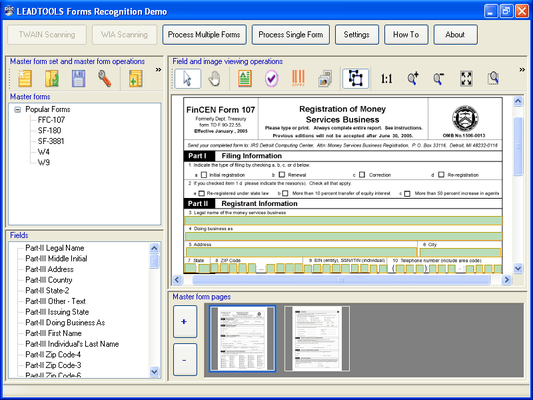
Screenshot Preview

LEADTOOLS Forms Recognition Module - Summary

by LEAD Technologies - Product Type: Component / Add-In / .NET WinForms / .NET Class / DLL / VC++ Class Library

LEADTOOLS Forms Recognition Module is no longer offered as an add on. It continues to be included in the LEADTOOLS Recognition SDK

Summary

LEADTOOLS Forms Recognition Module by LEAD Technologies

URLs: leadtools-forms-recognition-module, leadtools forms recognition module, leadtoolsformsrecognitionmodule, leadtools

Programming High-Speed Document Scanning Software. LEADTOOLS Forms Recognition is a high-level .NET SDK that harnesses the power of LEAD's image processing technology to intelligently identify document components and features that can be used to recognize and classify scanned documents. The LEADOOLS Forms Recognition toolkit can be used to process a list of images, return unique XML data that describes them, and then store and use that data set as a standard for recognizing future digital images. This approach is especially powerful when combined with LEADTOOLS scanning, deskew, document image clean up, OCR, ICR, OMR, MICR, redaction, and annotation functionalities for automating end-to-end (capture-to-data-processing) document handling workflows.

Key Features of LEADTOOLS Forms Recognition

Code Support

High level classes enable adding form recognition features with very little code

Includes full source code for an end-user Forms Recognition and Processing application, plus hundreds of lines of sample source code

Build Workflows

Use in conjunction with other LEADTOOLS Document Imaging functions to build workflows that incorporate scanning, OCR, ICR (hand-written text), OMR (to extract check marks, check boxes, etc), MICR, redaction and annotations with recognition and processing

Automatic, manual (text-analytic), trained, and multi-level recognition

Flexible automatic recognition engine can be customized to use Barcode, OCR, line detection, and special object detection (such as logos, text blocks, and shapes)

Recognizes any of 150+ input file formats, including different bits-per-pixel, dpi, scales, skew angles, and noise

Forms, Region, and Data Support

Define multi-page forms for recognition and processing

Store any number of pre-defined master forms for recognition

Recognize forms at both form and page level, to compare an image to any form page or compare a complete multi-page form to any predefined master form

Load and save form identification information as XML for storage in a database

Recognize any number of regions or objects on a page

Define inclusion and exclusion regions to be used to classify forms

Supports a variety of data fields:

Text fields support both printed and hand-written text

Supports regular expressions to find / validate text in a specified format

Image fields to extract signatures, personal pictures, logos, and fingerprints

Barcode fields support all barcode 1D (Linear) and 2D types, such as PDF417, DataMatrix, QR, EAN, UPC, Databar, and 4-state

Results Enhancement

Auto-registration (deskew) and clean-up to improve recognition results

Manual feature weighting for improved recognition performance

Generates comprehensive results and confidence level reports to assess performance

LEAD Releases Major Update to LEADTOOLS v16.5 SDKs

Many new features have been added to LEADTOOLS

OCR and Forms Recognition

Improved OCR Advantage recognition algorithm to improve accuracy.

New MICR support in OCR Advantage engine.

New XML output from OCR.

New Forms Recognition Only demo.

Improved Forms Recognition documentation including new topics, best practices and examples.

New Rake Remove Bitmap function to remove data rakes from form images.

PACS & Medical Imaging

New PACS Workstation Framework. The LEADTOOLS PACS Workstation Framework is a set of .NET PACS components to build a complete PACS Workstation system. To speed up development, a medical workstation viewer application with source code is included.

Create, load and save all IOD classes defined in the 2008 base standard and final 2008 DICOM text supplements.

New Auto Segment Bitmap function. Segments objects in CT/MRI images by shrinking a defined rectangular region onto the objects.

New Tissue Equalize Bitmap function. Equalizes between hard and soft tissue in x-ray images resulting in an enhanced image.

New DICOM HD MPEG-2 support.

New support for 16 bit grayscale images in WPF.

New Scroll event in the Medical Image Viewer control.

New Point to Client method in the Medical Viewer Cell class.

New DICOMDIR dialog.

PDF Imaging

New searchable and editable PDF save features including encryption, fast web viewing, size optimization, document author properties, and PDF profiles.

New PDF Dynamic Resolution demo.

Document Imaging

New Document Writers for XPS and DOCX.

New Empty Pages support for Document Writers.

New Vertical Text support for Document Writers.

New support for DPI in Document Writers.

Improved output for text flow formats such as TXT and DOC.

New support to rasterize Excel XLS files.

New C DLL snap to grid functionality for annotations.

Improved Auto Zone function algorithm.

New Get Background Color function.

New Sigma Filter Bitmap function to smooth images while maintaining sharp edges.

New Object Counter function that counts the number of binary objects in an image.

Barcode

New .NET assembiles for Barcode.

Improved QR Code error correction algorithm.

Web Imaging

New functionality to set text in the LEADTOOLS Web Thumbnail Viewer.

New functionality to clear the Web Image Viewer.

New Web Forms demo to call LEADTOOLS OCR WCF web service.

Updated Silverlight Image controls to Silverlight 3.0.

General Imaging

Added region of interest compression level support to JPEG 2000.

New Fast Magic Wand region selection function.

New rubberband multi-selection feature in LEADTOOLS WPF Image List control.

New feature to load images faster.

LEADTOOLS Forms Recognition Module is no longer offered as an add on. It continues to be included in the LEADTOOLS Recognition SDK

Programming High-Speed Document Scanning Software.

Evals & Downloads: Read the LEADTOOLS products range overview Help file, Read the LEADTOOLS products Help files, Read the LEADTOOLS Licensing Help file

Operating System for Deployment: Windows Vista, Windows XP, Windows 2000, Windows 98, Windows NT 4.0

Architecture of Product: 32Bit, 64Bit

Product Type: Component, Add-In

Component Type: .NET WinForms, .NET Class, DLL, VC++ Class Library

Compatible Containers: Microsoft Visual Studio 2005, Microsoft Visual Studio .NET 2003, Microsoft Visual Studio .NET, Microsoft Visual Studio 6.0, Microsoft Visual Studio 97, Microsoft Visual Basic 2005, Microsoft Visual Basic .NET 2003, Microsoft Visual Basic .NET, Microsoft Visual C++ 2005, Microsoft Visual C++ .NET 2003, Microsoft Visual C++ .NET, Microsoft Visual C++ 6.0, Microsoft Visual C++ 5.0, Microsoft Visual C++ 4.0, Microsoft Visual C# 2005, Microsoft Visual C# .NET 2003, Microsoft Visual C# .NET, Microsoft FrontPage, Microsoft Internet Explorer 7.0, Microsoft Internet Explorer 6.0, Microsoft Internet Explorer 5.5, Microsoft Internet Explorer 5.0, CodeGear C++ 5.0 (formerly Borland), CodeGear C++ (formerly Borland), C++Builder 4, Visual dBase 7.0, Sybase PowerBuilder 6.0, Sybase PowerBuilder 5.0, Watcom C/C++, .NET Framework 2.0, .NET Framework 1.1, .NET Framework 1.0

Keywords: LEADTOOLS Forms Recognition Module recognize scanned scan forms processing read reading scans workflow SharePoint

LEAD Technologies Image+50 Imaging+50 Toolkit+8 SDK+8, leadtools 17, leadtools V17, lead 17, lead v17, lead tools, lead tools 17, lead tools v17, lead tools v17.0, lead technologies

Scan scanning scanned scanner scans OCR optical character recognition

Imaging image images

Product Search

Enter search words:

Award Award