Actipro SyntaxEditor - .NET WinForms Component - V4.0.0.0256

von Actipro Software - Produkttyp: Komponente / .NET WinForms / .NET Class / 100% Managed Code

Bitte beachten Sie, diese Produktinformation ist nicht in deutscher Sprache verfügbar.
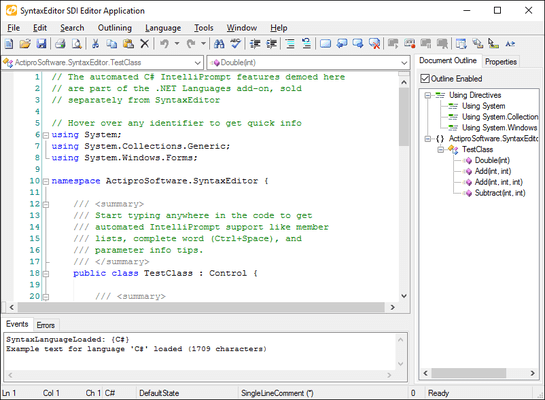
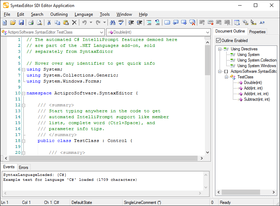
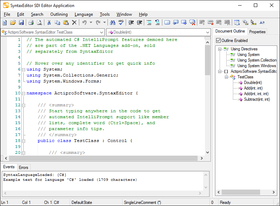
Bildschirmabzug von Actipro SyntaxEditor - .NET WinForms Component - V4.0.0.0256Feature-rich syntax-highlighting code editor control with optional Intellisense for C# and VB. SyntaxEditor is designed from the ground up to handle advanced language parsing and processing, with phases for performing lexical parsing, semantic parsing (in a worker thread), and automatic outlining. Custom language definitions can be developed and distributed with your applications. SyntaxEditor includes a complete parser generator that helps build semantic parsers and construct ASTs. Major code editing features of the control include code outlining, undo/redo, word wrap, split views, current line and bracket highlights, column guides, virtual space, block selection, macro recording/playback, indicators (breakpoints, syntax errors, etc.), text statistics, extensible rendering, IntelliPrompt code snippets, member lists, parameter info, quick info, smart tags, FontDropDownList and TextStylePreview controls, and more. SyntaxEditor is written in C# and includes 20 customizable language samples, including many of today's popular languages like CSharp, VB, XML, and HTML. Visual Studio .NET 2003 and Visual Studio 2005 (VS2005, VS 2005) compatible.

Durchschnittliche Rezension:  Durchschnittliche Rezensionsnote für Actipro SyntaxEditor - .NET WinForms Component - V4.0.0.0256 basierend auf 1 Rezension.

Ab
$342.95
Preis in

Unsere regulären Preise werden nachstehend angezeigt. Bitte melden Sie sich an um Ihre ermäßigten Preise zu sehen.

Actipro SyntaxEditor V4.0.0.0256

In den Einkaufswagen $ 342.95 1 Developer License Download (10.0 MB)
In den Einkaufswagen $ 1,028.95 4 Developer Team License Download (10.0 MB)
In den Einkaufswagen $ 1,714.95 8 Developer Team License Download (10.0 MB)
In den Einkaufswagen $ 3,135.95 1 Site Wide License (Allows Unlimited Developers at a Single Physical Address) - Includes Annual Subscription License Download (10.0 MB)
In den Einkaufswagen $ 7,839.95 1 Enterprise License (Allows Unlimited Developers throughout your entire organization, regardless of location) - Includes Annual Subscription License Download (10.0 MB)
In den Einkaufswagen $ 1,077.95 1 Blueprint Source Code License (Actipro SyntaxEditor Site or Enterprise License Required) Prüfen Download (10.0 MB)

Actipro SyntaxEditor V4.0.0.0256 Upgrades

In den Einkaufswagen $ 137.15 1 Developer Upgrade License from any previous version Prüfen Download (10.0 MB)
In den Einkaufswagen $ 411.55 4 Developer Team Upgrade License from any previous version Prüfen Download (10.0 MB)
In den Einkaufswagen $ 685.95 8 Developer Team Upgrade License from any previous version Prüfen Download (10.0 MB)
In den Einkaufswagen $ 1,254.35 1 Site Wide Upgrade License from any previous version (Allows Unlimited Developers at a Single Physical Address) Prüfen Download (10.0 MB)
In den Einkaufswagen $ 3,135.95 1 Enterprise Upgrade License from any previous version (Allows Unlimited Developers throughout your entire organization, regardless of location) Prüfen Download (10.0 MB)

Actipro SyntaxEditor Subscription / Subscription Renewal

In den Einkaufswagen $ 205.75 1 Developer Subscription / Subscription Renewal License (1 Developer License Required) Download (29 KB)
In den Einkaufswagen $ 617.35 4 Developer Team Subscription / Subscription Renewal License (4 Developer Team License Required) Download (29 KB)
In den Einkaufswagen $ 1,028.95 8 Developer Team Subscription / Subscription Renewal License (8 Developer Team License Required) Download (29 KB)
In den Einkaufswagen $ 1,861.95 1 Site Wide Subscription License / Subscription Renewal License - 1 Site License Required Download (29 KB)
In den Einkaufswagen $ 4,703.95 1 Enterprise License Subscription / Subscription Renewal License (1 Enterprise License License Required) Download (29 KB)

SyntaxEditor .NET Languages Add-on V4.0 Enterprise License

In den Einkaufswagen $ 195.95 1 Developer License (Allows Unlimited Developers throughout your entire organization, regardless of location) - Includes Annual Subscription License - Any Actipro SyntaxEditor V4 License Required Prüfen Download (10.0 MB)

SyntaxEditor .NET Languages Add-on V4.0 Source Code Blueprint License

In den Einkaufswagen $ 489.95 1 Developer License - Source code included (Any Actipro SyntaxEditor V4 Required) Prüfen Download (10.0 MB)

SyntaxEditor Web Languages Add-on V4.0 Enterprise License

In den Einkaufswagen $ 97.95 1 Developer License (Allows Unlimited Developers throughout your entire organization, regardless of location) - Includes Annual Subscription License - Any Actipro SyntaxEditor V4 License Required Prüfen Download (10.0 MB)

SyntaxEditor Web Languages Add-on V4.0 Source Code Blueprint License

In den Einkaufswagen $ 244.95 1 Developer License - Source code included (Any Actipro SyntaxEditor V4 Required) Prüfen Download (10.0 MB)

Dieses Produkt ist unter der GSA Schedule Preisstaffelung verfügbarUnsere Preise beinhalten einen technischen Support durch ComponentSource und für die meisten herunterladbaren Produkte zusätzlich ein Online-Backup sowie eine kostenlose Aktualisierung auf die neue Version, sofern sie binnen 30 Tagen nach dem Kauf freigegeben werden. Die angezeigten Preise sind zuzüglich aller Steuern. Für mehr Information zu eventuell anfallende Steuern, gehen Sie bitte auf diese Webseite. Alle Verkäufe unterliegen unseren Standardgeschäftsbedingungen und unseren Rückgaberegeln. Treten Sie bitte mit uns in Kontakt , wenn Sie eine Lizenzierungsoption anfordern möchten, die in der obigen Liste nicht aufgeführt ist, einschließlich Mehrplatzlizenzen und ältere Versionen.

Unsere regulären Preise werden oben angezeigt. Bitte melden Sie sich an um Ihre ermäßigten Preise zu sehen.

SyntaxEditor is an editing control, similar to a multi-line TextBox, which syntax highlights text and provides an amazing number of state-of-the-art features for code editing. SyntaxEditor is modeled after the code editor in VS.NET and provides nearly all of its functionality.SyntaxEditor is an editing control, similar to a multi-line TextBox, which syntax highlights text and provides an amazing number of state-of-the-art features for code editing. SyntaxEditor is modeled after the code editor in Visual Studio and provides nearly all of its functionality and more. Custom language definitions can be developed and distributed with your applications. While SyntaxEditor is designed for use in IDE (integrated development environment) applications, there are many other applications out there than can take advantage of such a control

The SyntaxEditor package includes:

  • The SyntaxEditor multi/single line edit control.
  • The Document class, which allows for parsing and manipulation of code documents with or without the use of a SyntaxEditor (separation of UI and parsing model).
  • The extensible SyntaxLanguage class, which provides a self-contained way to handle advanced language parsing and processing.
  • The SyntaxEditor parser generator that helps construct a robust semantic parser for languages in either C# or VB.NET.
  • The semantic parser service that can perform semantic parsing operations in a separate worker thread.
  • An object model for building and manipulating an AST (abstract syntax tree) of a code document.
  • A custom backtracking NFA regular expression engine, used as the backbone for dynamic language lexical parsing and find/replace operations.
  • The TextStylePreview control that visualizes highlighting styles, and the FontDropDownList that allows for easy font selection.
  • Many free dynamic language XML definitions for common languages such as C#, VB.NET, HTML, etc.
  • Availability of advanced add-on products, such as the .NET Languages Add-on, which provide complete parsing and automated IntelliPrompt for C#.

Editing Features

  • Unlimited undo/redo with action grouping.
  • Block indent/outdent.
  • Automated line modification tracking.
  • Virtual space past the end of lines.
  • Virtual space past the end of the document (virtual lines).
  • Block (rectangular) selection and ability to prevent certain selection methods.
  • Current line highlighting.
  • Line selection in the selection margin.
  • Clipboard operations natively supported (cut, copy, paste).
  • Customizable clipboard and drag/drop actions, with support for any DataObject.
  • Complete extended Unicode character and IME support.
  • Over 100 edit commands including everything found in Visual Studio such as caret movement, selection, indenting, tabification, transposition, and more.
  • Detailed hit-testing.
  • Customizable key processing, command/key binding, and mouse processing.
  • Text Visualization Features
  • Code outlining (collapsible regions), both automatic and manual outlining supported.
  • Syntax-highlighted tooltips when hovering over collapsed outlining nodes.
  • Word wrap (word, token, and character wrapping modes).
  • Whitespace display.
  • Indentation guides that show tabstops.
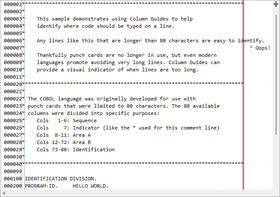
  • Content dividers and column guides.
  • Bracket highlighting.
  • Line indicators (bookmarks) and span indicators (breakpoints, misspelling markers, wave lines, etc.) with full customization support.
  • Appearance Features
  • Extensible renderer model that supports customized rendering and custom draw.
  • Line numbering in line number margin with ability to use custom line numbers.
  • User margin that supports custom drawing.
  • Any type of font is supported, including variable-width fonts.
  • Multiple fonts/sizes supported in the same document.
  • Four-way or two-way split views.
  • Multiple scrollbar visibility settings.
  • Custom EditorView buttons that may be placed on any side of a scrollbar.
  • Single-line mode.

Language/Parsing Features

  • An abstracted and fully extensible syntax language object model.
  • Various syntax language types that let you choose how low-level you wish to get in control of language implementation.
  • Language merging support, like HTML calling CSS, JScript, VBScript, etc.
  • Dynamic language XML definitions, which can be defined using regular expressions.
  • Free dynamic language XML definition samples for common languages like Assembly, Batch files, C#, CSS, HTML, INI files, Java, JScript, Lua, MSIL, Pascal, Perl, PHP, Python, SQL, VB.NET, VBScript, and XML.
  • Lexical parsing of text into tokens, with the ability to write programmatic lexical parsers and define custom token classes.
  • Semantic parsing of tokens, which can output update document tokens, output an AST, or anything else.
  • A semantic parser service that can perform semantic parsing operations in a separate worker thread, thereby reducing the load of the main UI thread.
  • An object model for supporting an AST (abstract syntax trees) representation of a code document.
  • The SyntaxEditor parser generator which accepts a grammar and outputs a C# or VB.NET semantic parser class along with template AST node classes.
  • Case sensitivity and auto-correct.
  • Triggers for handling keypresses while in certain lexical states.
  • Triggers for kicking off auto-replace operations while in certain lexical states.
  • Token-specific highlighting styles enabling custom styles for user-defined keywords in dynamic languages.

File Features

  • Load/save documents directly to files using a specific encoding.
  • Load/save documents directly to a stream using a specific encoding.
  • Works with CR/LF (Windows), CR (Mac), or LF (Unix) line terminators.
  • Ability to export text using any line terminator format.
  • HTML and RTF export.
  • IntelliPrompt Features
  • Code snippet that mimic Visual Studio 2005 functionality and save/load from the VS format.
  • Member lists with ability to custom draw items.
  • Complete word functionality.
  • Reflection helper methods for adding member list items from .NET types/members.
  • Parameter info tips that allow for mutiple overload display and parameter index tracking.
  • Quick info tips that show detailed information about what is under the mouse.
  • Smart tags that show when the mouse hovers over their indicator, and display a popup when clicked.
  • Other Features
  • Support for the entire document being read-only or only specific regions.
  • Macro recording and playback.
  • Feature-rich find/replace object model that supports regular expressions, wildcard format, and captures/substitutions.
  • Text statistics that calculate statistics such as line, word, character counts as well as readability scores.
  • Customizable dialogs for find/replace, goto line, spell check, and highlighting styles.
  • WYSIWYG printing and print preview with print-specific format settings.
  • A FontDropDownList control that can be used to select non-Symbol fonts on an Options dialog.
  • A TextStylePreview control that can be used to display highlighting styles on an Options dialog.
  • Full designer support for the SyntaxEditor control and languages.

.NET Languages Add-on
Please note that you do NOT require an Enterprise license of SyntaxEditor to purchase the Language add-on. Anyone with any valid license of SyntaxEditor, even a single developer license, can purchase the Enterprise license of the Language add-on. The .NET Languages Add-on is a new product built for use with the SyntaxEditor 4.0 code editing control. It provides an extremely advanced implementation of the C# language with automated IntelliPrompt code snippets, complete word, member lists, parameter info, and quick info. It achieves these features via the use of a custom reflection database that can be populated using external reference assemblies as well as by pointing to specific code files. Other great features include fast lexical parsing, compilation unit building using over 100 AST classes, automatic outlining, document outlining in a TreeView, syntax error wave lines and description tooltips, XML documentation comment auto-complete, smart indent with configurable options, code block selection, line commenting, and code statistics. A VB.NET language implementation will be added to the add-on shortly.

The .NET Languages Add-on implements an advanced C# language for use with the SyntaxEditor code editing control. A VB.NET language implementation is currently in development and will be added to the add-on when complete.

Major features of the .NET languages add-on that can be used by any .NET language that is implemented include:

  • An assembly repository that stores reflection information for .NET assemblies at run-time.
  • Ability to cache all reflection and documentation to data files which can be loaded extremely quickly once built.
  • A project resolver that manages external references (assemblies) for a "project" and coordinates reflection data between the assemblies and code files.
  • Over 100 AST node classes for representing .NET code in an AST.
  • Easy display of a compilation unit in a code outline TreeView.
  • A type/member drop-down list control that can bind to a SyntaxEditor control.

Major features of the C# language include:

  • Detailed lexical parsing of tokens down to specific keyword/operator level by using a fast programmatic lexical parser.
  • Semantic parser that conforms to the C# 2.0 specification, including generics, and uses the semantic parser service.
  • Semantic parser builds an AST based on document text.
  • Automatic outlining based on compilation unit.
  • Reporting and automatic display of syntax errors.
  • Automated IntelliPrompt code snippets, complete word, member lists, parameter info, and quick info.
  • IntelliPrompt tips with icons and highlighted text.
  • XML comment auto-complete.
  • Smart indent with configurable options.
  • Code block selection.
  • Line commenting.
  • Specialized C# text statistics for counting commented lines and determining comment coverage.

Actipro SyntaxEditor Web Languages Add-on provides an advanced language implementation for the XML language. The core SyntaxEditor control provides a free implementation of XML that has syntax highlighting and several other features. However to truly get extended functionality such as automated IntelliPrompt member lists, quick info, AST building, XML formatting and more, you need to get the Web Languages Add-on.


Produkt-Suche

Suchbegriffe eingeben:

Einsparungen bei Entwicklung

Lesen Sie unser Weißpapier über
die Berechnung der Investitionsrentabilität

Codezeilen: 43,000
Menschenmonate: 43
Arbeitskosten: $215,000

Funktionen benötigt:

Aufwand pro 1000 Codezeilen:

Arbeitskosten pro Monat:

Award