by Lassalle Technologies - Product Type: Component / ActiveX OCX
AddFlow by Lassalle Technologies
Create interactive flowcharts and workflow diagrams. AddFlow is an ActiveX component that is useful each time you need to display and use relationships between objects in your application. Drawings can be made interactively or programmatically. Features include distinct shapes, styles, pictures, colors, fonts, user data, and so on for each object of the diagram, metafile support, serialization, printing, zooming, custom shapes, link autorouting, customization and more. Runtime Royalty free.

Whats New in AddFlow 5.4?
Custom polygonal shapes
Custom drawings with the OwnerDraw events
Gradient colors for nodes
Link autorouting
Rounded corners for polyline links
JumpSize and RoundCornerSize properties allowing selecting the size of the link jumps and link rounded corners
CanChangeOrg and CanChangeDst properties
UndoNode, UndoLink, RedoNode, RedoLink properties
BeforeChangeOrg and BeforeChangeDst events
XMLFlow.ocx: a ocx control to load/save diagrams in XML
New versions of HFlow, TFlow, SFlow
A new graph layout control: OFlow (Orthogonal layout)
A new version of PrnFlow
An AddFlow diagram is a set of objects that can be linked each other. The objects are called nodes and the lines that connect objects are called links.
AddFlow provides two ways to build diagrams:
Interactive way (with the mouse): see the Quick Start of the help file in order to know how to interactively draw a diagram
Programmatic way with the AddFlow API
Following is a list of the main AddFlow features. Note that all those features are encapsulated in a small (375 Kb only), robust, fast and easy to use ActiveX component.
General
Runtime-royalty free
Digitally signed
Interactive and programmatic drawings
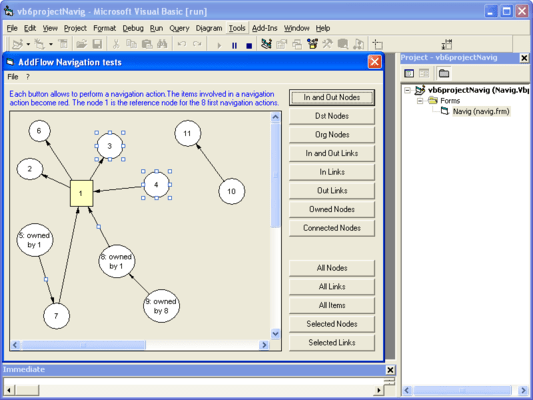
Navigation (You can access every nodes and links of a diagram with just 5 properties)
Collections support (nodes, links, selected nodes, selected links)
Customization: many properties allowing to customize the control (CanDrawNode, CanMoveNode, ReadOnly, etc...)
Input/output
Metafiles support (WMF, EMF)
Serialisation of diagrams (LoadFile, SaveFile methods)
XML serialisation
Clipboard management
Printing and print previewing
Interactivity
Scrolling (interactive and programmatic)
Autoscrolling
Selection and Multiselection of nodes and links (interactive and programmatic)
Nodes stay connected when moved or resized
Display facilities
OwnerDraw event allowing customized drawings
Zooming
Grid support
Data
Ability to associate a text, a unique key, a tooltip and a tag to a node or a link
Nodes and links
Change painting order of objects (ZOrder property)
Distinct colors for each object (FillColor, ForeColor, DrawColor)
Distinct fonts for each object
Distinct drawing styles (DrawStyle property)
Hidden objects
Links
Stretchable links. A link can be composed of many segments
Curved links (Bezier, Spline)
Rigid links. If a link is rigid, it follows (without being stretched) its origin node when this origin node is being dragged
Reflexive links
Links having only vertical and horizontal segments
Ability to adjust the position of the first and last point of a link
20 arrow styles for links
Ability to customize the drawing of a link (OwnerDraw event)
Link autorouting
Nodes
Ability to associate a picture (bitmap, standard or enhanced metafile, icon, GIF, JPEG) to a node
Ability to customize the drawing of a node (OwnerDraw event)
46 distinct shapes for nodes
Custom shapes
Transparent nodes
Text alignment
Autosize options for nodes
Gradient color
Automatic graph layout
AddFlow does not directly provide any automatic graph layout feature. However we provide LayoutFlow, a set of four AddFlow graph layout controls:
HFlow (hierarchical layout)
OFlow (orthogonal layout)
SFlow (symmetric force directed layout)
TFlow (tree layout)
A demonstration of each of these products is available in the LayoutDemo sample.
PartNumbers: PC-504614-59648 504614-59648 PC-504614-59660 504614-59660 PC-504614-59652 504614-59652 PC-504614-59644 504614-59644 PC-504614-59656 504614-59656 PC-504614-59640 504614-59640 PC-504614-69289 504614-69289
PurchaseOptions: AddFlow V5.4 1 Developer License , AddFlow V5.4 1 Developer Upgrade License from V2.0 or higher , AddFlow V5.4 4 Developer Team License , AddFlow V5.4 4 Developer Team License Upgrade from V2.0 or higher , AddFlow V5.4 1 Site Wide License (Allows Unlimited Developers at a Single Physical Address) , AddFlow V5.4 1 Site License Upgrade from V2.0 or higher , AddFlow V5.4 Academic License 1 Developer License
Resources: Read the AddFlow/LayoutFlow help file, Download the AddFlow/LayoutFlow evaluation on to your computer - Displays Nag Screens
Operating System for Deployment: Windows 2000, Windows 98, Windows NT 4.0, Windows 95
Architecture of Product: 32Bit
Product Type: Component
Component Type: ActiveX OCX
Built Using: MFC V4.2 / V6.0
General: OCX96 Compatible
Compatible Containers: Microsoft Visual Studio .NET, Microsoft Visual Studio 6.0, Microsoft Visual Studio 97, Microsoft Visual Basic .NET, Microsoft Visual Basic 6.0, Microsoft Visual Basic 5.0, Microsoft Visual Basic 4.0, Microsoft Visual C++ .NET, Microsoft Visual C++ 6.0, Microsoft Visual C++ 5.0, Microsoft Visual C++ 4.0, Microsoft Visual C# .NET, Microsoft Visual J++ 6.0, Microsoft FrontPage, Microsoft Internet Explorer 5.0, Delphi 5.0, Delphi 4.0, Delphi 3.0, .NET Framework 1.0
Product Class: User Interface Components
Search Items: New Product Apr 05, New Product May 05
Keywords: Lassalle Technologies Lasalle Lasal lassal Tech Flow Diagramming diagram diagrams flowchart Professional Partner Lassalle Technologies AddFlow Diagramming workflow Diagram Diagrams Graphing Graph Graphs Chart Charting Charts Display Data Interpretation Presentation FLOWCHARTS LAYOUT HIERARCHY lasselle