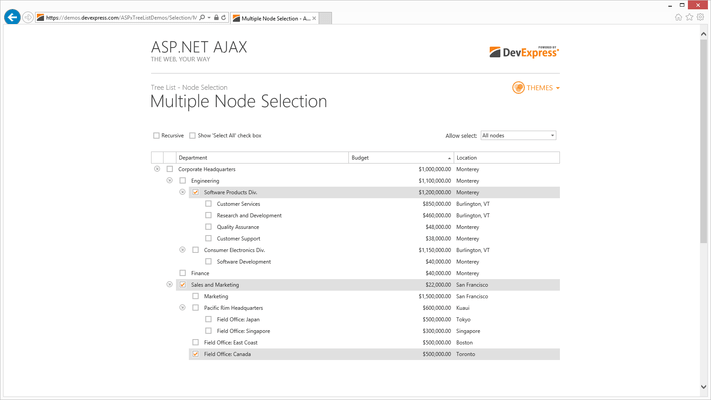
Screenshot Preview

ASPxTreeList

de DevExpress (Developer Express) - Tipo de producto: Componente / ASP.NET WebForms / ASP.NET AJAX (ATLAS) / AJAX

Por favor note que al menos que se indique lo contrario, esta es la versión en Inglés del producto.

*

A treeview-grid hybrid for ASP.NET. ASPxTreeList is a feature-complete treeview-grid control for Visual Studio. ASPxTreeList is a multi-purpose data visualization system that can display information as a tree, a grid, or a combination of both - in either data bound or unbound mode. This synergy between a traditional grid and a traditional treeview allows you to create cutting-edge and visually appealing web application interfaces for your end-users with ease. ASPxTreeList fully exploits existing DevExpress appearance and data management technologies for ASP.NET. ASPxTreeList includes features such as on-demand loading of individual nodes and callback support ensure that the solutions you build are both elegant and effective. In the implementation, the control never needs to transmit the entire tree structure when being updated. ASPxTreeList is smart enough to determine which portion of the tree to be renewed and only requests a few records from the server, making user interaction extremely fast. ASPxTreeList Subscription Licenses with Source Code available.


Desde
$58.79
Precio en

Nuestros precios Standard están indicados abajo. Inicia una sesión para ver sus precios con descuento.

ASPxTreeList   *

Añadir a la Cesta $ 58.79 Subscription Renewal for one year (for Subscriptions soon to expire or just expired)  * Verificar Descarga (139.8 MB)
Añadir a la Cesta $ 78.39 Subscription Renewal for one year (for Subscriptions soon to expire or just expired) - with Source code  * Verificar Descarga (139.8 MB)

Nuestros precios incluyen servicio técnico de ComponentSource y, para la mayoría de los productos disponibles para descarga, una copia de seguridad en línea y una actualización GRATUITA a la nueva versión si ésta se publica en un período de 30 días después de la compra.  Todas las ventas están sujetas a nuestros Términos y condiciones standard y a nuestra Política de devolución. Por favor, póngase en contacto con nosotros si necesita alguna opción de licencia no incluida en la lista anterior, incluida la compra por volumen de licencias y versiones anteriores.

Nuestros precios Standard están indicados arriba. Inicia una sesión para ver sus precios con descuento.

 *

What's new in ASPxTreeList v2011 vol 1?

Consistent Rendering for Default Web Page Doctypes - Default document types used by Microsoft Web development tools are as follows:

  • XHTML 1.0 Strict is used in Visual Studio 2010, SharePoint 2010, ASP.NET MVC 2
  • HTML5 is used in ASP.NET MVC 3.

To conform to these changes, DevExpress have improved the rendering of their controls so that they look and behave properly and uniformly within web pages using one of the following document types:

  • XHTML 1.0 Transitonal
  • XHTML 1.0 Strict
  • HTML5

Note that code generated by DevExpress ASP.NET controls is designed to fully comply with the XHTML 1.0 Transitional specification. In the other supported document types, the code works well but may not fully pass markup validation. Support for new doctypes applies across browsers, so the web controls appear and work identically under all supported browsers, including Microsoft Internet Explorer 6.0+, Mozilla FireFox 2.0+, Google Chrome 1.0+, Apple Safari 3.0+, Opera 9.0+ and Netscape Navigator 9.0+.

What's new in ASPxTreeList v2010 vol 2?

  • Popup Edit Form - In addition to using the in-line Edit Row and/or built-in Edit Form, Tree List control cell values can now be edited via a fully customizable Popup Edit Form. Though by default it is displayed near the node whose values are currently being edited, you can easily define a custom position and layout of the Popup Edit Form.

What's new in ASPxTreeList v2010 vol 1?

  • Full Support for Visual Studio 2010 and .NET Framework Client Profile

 *

Four data access options - To ensure that your data can be easily displayed within the ASPxTreeList, it provides the following data binding options:
  • Unbound Mode - You can build the desired tree structure in code using specially designed methods.
  • Dynamic Node Loading - At your option, you can populate only root-level nodes within the tree. Attempts to expand parent nodes with children will raise an event wherein you can specify the child nodes to be displayed. This approach offers significant performance gains against large datasets.
  • Bind to a Hierarchical Data Source - If you bind to a hierarchical data source, such as a site map, the control will automatically build the corresponding tree.
  • Bind to a Standard Data Source - When binding to a standard data source, you need to have two service fields to build a tree. One should specify a record's unique ID and the other should specify the parent record's ID.

Data Sorting - To make it easier to locate records within the control, the ASPxTreeList allows you to sort nodes against an unlimited number of columns. As you might expect, end-users can easily initiate sort operations by simply clicking column headers.

Data Summaries - If your web application requires data analysis, the data summary feature of the ASPxTreeList allows you to focus on the overall numbers instead of having to deal with individual records. You can either summarize data across all records or only those records with a common parent. In both instances, five built-in functions are at your service or you can manually summarize values using a specially designed event. The aggregate result is displayed within the control's footer or group footer. And note that you aren't limited to a single summary per column - you can calculate as many summaries as needed.

Conditional Formatting - To highlight important data or better indicate differences between values, you can use Conditional Formatting. With this feature, entire records or individual cells can be formatted depending upon the data they contain. The simplest use scenario is to highlight records or cells that have a particular value or that have values above or below a particular limit. Beyond these, you can also apply a "color map". This means that cells will use shades of the same color - lighter shades for smaller numbers and darker shades for higher numbers.

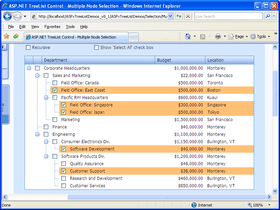
Focused and Selected Rows - You can enable the focused row feature to indicate the last clicked tree node. This is useful when using the treeview for navigation purposes...indicating the end-user's current position. It can also be used with data-browser trees when you must display node details in a separate control. For instance, it can be used when displaying forum messages...highlighting the node whose details are currently displayed. Multi-node selection is also a built-in feature of the ASPxTreeList. By toggling a single option, you can enable selection checkboxes within rows and display a Select All check box within the header panel.

Data Paging - If your tree contains many records, you can split data across multiple pages and thus guarantee a more efficient use of page space and faster initial page rendering. If you do so, the ASPxTreeList displays a built-in ASPxPager control allowing you to navigate to the required page via AJAX callbacks.

Customization Window (Field Chooser) - If end-users need to temporarily hide columns or make hidden columns visible, you can enable a Microsoft Outlook style Field Chooser window. End-users can simply drag fields to the window to hide them and then drag them back to the column header panel to make them visible again.

Node Preview Sections - To elegantly display memo fields, you can use the ASPxTreeList's built-in node preview feature. For instance, if you use the control to create a web forum, this feature allows you to preview individual messages within a discussion thread.


Atención

Para su comodidad, hemos incluido enlaces a Google Translate para traducir la información del producto que todavía tenemos que traducir. Por favor, tenga en cuenta que traducciones automáticas no siempre son totalmente exactas.
Con la tecnología de
Requiere Flash en Firefox y Opera

Búsqueda de productos

Escriba palabras de búsqueda:

¿Por qué comprar en ComponentSource?

ComponentSource ofrece un único servicio global, utilizado por más de 1.000.000 de desarrolladores en todo el mundo.

Más Información | Sobre Nosotros

Galería de capturas de pantalla

Haga clic para obtener una vista previa completa

Captura de pantalla ASPxTreeList - ASP.NET - v2011 vol 1 Captura de pantalla ASPxTreeList - ASP.NET - v2011 vol 1 Captura de pantalla ASPxTreeList - ASP.NET - v2011 vol 1 Captura de pantalla ASPxTreeList - ASP.NET - v2011 vol 1 Captura de pantalla ASPxTreeList - ASP.NET - v2011 vol 1
Award Award