经 BCGSoft - 产品类型: 构件 / DLL / VC++ 类库 / 源代码 / 静态链接库
BCGControlBar Library Professional Edition MFC (BCGControlBar Professional) 经 BCGSoft
URLs: bcgcontrolbar-library-professional, bcgcontrolbar library professional, bcgcontrolbarlibraryprofessional, bcgsoft
用类似与微软Office 2007/XP/2003/2007、微软Visual Studio、微软IE以及其他著名软件产品类似的界面创建应用程序。 BCGControlBar Library 专业版(BCGControlBar Pro MFC) 是一个MFC 扩展库,拥有200多个静心设计、测试和带有全套文档的MFC扩展类例如 工具条、功能选单、控件及定制化和可视化功能,可加入您的应用程序,增加类似Office和微软Visual Studio的用户界面。 BCGControlBar Library 专业版 (BCGControlBar Pro MFC) 支持Office 2007 (Office 12)的ribbon控件、皮肤界面、 Vista Aero, Gantt等界面。 BCGControlBar Library 专业版的License包括源代码和一年免费的使用,提供电子邮件技术支持、补丁和升级。
概览/strong>
BCGControlBar Library 专业版(BCGControlBar Pro MFC) ("商业控件收藏控制条")是一个MFC 扩展库, 允许您创建与微软® Office 2000、XP、 2003、 2007、Vista和微软® Visual Studio®.NET类似的应用程序,具有全套的定制选项(可定制的工具条、功能选单、键盘等)。
此扩展库具有200带全套文档的MFC扩展类,可以很方便地加入您的应用程序中,从而节省数百小时的开发和调试时间。
BCGControlBar 专业版是一个包含许多先进功能的MFC扩展库例如可分离的标签窗口、自动隐藏窗口、在拖放时对接显示上下文的控制条和工具条、新的对接算法(与微软®的Visual Studio.NET®环境与Microsoft® Visio®采用的算法类似),带可分离盘的快捷工具条、标签工具条、带语法强调和支持IntelliSense®风格的文本编辑器、完全平面化的外观等:
工具条和(功能)选择单
Microsoft® Office 2000 、Office XP、 Office 2003和Office 2007风格的工具条和功能选单
Microsoft ® Visual Studio 6.0、Visual Studio.NET (VB.NET、 C#等)、 Visual Studio 2005 和 VS2008主题
微软® IE外观
定制的应用程序外观(支持应用程序定义的皮肤)
高彩和真彩工具条/支持(功能)选择单图形
支持大图标
在(功能)选择单和ToolTip中自动创建键盘快捷方式名称
工具条功能选单按钮
内置的工具条控件,例如组合框、编辑框、编辑框、日期/时间控件和色彩拾取器等
标签工具条
与微软® Office类似的"分离" ("可分离") (功能)选择单
控制条
快捷方式 (微软® Outlook风格)栏
Visual Studio® 风格的对接/可缩放控制条,具有可分离标签和自动隐藏模式。
VS 2005 风格的对接
微软® Office 风格的任务面板
Visual Studio.NET® 风格的工具箱
增强的状态条,带内置的进程条、动画和图标
先进的文档管理
MDI 标签控制和MDI标签组
标签视图
支持MTI界面
对接视图
定制化
可定制的工具条和功能选单
上下文功能选单的定制化
定制快捷键
用户定义的工具
用户定义的图形编辑(包括简单的位图编辑器)
可视化和皮肤
内置的皮肤: Office2000 风格、OfficeXP风格、 Office2003 风格、 VS.NET like风格、 VS2005风格
用户定义的皮肤
Planner 控件
微软® Outlook风格的日历,显示星期、工作周、周视图和月视图
约会和日程
约会提醒
重复约会
时间
打印支持
与日历控件的集成
网格与报告控件
微软® Outlook风格的报告控件,带分组、栏、拖放打印等。
支持分层数据的先进网格控制
内置的单元格类型例如文本、数字、颜色、字体、URL等
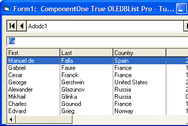
对数据绑定的支持。 控件框支持ODBC、ADO 和 DAO
弹出(桌面提醒)窗口
这种微软® Office风格的弹出控件可显示即使消息
与标准消息框相反,此窗口不要求用户点击"Ok"按钮来关闭,而是在很短的时间内自动消失
内容可通过用户定义的对话框资源创建,或由给定的文本和图标自动生成
各种弹出窗口外观: Office 200/XP/2003、MSN Messenger 等
各种动画风格: 渐隐、幻灯和展开
半透明背景
定制的事件
其他的图形界面控件
支持IntelliSense和语法强调的,先进的编辑控件
属性列表控件
超链接控件
先进的标签控件
微软® Office 风格的色彩拾取器
字体拾取器
屏蔽编辑控件
日期/时间拾取器
日历控件
带热点区字段的图形
计算器
对话框
先进的属性表: 顶部的标签可通过左键点击快捷方式栏或树来替换。
定制化对话框
图形编辑对话框
Office风格的颜色选择对话框
Key Map 对话框
Windows Management 对话框
Visual Studio 集成
支持VC++ 6.0、 VS.NET 2002/2003 ( VB.NET、CSharp等) VS.NET 2005 和 VS 2008
集成向导可在您的Visual Studio环境下集成库
应用程序向导可在几秒中内为您的应用程序设计处全新而又时尚的外观
创建向导可创建需要的库配置。
集成MSDN的帮助。 由于集成了MSDN的帮助库, 只要您暗下编辑器中的F1键,就可以获得相关的帮助主题。
外观向导可帮助您从头创建自己的皮肤外观。
其他
Shell management类和shell tree及列表控件
对UNICODE的支持
支持微软® Active Accessibility
支持从右向左书写的语言(RTL)
该库已经翻译为汉语、捷克语、丹麦语、荷兰语、法语、德语、希腊语、匈牙利语、意大利语、日语、韩语、波兰语、葡萄牙语、罗马尼亚语、俄语、斯洛伐克语、瑞典语、土耳其语、斯洛文尼亚语和西班牙语。 其内在机理允许程序员在运行过程中改变用户界面语言
What's New in BCGControlBar Library Professional Edition MFC (BCGControlBar Professional) V12?
CBCGPVisualManager2010 implements Microsoft Office 2010 Beta 1 color themes
Added Microsoft Office 2010-style Ribbon Backstage View
The Ribbon bar Application ("main") Button can display a text label instead of icon in the "scenic" mode (usually "File" in English language UI).
Implemented ability to add Ribbon Galleries to the dialogs
Implemented Resizable Dialogs support
Significantly improved CBCGPVisualManagerVS2010
Calculator control has been significantly improved
What's New in BCGControlBar Library Professional Edition MFC (BCGControlBar Professional) V11?
New Visual Manager - CBCGPVisualManager2010, which implements the new Microsoft Office 2010 TP white theme
New class CBCGPVisualManagerVS2010, which implements Microsoft Visual Studio 2010 Beta 1 look
Added Windows 7 Taskbar Interaction for MDI applications
Added ability to search the Ribbon commands "on the fly"
Added Vista-style Breadcrumb control
Added Office 2010 style Ribbon minimize button
What's New in BCGControlBar Library Professional Edition MFC (BCGControlBar Professional) V10.3?
The library is fully tested on Windows 7 Beta
The product is fully High DPI-compatible now
Added a new visual manager 'CBCGPVisualManagerScenic" that Implements Windows 7-like ("Scenic") Ribbon bar
Added support for Visual Studio 2008-style semi-transparent docking markers
What's New in BCGControlBar Library Professional Edition MFC (BCGControlBar Professional) V10.21?
Added ability to export a Ribbon bar to the Ribbon designer (XML) format. Just call a new static method CBCGPRibbonBar::SaveRibbon after Ribbon initialization and now you can load and edit your Ribbon in the visual designer.
Added read-only mode to CBCGPGanttControl: use a new method SetReadOnly to enable/disable this mode and IsReadOnly to whether a Gantt control is in read-only mode.
Class "CBCGPRibbonRecentFilesList" is exportable now.
What's New in BCGControlBar Library Professional Edition MFC (BCGControlBar Professional) V10?
Improved Office 2007-style Ribbon
Calendar and Grid Enhancements
Skinned dialogs and forms
Vista Aero controls
Gantt Chart
Ribbon Designer is available: This designer dramatically simplifies the ribbon creation process and allows to create the "state of the art" products in few minutes.
What's New in BCGControlBar Library Professional Edition MFC (BCGControlBar Professional) V9.56?
The library is fully-compatible with Microsoft® Visual Studio 2008 now. The following features have been implemented:
Integration and Build wizard
VS 2008 Application Wizard
Implemented a new visual manager "CBCGPVisualManagerVS2008" which allows to create applications with Microsoft® Visual Studio 2008 ("Orcas") look.
What's New in BCGControlBar Library Professional Edition MFC (BCGControlBar Professional) V9.55?
Added .PNG image support for the following products:CBCGPButton, CBCGPHotSpotImageCtrl, CBCGPPropertySheet,CBCGPRibbonStatusBarPane
The .PNG image support can be excluded from the product now
MS Office 2007-style DLLs have a version number prefix now: for example, MS Office 2007 Blue theme DLL in version 9.55 has the following file name: BCGPStyle2007Luna955.dll
CBCGPVisualManager2007: MDI child system buttons located on the menu bar have Office 2007 look now.
CBCGPRibbonEdit class has a new protected method: CreateSpinButton. Calling this method allows to create spin buttons in CBCGPRibbonEdit-derived classes.
What's New in BCGControlBar Library Professional Edition MFC (BCGControlBar Professional) V9.53?
Added support for Microsoft® Visual Studio® 9.0 Beta 1 (Code Name "Orcas"). The Build and Integration Wizards are not ready yet, but you can open VS 9.0 solutions (BCGCBPro90.sln or BCGCBProStatic90.vcproj), build required DLLs/libraries and use them in your projects. All our examples/samples were thoroughly tested with VS 9.0 and no problems were detected. However, if you detect any compatibility issues, please inform us and we'll resolve them. Important note: CBCGPMenuBar::GetMenu and CBCGPPopupMenu::GetMenu methods have been replaced by GetHMenu methods. This change made due to impossibility to override virtual methods returning different types in VS Orcas.
Added IE 7-style "Close" button displayed on active tabs
What's New in BCGControlBar Library Professional Edition MFC (BCGControlBar Professional) V9.52?
Significantly improved Ribbon layout and performance
Added the ability to customize collapsing order of Ribbon control panels
CBCGPCaptionBar can be created as MS Office 2007-style message bar now
Now the toolkit utilizes Microsoft Office 2007 font (if installed on the client machine)
What's New in BCGControlBar Library Professional Edition MFC (BCGControlBar Professional) V9.51?
CBCGPRibbonStatusBar is merged now with the frame bottom edge
Added tooltip support to ribbon galleries
Significantly improved behavior of ribbon mini-toolbar ("floaty")
CBCGPRibbonPaletteButton is automatically stretched when the parent ribbon panel is being resized
What's New in BCGControlBar Library Professional Edition MFC (BCGControlBar Professional) V9.4?
BCGControlBar Pro is fully compatible with Microsoft® Windows® Vista® now. The following general features have been added and improved for the Vista support:
Ribbon "glass" caption. Includes semi-transparent icons on QAT, Vista-style system buttons with glove and animation nd glass-style contextual caption
Glass borders and captions in Visual Manager 2007
All menu shadows are fully Vista-compatible
The library correctly handles DWM notifications in order to automatically apply Aero styles to frames and control bars.
The following ribbon gadgets have been added and improved:
Added a new class CBCGPRibbonEdit: implements ribbon edit box with image, text label and spin buttons.
CBCGPRibbonStatusBarPane allows to show animation on status bar pane. You need to pass an image list to CBCGPRibbonStatusBarPane constructor and call StartAnimation/StopAnimation methods in order to add animation to status bar pane.
CBCGPRibbonPaletteButton allows to resize drop-down menu.
CBCGPRibbonComboBox drop-down list is resizable
Added a new class CBCGPRibbonPaletteMenuButton: implements a popup palette submenu and can be used in CBCGPPopupMenu instead of CBCGPToolbarMenuButton item. Please take a look at CMainFrame::OnShowPopupMenu in BCGPMSOffice2007Demo example to learn how to use palettes in application context menus.
You can add separators to the Ribbon QAT
Introduced new, Office 2007-style options dialog. The new style 'PropSheetLook_List' has been added to CBCGPPropertySheet class. In addition, you can define your own property sheet headers. Call CBCGPPropertySheet::EnablePageHeader and override CBCGPPropertySheet::OnDrawPageHeader method in order to create your property sheet header.
What's New in BCGControlBar Library Professional Edition MFC (BCGControlBar Professional) V9.3?
CBCGPVisualManager2007 implements MS Office 2007 Beta 2 Technical Refresh look
Added popup ribbon panels in minimized state. When an user clicks the category tab on minimized ribbon bar, the temporary popup category appears instead of restored ribbon. This functionality is very similar to Visual Studio auto-hide bars and allows to keep more free space for editing without loosing the ribbon functionality. This feature is provided automatically "out of the box", so no code changes are required
A new class CBCGPRibbonStatusbar has been added. This class implements Office 2007-style customizable, ribbon-based status bar control
The following new Ribbon widgets have been added:
CBCGPRibbonStatusBarPane: implements status bar pane element
CBCGPRibbonSlider: implements slider control
CBCGPRibbonProgressBar: implements progress bar
x64 libraries and DLLs are compiled in separate folder bin64. This prevents mix-up between 32 and 64-bit program databases when both platforms are used together
用类似与微软Office 2007/XP/2003/2007、微软Visual Studio、微软IE以及其他著名软件产品类似的界面创建应用程序。
定价: BCGControlBar Library Professional Edition MFC (BCGControlBar Professional) V17.0 - Source Code and 1 Year Subscription Included 每1-4个程序员1个 程序员Subscription License , BCGControlBar Library Professional Edition MFC (BCGControlBar Professional) V17.0 - Source Code and 1 Year Subscription Included 每1-10个程序员5个 程序员Subscription License , BCGControlBar Library Professional Edition MFC (BCGControlBar Professional) V17.0 - Source Code and 1 Year Subscription Included 每1-20个程序员11个 程序员Subscription License , BCGControlBar Library Professional Edition MFC (BCGControlBar Professional) V17.0 - Source Code and 1 Year Subscription Included 1个公司License(允许在一个公司内供不限数量的程序员使用), BCGControlBar Library Professional Edition MFC (BCGControlBar Professional) V17.0 - Renewal 1程序员Subscription 续期License, BCGControlBar Library Professional Edition MFC (BCGControlBar Professional) V17.0 - Renewal 1个公司续期License(允许在一个公司内供不限数量的程序员使用)
评估和下载: 浏览BCGControlBar Library屏幕截图的网页
开发用操作系统: Windows 7, Windows Vista, Windows XP, Windows ME, Windows 2000, Windows 98, Windows NT 4.0, Windows 95
产品架构: 32位, 64位
产品类型: 构件
构件类型: DLL, VC++ 类库, 源代码, 静态链接库
兼容容器: Microsoft Visual Studio 2010, 微软 Visual Studio 2008, 微软 Visual Studio 2005, 微软 Visual Studio .NET 2003, 微软 Visual Studio .NET, 微软 Visual Studio 6.0, Microsoft Visual Basic 2010, 微软 Visual Basic 2008, 微软 Visual Basic 2005, 微软 Visual Basic .NET 2003, 微软 Visual Basic .NET, Microsoft Visual C++ 2010, 微软 Visual C++ 2008, 微软 Visual C++ 2005, 微软 Visual C++ .NET 2003, 微软 Visual C++ .NET, 微软 Visual C++ 6.0, Microsoft Visual C# 2010, 微软 Visual C# 2008, 微软 Visual C# 2005, 微软 Visual C# .NET 2003, 微软 Visual C# .NET, .NET Framework 4.0, .NET Framework 3.5, .NET Framework 3.0, .NET Framework 2.0, .NET Framework 1.1, .NET Framework 1.0
产品类: 用户界面构件
关键词: BCGControlBar Library, BCGSoft Library, BCGControlBar Pro, BCGControlBar Library Professional Edition bcgcontrol bcg
表格, datagrid, data grid, data table, net gridview, net datagrid, data grid, grid control, net datatable, c# gridview, c# datagrid, asp.net datagrid, grid asp, vb.net datagrid, vb.net datatable, datagrid in net, asp.net datatable, datagrid control
部件号: PC-511063-433817 511063-433817 PC-511063-433822 511063-433822 PC-511063-433827 511063-433827 PC-511063-433832 511063-433832 PC-511063-433837 511063-433837 PC-511063-433842 511063-433842
发布者
首要类别
相关产品
相关类别