by Accusoft Pegasus (formerly Pegasus Imaging Corp.) - Product Type: Component / .NET Class / ActiveX OCX
CapturePRO by Accusoft Pegasus (formerly Pegasus Imaging Corp.)
URLs: capturepro, accusoft-pegasus, accusoft pegasus, accusoftpegasus
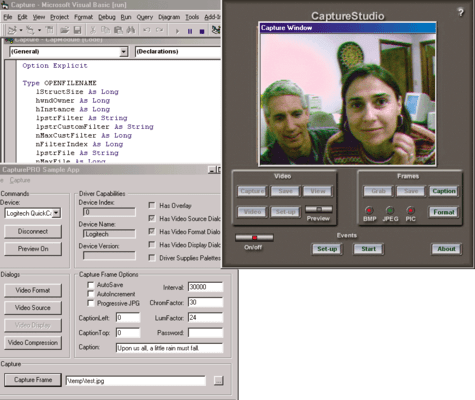
Perform robust capturing of digital images and video. CapturePRO interfaces with any video capture device that supports USB, FireWire, WDM, or native DirectShow including digital video and legacy Video For Windows devices. CapturePRO contains managed .NET, COM and VCL components (CapturePRO and TwainPRO) that perform image and video acquisition from video capture devices.

Main Features Include:
Programming environments: Win32 Visual development environments (excluding Windows 95 and NT version 4.0). Also requires DirectX 8.0 or greater
Sample code is included for: .NET, VB, Delphi, VC++
Deploys within .NET as a managed control (see The Pegasus Imaging Dot Net Philosophy)
Uses ATL to guarantee the smallest footprint and does not require MFC
Can be used in any development environment that hosts ActiveX/COM controls
Use the included CAB file or create a custom one
Interfaces with any video capture device that supports USB, FireWire, WDM, or native DirectShow including legacy Video For Windows devices
Capture images directly into an application instead of resorting to third-party applications and loading files from disk
Complete control over image capture, compress and save options
Acquire both still images and video streams under program control
Capture and compress video with or without audio
Output compressed or uncompressed formats including AVI, Windows Media Content, and others, depending on DirectShow filters the user has installed
Save images to BMP and JPG for high-quality output images
Password protect images using PIC, a Pegasus Imaging Corporation format that allows greater compression and password capability. These files require Pegasus Imaging products to view and manipulate them
CapturePRO also includes the TwainPRO component to interface with TWAIN devices
Capture to a video file or to programmatically named still images
Programmatically select the capture devices to use
Programmatically select flicker-free video, capture preview, and audio preview
Save and retrieve current settings with a single call
Dialogs make available all modes and capabilities for a particular device, including screen preview of live video
Direct access to filtergraph for advanced applications
Track video statistics such as number of frames captured and duration of a clip
AutoSave can be set via an interval timer
Video and audio source selection
Watermark images with text
TV tuner support
Applications include photo ID badges, networked security applications, medical imaging devices, industrial monitoring systems, Internet video solutions, document imaging, and more
Free full-featured trial version available for immediate download (comes bundled with a trial version of the PICVideo Codec for Motion JPEG and Lossless JPEG compression/decompression)
CapturePRO Also Includes:
TwainPRO・v3 Image Acquisition From TWAIN Capture Devices
Benefits:
Imaging application developers can quickly incorporate advanced image acquisition capabilities into their products.
Perform robust capturing of digital images and video.
Pricing: CapturePRO V3.0 1 Developer License, CapturePRO V3.0 Deployment Licensing(A minimum of 5 client licenses is required for first time purchases) 1 Client Runtime License, price per client (5 to 9) (minimum quantity 5), CapturePRO V3.0 Deployment Licensing(A minimum of 5 client licenses is required for first time purchases) 1 Client Runtime License, price per client (10 to 24) (minimum quantity 10), CapturePRO V3.0 Deployment Licensing(A minimum of 5 client licenses is required for first time purchases) 1 Client Runtime License, price per client (25 to 49) (minimum quantity 25), CapturePRO V3.0 Deployment Licensing(Servers are licensed per core, annually. Minimum 2 core per server.) 1 Server (CPU) Deployment License (Minimum quantity 2 per server)
Evals & Downloads: Read the CapturePRO help file, Browse the Licensing Information Web pages, Read the CapturePRO changes document, Read the CapturePRO Quick reference guide, Read the Pegasus .NET Philosophy document - Requires Acrobat Reader, Download the CapturePRO V3.0 evaluation on to your computer - Displays Nag Screens
Operating System for Deployment: Windows 7, Windows Vista, Windows XP, Windows ME, Windows 2000
Architecture of Product: 32Bit
Product Type: Component
Component Type: .NET Class, ActiveX OCX
Built Using: ActiveX Template Library (ATL)
General: Internet Enhanced, OCX96 Compatible, Supports Component Categories, Supports Apartment Model Threading
Compatible Containers: Microsoft Visual Studio .NET, Microsoft Visual Studio 6.0, Microsoft Visual Basic .NET, Microsoft Visual Basic 6.0, Microsoft Visual Basic 5.0, Microsoft Visual Basic 4.0, Microsoft Visual C++ .NET, Microsoft Visual C++ 6.0, Microsoft Visual C++ 5.0, Microsoft Visual C++ 4.0, Microsoft Visual C# .NET, Microsoft Visual InterDev 6.0, Microsoft Visual FoxPro 6.0, Microsoft ActiveX Control Pad, Microsoft FrontPage, Microsoft Internet Explorer 4.0, Microsoft Internet Explorer 3.0, .NET Framework 1.0
Product Class: User Interface Components
Keywords: Pegasus Imaging Capture PRO Activex com vcl Imaging Image Picture Scanning Scan scanners Bitmap draw drawing art processing graphic JPEG TIF GIF BMP PCX video acquisition digital capture devices cameras frame grabbers cards
Pegasus Image Imaging accusoft
Imaging image images
Scan scanning scanned scanner scans OCR optical character recognition
Part numbers: PC-505755-234808 505755-234808 PC-505755-234810 505755-234810 PC-505755-234811 505755-234811 PC-505755-234812 505755-234812 PC-505755-234814 505755-234814
Publisher
Primary Category
Related Products
Related Categories
ComponentSource offers a unique global service, used by over 1,000,000 software developers worldwide.