Humanize Application Interfaces
Runtime EventBrowse runtime events in the Events window.
VoiceXML Document TestingTest VoiceXML documents offline before deploying to servers.
VoiceXML Syntax Error DebuggingAutomatic syntax checking displays visual cues and syntax error messages in the Error window. Click on the error to take you to the location of it in the document window.
VoiceXML, SRGS, and SSML EditingEdit inline speech recognition grammars and text-to-speech markup in addition to VoiceXML.
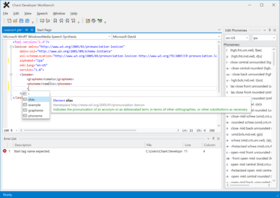
VoiceXML Document EditingEdit W3C VoiceXML documents faster with built-in intelliprompt that suggests valid syntax.
Conversation ManagementCreate, validate, edit, test, and debug VoiceXML offline before deploying to voice response servers.
TTS PlaybackPlayback text-to-speech markup with a click of the button. Highlight specific text or playback the entire document.
SSML Error DebuggingAutomatic syntax checking displays visual cues and syntax error messages in the Error window. Click on the error to take you to the location of it in the document window.
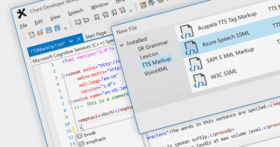
SSML EditingEdit L&H Native Control Sequence, SAPI 5, and W3C Speech Synthesis Markup Language (SSML) faster with built-in intelliprompt that suggests valid markup syntax.
Synthesizer ManagementTrace synthesis events in the Events window.
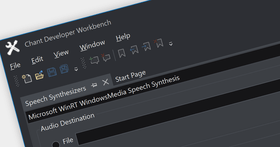
Synthesizer ManagementEnumerate and test synthesizers with live playback or persisting synthesized speech to files.
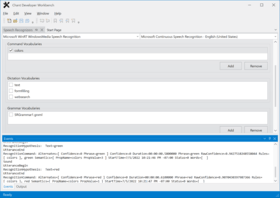
Recognizer ManagementRecognize speech from a microphone and prerecorded audio. Trace recognition events in the Events window.
Recognizer ManagementEnumerate and test recognizers with command, dictation, and grammar vocabularies.
Built-in Speaker TrainingEnumerate and train speech recognition profiles with recognizer built-in speaker training.
Cepstral Pronunciation EditingCreate and edit Cepstral default pronunciations faster by using the auto generation feature. Simply type the word, space, and 0 to generate the default pronunciation for editing.
PLS Lexicon EditingEdit word pronunciations faster with built-in intelliprompt that suggests valid syntax and with built-in phoneme generation and editing tool windows.
Compilation Error DebuggingBrowse compilation errors in the Error window. Click on the error to take you to the location of it in the document window.
Recognition EventsBrowse recognition events in the Events window.
Recognition ResultsView recognition results in the Output window.
Grammar Compiling and TestingCompile and test grammars with a click of a button. Review compiler messages in the output window. Speak into a microphone to test grammar.
Syntax Error DebuggingAutomatic syntax checking displays visual cues and syntax error messages in the Error window. Click on the error to take you to the location of it in the document window.
Grammar EditingEdit SAPI 5, L&H BNF+, JSGF, and W3C speech recognition grammars faster with built-in intelliprompt that suggests valid grammar syntax.
Conversation ManagementCreate, validate, edit, test, and debug VoiceXML offline before deploying to voice response servers.
SSML EditingEdit L&H Native Control Sequence, SAPI 5, and W3C Speech Synthesis Markup Language (SSML) faster with built-in intelliprompt that suggests valid markup syntax.
Recognizer ManagementEnumerate and test recognizers with command, dictation, and grammar vocabularies.
Built-in Speaker TrainingEnumerate and train speech recognition profiles with recognizer built-in speaker training.
PLS Lexicon EditingEdit word pronunciations faster with built-in intelliprompt that suggests valid syntax and with built-in phoneme generation and editing tool windows.
Track Movement with KinesicsKitA KinesicsKit application can capture and map color, depth, and body data as well as record and playback audio files. It can also integrate movement tracking with speech technology.
Grammar ManagementDesign, compile, test, and debug speech recognition grammars before deployment.
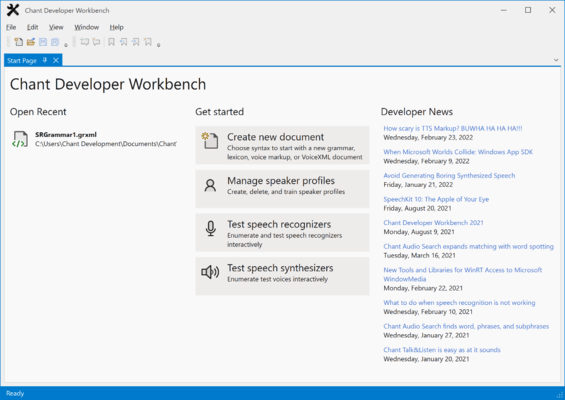
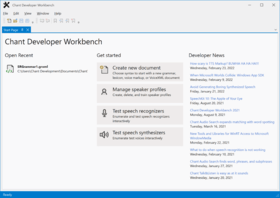
Chant Developer WorkbenchChant Developer Workbench provides a comprehensive development and testing environment for working with speech technology and natural user interface technology that features a Multi-document, interactive and customizable environment, a powerful editor with color-coded formatting, IntelliPrompt, optional outlining, optional line numbers, undo-redo, word wrap, and find/replace. Resource browsers for testing and event tracing.