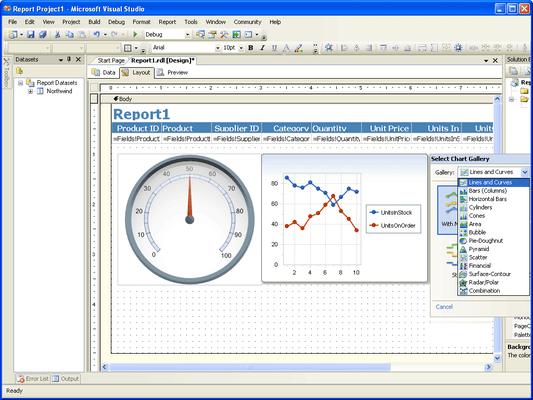
Screenshot Preview

Chart FX for Reporting Services

经 Software FX - 产品类型: 构件 / ASP.NET WebForms / .NET WinForms

‏请注意: 除非另有说明,此为英语产品

*

Add enterprise quality charts and gauges to your SQL Server 2005 Reporting Services projects. Chart FX for Reporting Services allows you to create visually appealing charts and gauges for your SQL Server 2005 Reporting Services projects in minutes. Chart FX for Reporting Services includes over 20 different chart types (including radial, horizontal, vertical, digital meter and LED panel gauges). Chart FX for Reporting Services features customizable legends, ready-to-use color palettes, multiple and customizable axes, per-marker attributes, gridlines, background images and border objects. Chart FX for Reporting Services Design-time experience includes the use of Smart Tags and a Data Wizard to connect more meaningfully with your data with absolutely no coding required. Chart FX for Reporting Services is 64bit compatible.

$845.06
价格

‏我们的常规价格如下。 请登录后查看打折后的价格。

Chart FX for Reporting Services V7.0   *

加入购物车 $ 845.06 1 Chart FX for Reporting Services License (includes 1 Designer & 1 Server License)  *
Mfr. 部件号: CRS70
下载 (101.6 MB)
加入购物车 $ 1,175.02 1 Chart FX for Reporting Services License (includes 1 Designer & 1 Server License) - includes 1 Year Priority Support Program  * 下载 (101.6 MB)
加入购物车 $ 469.06 1 Additional Designer License  *
Mfr. 部件号: CRS70D
验证 下载 (49.3 MB)

我们的价格包括ComponentSource的技术支持。对于大多数可下载的产品,还提供在线备份和免费升级为新版本,若新版本在购买后的30日内发布的话。  所有销售都是按照我们的标准条款 进行的,并且适用我们的退货政策. 请 联系我们 若您需要任何未在上面列出的License选择,包括批量License及以前的版本。 

‏我们的常规价格见上。 请登录后查看打折后的价格。

 *

Chart FX for Reporting Services leverages the charting features from the award winning Chart FX charting engine allowing you to add enterprise quality charts and gauges to your SQL Server 2005 Reporting Services projects. Chart FX for Reporting Services is 64 bit compatible.


 *

Chart FX for Reporting Services Visual Capabilities Features

  • Multiple Gallery Types: 20 different chart types including Lines, Curves, Bars, Horizontal Bars, Cylinders, Cones, Area, Bubble, Pie, Doughnut, Pyramid, Scatter, Open-Hi-Low-Close, Candlestick, Surface, Contour, Radar and Polar
  • Gauge Gallery Types: Extend your charting capabilities with Radial, Horizontal, Vertical, Digital Meter and LED Panel gauge types
  • 2D/3D Rendering: Most charts can be viewed in 2D or 3D and can be rotated to specific angles and perspectives

Chart FX for Reporting Services Advanced Features

  • Per Series Attributes:Chart FX allows you to set visual attributes such as color, gallery type and marker type per series
  • Axis Sections:Highlight certain value ranges in individual axes with editable axis sections
  • Multiple Axes:Chart FX for Reporting Services fully supports multiple X and Y Axes
  • Logarithmic Axes:When plotting large numbers, Chart FX for Reporing Services supports independent logarithmic scales on any of the axes (Primary, Secondary Y and X when used in a numerical sense)
  • Smart DateTime Axis Handling: Automatically adjusts the labels for Date/Time axes to show meaningful periods of time, such as months, quarter, years, etc.
  • Multiple Panes: Chart FX for Reporting Services allows you to render multiple panes within the same chart. You can compare multiple unrelated entities which share an X axis, all on the same chart
  • Grid Lines: Grid Lines are highly customizable, horizontal and vertical lines used to separate or highlight an area
  • Conditional Attributes:Highlight values based on conditions you define in the Properties Grid
  • Data Compacting: The Data Compacting feature will provide meaningful, summarized data when your raw data is extremely lengthy and would not normally be useful in a chart
  • Artistic Borders: Add visual pizazz to your charts by selecting from standard (flat, raised, sunken, etc.) or artistic borders (embossed, embedded, riveted, etc)
  • Background Images: Add images, such as a company logo or any other preferred image, to the background of the chart
  • Gradients: Add gradients to the chart's main and/or inside background or to each series for an artistic touch
  • Color Palettes: Apply predefined color palettes to your chart for an artistic, uniform look
  • Titles: Chart FX for Reporting Services supports multiple titles for the chart and each axis. Each title can have its own font and color
  • Rich Text Titles: Include Rich Text format (similar to html tags) in the titles such as <b>Bold</b>, <i>Italic</i>, etc.
  • Point Labels: Show the value of each marker. Font, color, position and angle can be changed universally or individually for each marker
  • Point Label Collision Detection:Intelligently distributes the point labels to prevent overlapping
  • Data Grid: A tabular display used to view the specific data that is fed to the chart
  • Legends: Series and/or points legends can be shown in different positions: stacked (customizable, left, top, right, bottom, near, center, far, spread) or floating anywhere in the chart

Chart FX for Reporting Services Ease of Use & Integration

  • Chart Wizard: When you drop a chart in your report, a Smart Tag appears in the upper right-hand corner of the control. This allows you easy access to Chart FX's main features
  • Chart FX for Reporting Services is 64-bit compatible.
  • Data Wizard: Connecting and configuring your chart to your datasource is a snap with the Chart FX Data Wizard. Simply select your datasource and follow the simple instructions and your chart will adapt to the type and content of the data you provide
  • Property Grid: Users can choose to manipulate their chart using the familiar Property Grid in the Reporting Services IDE


注意

还未完成翻译的产品说明, 我们提供了Google 翻译的连结方便您使用. 但请注意, 自动翻译有时候可能会有翻译错误.
强力驱动
在Firefox 和Opera 需要Flash.

产品搜索

输入搜索词:

为什么从ComponentSource购买?

ComponentSource 提供独特的全球国际服务, 在世界各地共有超过1,000,000开发者客户.

更多讯息 | 关于我们

奖励