von Codejock Software - Produkttyp: Komponente / ActiveX OCX / ActiveX EXE / ActiveX DLL / DLL / VB Class Library / ActiveX Designer
Bitte beachten Sie, diese Produktinformation ist nicht in deutscher Sprache verfügbar.
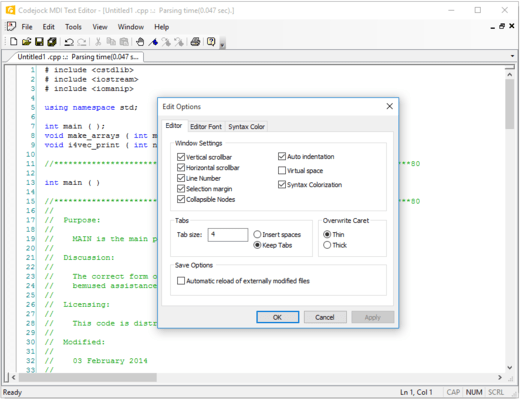
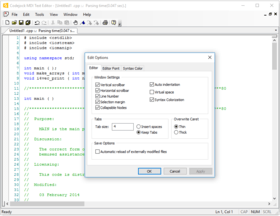
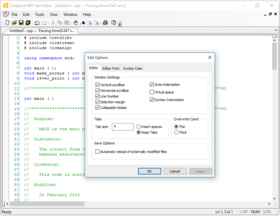
Visual Studio .NET style code editor control. Xtreme SyntaxEdit Visual Studio .NET style Syntax Editor Control provides your users with a highly sophisticated text editor control that supports advanced features such as text block grouping, syntax colorization, line numbers, font type, pre-defined color schemes, book marks, break points, Intellisense help and many more advanced features. INI file based syntax colorization allows you to specify specific colorization rules for your text documents. For example, you can specify a different set of colors to be used for cpp, h, html, asp, etc files. Color rules can be applied to specific words or groups of words and phrases.
Unsere regulären Preise werden nachstehend angezeigt. Bitte melden Sie sich an um Ihre ermäßigten Preise zu sehen.
| In den Einkaufswagen | $ 94.05 | 1 Developer License | Download (3.9 MB) | |
| In den Einkaufswagen | $ 236.55 | 4 Developer Team License | Download (3.9 MB) | |
| In den Einkaufswagen | $ 426.55 | 8 Developer Team License | Download (3.9 MB) | |
| In den Einkaufswagen | $ 970.20 | 1 Site Wide License (Allows Unlimited Developers at a Single Physical Address) | Download (3.9 MB) |
| In den Einkaufswagen | $ 141.55 | 1 Developer License | Download (3.9 MB) | |
| In den Einkaufswagen | $ 293.02 | 4 Developer Team License | Download (3.9 MB) | |
| In den Einkaufswagen | $ 489.02 | 8 Developer Team License | Download (3.9 MB) | |
| In den Einkaufswagen | $ 1,460.20 | 1 Site Wide License (Allows Unlimited Developers at a Single Physical Address) | Download (3.9 MB) |
| In den Einkaufswagen | $ 65.55 | 1 Developer License | Prüfen | Download (29 KB) |
| In den Einkaufswagen | $ 111.72 | 4 Developer Team License | Prüfen | Download (29 KB) |
| In den Einkaufswagen | $ 170.52 | 8 Developer Team License | Prüfen | Download (29 KB) |
| In den Einkaufswagen | $ 676.20 | 1 Site Wide License (Allows Unlimited Developers at a Single Physical Address) | Prüfen | Download (29 KB) |
Unsere Preise beinhalten einen technischen Support durch ComponentSource und für die meisten herunterladbaren Produkte zusätzlich ein Online-Backup sowie eine kostenlose Aktualisierung auf die neue Version, sofern sie binnen 30 Tagen nach dem Kauf freigegeben werden. Die angezeigten Preise sind zuzüglich aller Steuern. Für mehr Information zu eventuell anfallende Steuern, gehen Sie bitte auf diese Webseite. Alle Verkäufe unterliegen unseren Standardgeschäftsbedingungen und unseren Rückgaberegeln. Treten Sie bitte mit uns in Kontakt , wenn Sie eine Lizenzierungsoption anfordern möchten, die in der obigen Liste nicht aufgeführt ist, einschließlich Mehrplatzlizenzen und ältere Versionen.
Unsere regulären Preise werden oben angezeigt. Bitte melden Sie sich an um Ihre ermäßigten Preise zu sehen.
Text Block Grouping - Visual Studio .NET style text block grouping allows you to easily organize a document of text into blocks of text that can be hidden with the click of a button. Hidden blocks of text can have a message stating what has been hidden for view. This allows you to minimize the clutter of vary large text documents.
Bookmarks - Bookmarks allow you to place a "bookmark" at any position in your text document. You can later cycle through all of your bookmarks to easily return to positions of interest in your document.
Breakpoints - Visual Studio style breakpoints allow you to place a "breakpoint" at any position in your text document. This can be used for many different reasons, for example, if you have a code compiler you could use these breakpoints to indicate where code execution will "break" and wait for user interaction.
Visual Studio .NET Style Intellisense Help - Using various configuration files such as a C++ configuration file you can add intellisense to the syntax editor. Using the configuration file you can specify which "keywords" will use the intellisense feature. To active intellisense press Ctrl + Space anytime during editing.
Line Numbers - Line numbers allow you to easily see how many lines are in a text document as well as serve reference to the position you are at in the document. You can use these numbers to communicate points of interest in a document.
Syntax Colorization - INI file based syntax colorization allows you to specify specific colorization rules for your text documents. For example, you can specify a different set of colors to be used for cpp, h, html, asp, etc files. Color rules can be applied to specific words or groups of words and phrases.