Codejock Xtreme SyntaxEdit - ActiveX COM - 2008 Vol 1

de Codejock Software - Tipo de producto: Componente / ActiveX OCX / ActiveX EXE / ActiveX DLL / DLL / VB Class Library / ActiveX Designer

Por favor note que la información sobre este producto no está disponible en español.
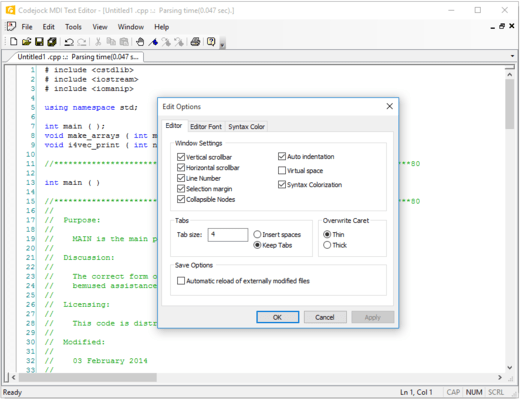
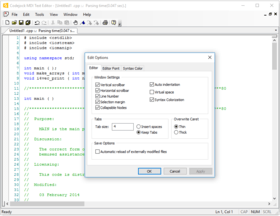
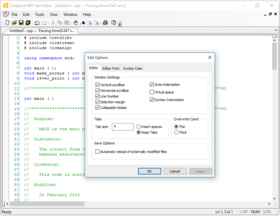
Captura de pantalla Codejock Xtreme SyntaxEdit - ActiveX COM - 2008 Vol 1Visual Studio .NET style code editor control. Xtreme SyntaxEdit Visual Studio .NET style Syntax Editor Control provides your users with a highly sophisticated text editor control that supports advanced features such as text block grouping, syntax colorization, line numbers, font type, pre-defined color schemes, book marks, break points, Intellisense help and many more advanced features. INI file based syntax colorization allows you to specify specific colorization rules for your text documents. For example, you can specify a different set of colors to be used for cpp, h, html, asp, etc files. Color rules can be applied to specific words or groups of words and phrases.

Desde
$94.05
Precio en

Nuestros precios Standard están indicados abajo. Inicia una sesión para ver sus precios con descuento.

Xtreme SyntaxEdit 2008 Vol 1 (V12.0.2) .NET/ActiveX with 30 Days Subscription

Añadir a la Cesta $ 94.05 1 Developer License Descarga (3.9 MB)
Añadir a la Cesta $ 236.55 4 Developer Team License Descarga (3.9 MB)
Añadir a la Cesta $ 426.55 8 Developer Team License Descarga (3.9 MB)
Añadir a la Cesta $ 970.20 1 Site Wide License (Allows Unlimited Developers at a Single Physical Address) Descarga (3.9 MB)

Xtreme SyntaxEdit 2008 Vol 1 (V12.0.2) .NET/ActiveX with 1 Year Subscription

Añadir a la Cesta $ 141.55 1 Developer License Descarga (3.9 MB)
Añadir a la Cesta $ 293.02 4 Developer Team License Descarga (3.9 MB)
Añadir a la Cesta $ 489.02 8 Developer Team License Descarga (3.9 MB)
Añadir a la Cesta $ 1,460.20 1 Site Wide License (Allows Unlimited Developers at a Single Physical Address) Descarga (3.9 MB)

Xtreme SyntaxEdit .NET/ActiveX - Subscription Renewal

Añadir a la Cesta $ 65.55 1 Developer License Verificar Descarga (29 KB)
Añadir a la Cesta $ 111.72 4 Developer Team License Verificar Descarga (29 KB)
Añadir a la Cesta $ 170.52 8 Developer Team License Verificar Descarga (29 KB)
Añadir a la Cesta $ 676.20 1 Site Wide License (Allows Unlimited Developers at a Single Physical Address) Verificar Descarga (29 KB)

Este producto esta disponible con precios reservados al GSA Schedule.Nuestros precios incluyen servicio técnico de ComponentSource y, para la mayoría de los productos disponibles para descarga, una copia de seguridad en línea y una actualización GRATUITA a la nueva versión si ésta se publica en un período de 30 días después de la compra.  Todas las ventas están sujetas a nuestros Términos y condiciones standard y a nuestra Política de devolución. Por favor, póngase en contacto con nosotros si necesita alguna opción de licencia no incluida en la lista anterior, incluida la compra por volumen de licencias y versiones anteriores.

Nuestros precios Standard están indicados arriba. Inicia una sesión para ver sus precios con descuento.

Text Block Grouping - Visual Studio .NET style text block grouping allows you to easily organize a document of text into blocks of text that can be hidden with the click of a button. Hidden blocks of text can have a message stating what has been hidden for view. This allows you to minimize the clutter of vary large text documents.

Bookmarks - Bookmarks allow you to place a "bookmark" at any position in your text document. You can later cycle through all of your bookmarks to easily return to positions of interest in your document.

Breakpoints - Visual Studio style breakpoints allow you to place a "breakpoint" at any position in your text document. This can be used for many different reasons, for example, if you have a code compiler you could use these breakpoints to indicate where code execution will "break" and wait for user interaction.

Visual Studio .NET Style Intellisense Help - Using various configuration files such as a C++ configuration file you can add intellisense to the syntax editor. Using the configuration file you can specify which "keywords" will use the intellisense feature. To active intellisense press Ctrl + Space anytime during editing.

Line Numbers - Line numbers allow you to easily see how many lines are in a text document as well as serve reference to the position you are at in the document. You can use these numbers to communicate points of interest in a document.

Syntax Colorization - INI file based syntax colorization allows you to specify specific colorization rules for your text documents. For example, you can specify a different set of colors to be used for cpp, h, html, asp, etc files. Color rules can be applied to specific words or groups of words and phrases.


Búsqueda de productos

Escriba palabras de búsqueda:

Ahorro sobre desarrollo

Lea nuestro Libro Blanco sobre como calcular
el Retorno sobre la Inversión

Líneas de código: 8,280
Hombre-mes: 8
Costo Recursos Humanos: $41,400

Funciones Requeridas:

Esfuerzo por 1000 líneas de código:

Costo Mensual de Recursos Humanos :

Award