de Codejock Software - Tipo de producto: Componente / DLL / VC++ Class Library / Source Code / Static Link Library
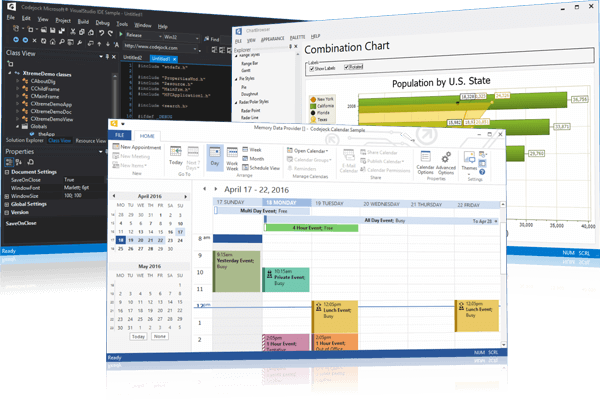
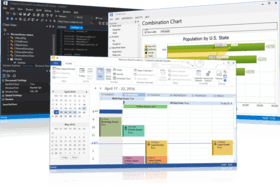
Easily develop professional GUI applications. Toolkit Pro provides Windows developers with a sophisticated set of components to give applications a professional, modern appearance. Toolkit Pro combines ten components, SyntaxEdit, Controls, CommandBars, Docking Pane, Property Grid, Report Control, Chart Pro, Calendar, Task Panel, ShortcutBar, and Controls. With Toolkit Pro you can create enterprise class applications that incorporate a full set of highly customizable user interface components that include Microsoft Office style toolbars and menus.
Nuestros precios Standard están indicados abajo. Inicia una sesión para ver sus precios con descuento.
| Añadir a la Cesta | $ 603.84 | 1 Developer License - for Visual C++ - includes Source code * Ref. Fabricante: 1610-MFC-TOOLKITPRO-1DL-30 |
Descarga (44.3 MB) | |
| Añadir a la Cesta | $ 483.07 | 1 Developer License - for Visual C++ - includes Source code - for Visual C++ - Upgrade from any Codejock product * | Verificar | Descarga (44.3 MB) |
| Añadir a la Cesta | $ 714.42 | 2 Developer License - for Visual C++ - includes Source code * Ref. Fabricante: 1610-MFC-TOOLKITPRO-2DL-30 |
Descarga (44.3 MB) | |
| Añadir a la Cesta | $ 812.42 | 3 Developer License - for Visual C++ - includes Source code * Ref. Fabricante: 1610-MFC-TOOLKITPRO-3DL-30 |
Descarga (44.3 MB) | |
| Añadir a la Cesta | $ 891.84 | 4 Developer License - for Visual C++ - includes Source code * Ref. Fabricante: 1610-MFC-TOOLKITPRO-4DL-30 |
Descarga (44.3 MB) | |
| Añadir a la Cesta | $ 713.47 | 4 Developer License - for Visual C++ - includes Source code - for Visual C++ - Upgrade from any Codejock product * | Verificar | Descarga (44.3 MB) |
| Añadir a la Cesta | $ 1,008.42 | 5 Developer License - for Visual C++ - includes Source code * Ref. Fabricante: 1610-MFC-TOOLKITPRO-5DL-30 |
Descarga (44.3 MB) | |
| Añadir a la Cesta | $ 1,106.42 | 6 Developer License - for Visual C++ - includes Source code * Ref. Fabricante: 1610-MFC-TOOLKITPRO-6DL-30 |
Descarga (44.3 MB) | |
| Añadir a la Cesta | $ 1,204.42 | 7 Developer License - for Visual C++ - includes Source code * Ref. Fabricante: 1610-MFC-TOOLKITPRO-7DL-30 |
Descarga (44.3 MB) | |
| Añadir a la Cesta | $ 1,275.84 | 8 Developer License - for Visual C++ - includes Source code * Ref. Fabricante: 1610-MFC-TOOLKITPRO-8DL-30 |
Descarga (44.3 MB) | |
| Añadir a la Cesta | $ 1,020.67 | 8 Developer License - for Visual C++ - includes Source code - for Visual C++ - Upgrade from any Codejock product * | Verificar | Descarga (44.3 MB) |
| Añadir a la Cesta | $ 6,038.40 | 1 Site Wide License (Allows Unlimited Developers at a Single Physical Address) - for Visual C++ - includes Source code * Ref. Fabricante: 1610-MFC-TOOLKITPRO-UDL-30 |
Descarga (44.3 MB) |
| Añadir a la Cesta | $ 767.04 | 1 Developer License - for Visual C++ - includes Source code * Ref. Fabricante: 1610-MFC-TOOLKITPRO-1DL-365 |
Descarga (44.3 MB) | |
| Añadir a la Cesta | $ 613.63 | 1 Developer Upgrade License from any Codejock product - for Visual C++ - includes Source code * | Verificar | Descarga (44.3 MB) |
| Añadir a la Cesta | $ 881.02 | 2 Developer License - for Visual C++ - includes Source code * Ref. Fabricante: 1610-MFC-TOOLKITPRO-2DL-365 |
Descarga (44.3 MB) | |
| Añadir a la Cesta | $ 979.02 | 3 Developer License - for Visual C++ - includes Source code * Ref. Fabricante: 1610-MFC-TOOLKITPRO-3DL-365 |
Descarga (44.3 MB) | |
| Añadir a la Cesta | $ 1,055.04 | 4 Developer License - for Visual C++ - includes Source code * Ref. Fabricante: 1610-MFC-TOOLKITPRO-4DL-365 |
Descarga (44.3 MB) | |
| Añadir a la Cesta | $ 844.03 | 4 Developer License - for Visual C++ - includes Source code - for Visual C++ - Upgrade from any Codejock product * | Verificar | Descarga (44.3 MB) |
| Añadir a la Cesta | $ 1,175.02 | 5 Developer License - for Visual C++ - includes Source code * Ref. Fabricante: 1610-MFC-TOOLKITPRO-5DL-365 |
Descarga (44.3 MB) | |
| Añadir a la Cesta | $ 1,273.02 | 6 Developer License - for Visual C++ - includes Source code * Ref. Fabricante: 1610-MFC-TOOLKITPRO-6DL-365 |
Descarga (44.3 MB) | |
| Añadir a la Cesta | $ 1,371.02 | 7 Developer License - for Visual C++ - includes Source code * Ref. Fabricante: 1610-MFC-TOOLKITPRO-7DL-365 |
Descarga (44.3 MB) | |
| Añadir a la Cesta | $ 1,439.04 | 8 Developer License - for Visual C++ - includes Source code * Ref. Fabricante: 1610-MFC-TOOLKITPRO-8DL-365 |
Descarga (44.3 MB) | |
| Añadir a la Cesta | $ 1,151.23 | 8 Developer License - for Visual C++ - includes Source code - for Visual C++ - Upgrade from any Codejock product * | Verificar | Descarga (44.3 MB) |
| Añadir a la Cesta | $ 7,670.40 | 1 Site Wide License (Allows Unlimited Developers at a Single Physical Address) - for Visual C++ - includes Source code * Ref. Fabricante: 1610-MFC-TOOLKITPRO-UDL-365 |
Descarga (44.3 MB) |
| Añadir a la Cesta | $ 219.84 | 1 Developer License * Ref. Fabricante: 1610-MFC-TOOLKITPRO-1DL-SUB |
Verificar | Descarga (29 KB) |
| Añadir a la Cesta | $ 273.42 | 2 Developer License * Ref. Fabricante: 1610-MFC-TOOLKITPRO-2DL-SUB |
Verificar | Descarga (29 KB) |
| Añadir a la Cesta | $ 322.42 | 3 Developer License * Ref. Fabricante: 1610-MFC-TOOLKITPRO-3DL-SUB |
Verificar | Descarga (29 KB) |
| Añadir a la Cesta | $ 363.84 | 4 Developer License * Ref. Fabricante: 1610-MFC-TOOLKITPRO-4DL-SUB |
Verificar | Descarga (29 KB) |
| Añadir a la Cesta | $ 420.42 | 5 Developer License * Ref. Fabricante: 1610-MFC-TOOLKITPRO-5DL-SUB |
Verificar | Descarga (29 KB) |
| Añadir a la Cesta | $ 469.42 | 6 Developer License * Ref. Fabricante: 1610-MFC-TOOLKITPRO-6DL-SUB |
Verificar | Descarga (29 KB) |
| Añadir a la Cesta | $ 518.42 | 7 Developer License * Ref. Fabricante: 1610-MFC-TOOLKITPRO-7DL-SUB |
Verificar | Descarga (29 KB) |
| Añadir a la Cesta | $ 555.84 | 8 Developer License * Ref. Fabricante: 1610-MFC-TOOLKITPRO-8DL-SUB |
Verificar | Descarga (29 KB) |
| Añadir a la Cesta | $ 2,198.40 | 1 Site Wide License (Allows Unlimited Developers at a Single Physical Address) * Ref. Fabricante: 1610-MFC-TOOLKITPRO-UDL-SUB |
Verificar | Descarga (29 KB) |
Nuestros precios incluyen servicio técnico de ComponentSource y, para la mayoría de los productos disponibles para descarga, una copia de seguridad en línea y una actualización GRATUITA a la nueva versión si ésta se publica en un período de 30 días después de la compra. Todas las ventas están sujetas a nuestros Términos y condiciones standard y a nuestra Política de devolución. Por favor, póngase en contacto con nosotros si necesita alguna opción de licencia no ofrecida en la lista, como por ejemplo volumen de licencias y versiones anteriores.
Nuestros precios Standard están indicados arriba. Inicia una sesión para ver sus precios con descuento.
What’s new in Codejock Toolkit Pro 2013 V16.1?
What’s new in Codejock Toolkit Pro 2011 Vol 2 V15.3.1?
CommandBars
Ribbon Bar
Skin Framework
Property Grid
Docking Pane
Task Panel
Report Control
Calendar Pro
Syntax Edit
Chart Pro
What’s new in Codejock ToolkitPro 2011 Vol. 2 V15.2.1?
What’s new in Codejock ToolkitPro 2011 Vol. 1 V15.1.1?
What’s new in Codejock ToolkitPro 2011 Vol. 1 V15.0.1?
What’s new in Codejock ToolkitPro 2009 Vol. 4 V13.4.1?
Controls
CommandBars
Skin Framework
Property Grid
Docking Pane
Report Control
Calendar
Syntax Edit
XAML Markup Support
What’s new in Toolkit Pro 2009 Vol 4?
Controls
CommandBars
Skin Framework
Property Grid
Docking Pane
Report Control
Calendar
What’s new in Codejock ToolkitPro 2009 Vol. 3 V13.3.0?
This release introduces many stability and usability enhancements for all components for Windows 7 and x64 platforms. Additionally, a new Track Control for video editing is included, all ActiveX products are now x64 compatible, merged cell support for the report control and support has been added for Visual Studio 2010 RC.
What’s new in Codejock ToolkitPro 2009 Vol. 3 V13.2.0?
What’s new in Codejock ToolkitPro 2009 Vol. 2 V13.1.0?
What’s new in Codejock ToolkitPro 2009 Vol. 1 V13?
What’s new in Codejock ToolkitPro 2008 Vol. 2?
What’s new in Codejock 2008 Vol. 1?
What’s new in Codejock ToolkitPro 2007 Vol 2?
What’s new in Codejock ToolkitPro 2007 Vol 1?
Vol 1 is the 1st major release for 2007 that introduces Vista style Task Dialog, SkinFramework for .NET with RTL support, built-in Slider and Spin Button controls for Property Grid, Multiple Resources for Each Calendar Day, Enhanced Report Control Memory Management, updated language translations including support for Bulgarian and Turkish languages.
What's new in Codejock ToolkitPro 2006 Q4?
Q4 is the fourth major release for 2006 incorporating several new enhancements that include the new Office 2007 silver theme, RibbonBar Vista glass effect, Ribbon and CommandBar Office 2007 Style ScreenTips, variable Ribbon and CommandBar font sizes, Office 2007 style system popup menu, Vista Skins for SkinFramework, brand new Syntax Editor control, CommandBar Radio button, CommandBar color picker control, Docking Pane keyboard navigation, Print Preview for Calendar and Report Control, MDI and Context menu manager, Built-in calendar dialogs, and the ability to automatically convert standard VB6 menus to commandbars.
What's new in Codejock ToolkitPro Vol 3?
Vol 3 is the third major release for 2006 incorporating several new enhancements that include new Office 2007 style Galley Components, full support for Right-To-Left (RTL) languages, Skin Framework support for PNG file format, new Ribbon Bar themes Obsidian (black) theme and Office 12 (Aqua) color theme from Beta 1, Office 2007 style Ribbon and Command Bar animation effects, improved compatibility with automated testing tools, and full support for Windows Vista and Windows x64 platforms.
Toolkit
The Office Colorization Manager in Toolkit gives applications the closest, most exact colorization possible because it matches the same colors used by Office for each particular Windows color setting. The Office style or cool menus can be configured with as little as one line of code, making Toolkit a time saver. With this, you can configure the menus to use your existing toolbar resources or define a set of commands that you can hide from the user until they expand the menus by pressing or hovering over the chevron style button. You can also configure how you desire your menus to be displayed using animation and shadow effects. Animation delay time can easily be configured, and you can choose from several predefined effects such as Random, Unfold, Slide, Fade and None or create your own custom animation effects.
The accelerator key manager allows you to assign shortcuts to menu commands quickly and easily. You can also save this information for your entire application or on a per document basis. Inserting a tools menu into your workspace is simple when using the customizable tools menu in Toolkit. You can assign menu commands to program files or web pages that can be run directly from your application. The menu bars component provides a toolbar style dockable menu bar. Floating or docking your application menu to any side of your workspace window is simple.
Toolkit also provides you with enhanced controlbars including Office style toolbars and menubars, high color toolbars, multiple frame docking, color picker toolbar buttons, tear-off popup windows, a custom status bar, docking windows, and persistent rebars everything needed from controlbars. It also offers many dialog options including a tip of the day dialog, browse for folder dialog, resizable layout manager and MDI Windows manager. The shortcut bar features that are included with Toolkit are the Office style shortcut bar, the VS.NET style toolbox and the pager common control.
Also included are button controls, combo box controls, windows shell API, static controls, edit controls, tree controls, list box, tabbed controls, views and seamless Visual Studio integration.
Toolkit comes with complete documentation that gives Windows developers the ability to create sophisticated GUIs similar to those seen in Microsoft Office, Visual Studio.NETand Internet ExplorerIt is continually enhanced and improved upon and new versions are released frequently to ensure that you always have the most up-to-date and fully supported version available. Complete source code is included for Toolkit and all sample projects to ensure that you always have access to the latest enhancements and bug fixes.
Codejock Software's Toolkit Professional provides all of the advanced features found in the Suite, including Command Bars, Docking Pane, Chart Pro and Property Grid.
Chart Pro
Chart Pro is an advanced chart library for Windows software development. Codejock Chart Pro Visual C++ includes the following chart types: area, bar, bubble, candle stick, line, fast line, funnel, pyramid, gantt, high low, pie, point, range bar, spline area, stacked area, stacked bar, stacked spline, 100% stacked bar, 100% stacked area, side-by-side stacked bar, scatter line, step line, stacked spline area, doughnut, 3D pie, 3D doughnut, 3D torus, 3D pyramid and rotated bars. Codejock Chart Pro Visual C++ supports zooming and scrolling, secondary axes, multiple diagrams and markup titles. Included is a Chart Builder application that allows a chart to be built using the WYSIWYG designer and then loaded into the chart. In addition to the chart, the new Flow Graph control is also included in Codejock Chart Pro Visual C++.
Command Bars
Codejock Software's Command Bars provides Windows developers with a sophisticated Office style Command Bars and One Note style MDI tab windows. The framework fully supports menu and toolbar customization to give you more control over your applications workspace. Command Bars comes with built in theme support that will allow you to choose from predefined themes or create your own custom theme.
Command Bars supports all the features you would expect from an enterprise class component.
Command Bar provides complete menu and toolbar customization.
With Command Bar you can choose from different display styles for your command icons.
In addition to full menu and toolbar control, Command Bar offers several specialized controls that you can use in your application.
Command Bars provides several built in themes that are ready to use. You can choose from several predefined themes or create your own.
Docking Pane
Codejock Software's Docking Pane provides Windows developers with a sophisticated Visual Studio.NETstyle docking pane. Windows developers can easily create tear off tabs and auto hide windows that allow for a more manageable application workspace. The docking panes comes with built in theme support that will allow you to choose from predefined themes such as Visio and Visual Studio or create your own custom theme.
Docking Pane supports many standard features you would expect from an enterprise class component.
Docking Pane provides several built in themes that are ready to use. You can choose from any of the predefined themes or create your own.
Docking Pane provides the ability to load and save your panel layouts to an XML format. You choose to define several layouts and load them dynamically during runtime.
Property Grid
Codejock Software's Property Grid provides Windows developers with a sophisticated Visual Studio.NETstyle property grid. Windows developers can easily create a hierarchical list of editable properties and represent any data type or sub-item. The property grid comes with a built in toolbar for easy sorting and grouping, and a help panel to display information on each selected item.
Property Grid supports many standard features you would expect from an enterprise class grid component.
Property Grid provides several built in data types that are ready to use. You can choose from any of the predefined data types or define your own.
Property Grid can support an unlimited number of data types by allowing you to create your own customized type. Our sample projects show you how to do this easily, here are just a few.
Report
Report supports many standard features you would expect from an enterprise class grid component.
Report Column Features - The columns in Report support features such as drag and drop ordering and data sorting.
Report Grid Lines - Report allows you to change the color and style of the grid lines in the report.
Report Cell Types and Features - Report supports many different data types. Cells can contain images, combo boxes, buttons, etc.
Report Cell Attributes - Report cells have many different attributes that can easily be customized.
Calendar
Calendar supports many standard features you would expect from an enterprise class calendar component.
Calendar Views - Calendar provides several built in display formats to choose from. You can choose from day, 7 day week, 5 day work week, or month view. If a built in view is not desired, then a user defined range of day can be specified.
Calendar View Options - Several options are available to customize the different views in the calendar.
Built in Appointment Types - Calendar provides several built in appointment types that are ready to use in the calendar. You can choose from any of the predefined appointment types.
Appointment Attributes - Calendar provides several ways to customize the appearance of the appointments in the calendar to make it easy to see what the appointment is simply by looking at it.
Data Formats - Calendar provides several ways to save and load the Appointment data in the calendar. The data in the calendar can be bound to an external database, xml file, or binary file.
TaskPanel
Codejock Software's TaskPanel provides Windows developers with a sophisticated Office Task Panel similar to what is seen in Microsoft® Office and Windows Explorer. The TaskPanel can even be used as a Visual Studio .NET style tool box. Full “drag and drop” support makes organizing items in the task panel quick and easy. Many different themes are available. Not only can you make your Task Panel look good, but you can change the behavior too. Available behaviors include Windows Explorer, List Box, and Tool Box. With the Task Panel’s grouping feature you can easily manage your application shortcuts and have a unique way of displaying information to your users.
Office and Explorer Task Panel
VS.NET Style ToolBox Control - Task Panel provides you with fully functional ToolBox control
ShortcutBar
Codejock Software's ShortcutBar provides Windows developers with a sophisticated Office Shortcut Bar navigation panel similar to the navigation panel seen in Microsoft Outlook 2003.
The ShortcutBar is an excellent way to consolidate your application. Shortcuts in the navigation panel provide users with a quick and easy way to access different places in your application.
The Shortcut Bar’s client pane allows you to display controls such as a tree control to display a list of folders.
ShortcutBar provides your application with Office style themes. Several different themes are available.
Outlook Shortcut Bar
Common Control
Provides Windows GUI engineers with a comprehensive set of object-oriented components has been designed to handle most any GUI application development requirement.
Subscription License: Includes the latest product updates and phone/email technical support for one year/30 days.
Several translations are available for the software. In addition to English, there are translations for Portuguese, Chinese, Czech, German, Danish, Spanish, French, Italian, Japanese, Korean, Dutch, Norwegian, Polish, Romanian, Russian and Swedish.

Autor
Categoría principal
Productos relacionados
Categorias relacionadas
ComponentSource ofrece un único servicio global, utilizado por más de 1.000.000 de desarrolladores en todo el mundo.