di ComponentOne - Tipo prodotto: Applicazione / Developer Application / End User Application
ComponentOne DemoWorks 2009 by ComponentOne
Record Screen Activity and Produce WMV, Flash, GIF, AVI, EXE, and Java. ComponentOne DemoWorks 2009 produces professional quality demonstration videos without the need for programming, multi-media, or graphic design expertise. ComponentOne DemoWorks 2009 can also Record any screen activity, with or without audio narration, and produce video in industry standard formats such as Flash, animated GIF, and AVI. ComponentOne DemoWorks 2009 can also edit videos frame-by-frame, add captions, highlights, and more. DemoWorks 2009 can also output to the Windows Movie format (WMV).

ComponentOne DemoWorks 2009 allows you to create professional Flash demonstrations or animated GIF snippets for Web sites, Self-running videos for CD delivery, create entire tutorials or include small clips in online Help, Easily Record Screen Activity, Edit Your Video and many more. DemoWorks 2009 can now output to the Windows Movie format (WMV) too.
ComponentOne DemoWorks 2009 Main Features:
Recording
Full-motion Recording: Record any visible screen activity including but not limited to mouse clicks, mouse movement, keystrokes, animation and menus
Capture Cursor Movement: Cursor movement is captured and available for later recording
Auto-capture and Manual Recording Options: Automatically record everything or only record what you want
Multiple Recording Options: Record a customizable region, application, window or entire screen
Background Mode:Run DemoWorks in the background so that it is accessible when you need it via keyboard shortcuts or mouse click
Action-based Recording:Optional presentation mode only records user-initiated actions; good for presentations and cases where files may be small
Record and Add Additional Frames: Record new frames and add them to a project
Movie Editing
User-Friendly GUI:Intuitive interface requires no special multi-media, programming, or IT skills. DemoWorks can be used by anyone
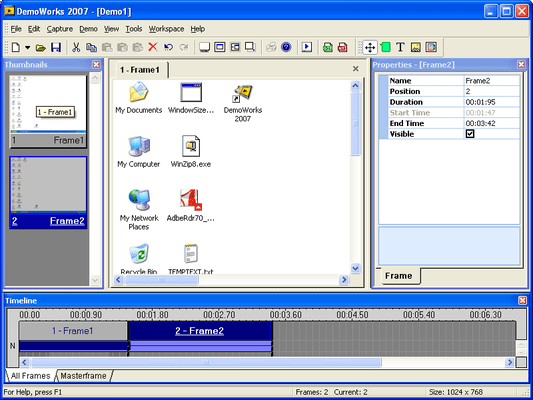
Frame Thumbnails: View all frames as thumbnails and perform simple editing tasks, such as delete and hide
Timeline with Layers: View all frames on a timeline to edit frame lengths and organization as well as add effects such as captions and highlights. You can even drag multiple effects across frames. This view gives you an overview look at how all the movie elements work together
Insert Narration: Add audio files for narration or music
Hide Frames with Cursor Motion Auto-Correcting: Hide any frame and DemoWorks will automatically adjust the cursor's path so it looks natural
Customizable Mouse Cursors and Tracks: Customize the mouse pointer style with any image and also customize the cursor's motion on the screen
Masterframe: Configure a Masterframe for items you wish to display across the entire movie, such as a logo
Movie Properties: Specify the frame rate, audio frequency, sizing and other general movie properties
Movie Preview: Instantly view the movie in the DemoWorks player before you publish the output
Text, Captions, and Other Effects
Insert Text and Images: Insert any text or image
Customizable Themed Captions:Choose from a variety of caption styles and then edit and insert them
Customizable Highlights:Use shapes to highlight items on the screen. You can choose the border color, fill color, and size
Effect Fading: Fade any effect in and out
Publishing
Publishing Wizard: Easy-to-use publishing wizard for setting preferences for each output
Send to Email: Send movie directly to email
Optimize File Size: DemoWorks allows you to produce very small file sizes for an optimal downloading experience
Customize Window Size: Specify the size of the movie player
Output
Output to the Windows Movie format (WMV), which creates a Windows movie.
Flash: Generate a flash file with themed navigation bar
Operating System Independent EXE with the DemoWorks Player: Generate a self-running EXE file that can be run on any PC. DemoWorks' own player is used, so no third-party player needs to be installed. This option is great for CD publishing
Animated GIF: Produce animated GIFs for small movies. These are great when movies need to be short and small in file size, such as Help files and for including in emails
Windows AVI: Produce movies in Windows' standard movie format
Java:Produce movies in Java format for a Web-browser alternative to Flash
What's New in ComponentOne DemoWorks 2009?
DemoWorks 2009 can now output to the Windows Movie format (WMV), which creates a Windows movie. This format is widely used and accepted across many industries and it is Silverlight compatible.
PartNumbers: PC-517939-170677 517939-170677 PC-517939-170675 517939-170675 PC-517939-170676 517939-170676
Publisher PartNumbers: DEMOW09 DEMOW09-U ESD-DEMOW09 ESD-DEMOW09-U
PurchaseOptions: Doc-To-Help Enterprise DemoWorks Bundle 1 Developer License , ComponentOne DemoWorks 2009 1 User License , ComponentOne DemoWorks 2009 Upgrade 1 User Upgrade License
Resources: Read the ComponentOne Demoworks License Agreement, Download the ComponentOne DemoWorks 2009 Community Edition on to your computer - Output Limited to 30 Seconds
Operating System for Deployment: Windows Vista, Windows XP, Windows Server 2003, Windows ME, Windows 2000, Windows 98, Windows NT 4.0, Windows NT 3.51
Architecture of Product: 32Bit
Product Type: Application
Application Type: Developer Application, End User Application
Product Class: Business Components
Keywords: Demonstration demonstrate demos demo presentation presents present componentone, component1, componentone studio, component one, componentone studio enterprise, componentone com, www componentone, componentone llc, componentone review, componentone activex, component one studio, studio enterprise, studio for winforms Enterprise Partner ComponentOne Demoworks, Demoworks, ComponentOne DemoWorks 2009