经 ComponentOne - 产品类型: 构件 / .NET WinForms / 100% 受控代码
ComponentOne True DBGrid for WinForms can also be bought as part of ComponentOne Studio Enterprise and ComponentOne Studio for WinForms.
If you require more information please Contact Us
Completely manage the database interface. ComponentOne True DBGrid for WinForms is the .NET version of the ActiveX control, True DBGrid Pro that offers outstanding features and flexibility to browse, edit, add, delete, and manipulate tabular data using ADO.NET, the latest data binding technology. Features include: multiple display modes, horizontal and vertical splits with independent or synchronized scrolling, fully customizable grid appearance (fonts, colors, pictures, and format), enhanced keyboard navigation, robust print options, and more. ComponentOne True DBGrid for WinForms is now compatible with Visual Studio 2010 and the .NET framework 4.0.

我们的常规价格如下。 请登录后查看打折后的价格。
| 加入购物车 | $ 490.00 | 1 Developer Subscription License * Mfr. 部件号: ESD-N-TDBG |
下载 (139.4 MB) | |
| 加入购物车 | $ 392.00 | 1 Developer Subscription Renewal * Mfr. 部件号: ESD-N-TDBG-R |
验证 | 下载 (139.4 MB) |
| 加入购物车 | $ 392.00 | 1 Developer Subscription Upgrade from previous version * Mfr. 部件号: ESD-N-TDBG-U |
验证 | 下载 (139.4 MB) |
| 加入购物车 | $ 294.00 | 1 Platinum Support License (Includes a year of Telephone and Online Technical Support) * Mfr. 部件号: SUPPORT-TS |
验证 | 下载 (20 KB) |
我们的价格包括ComponentSource的技术支持。对于大多数可下载的产品,还提供在线备份和免费升级为新版本,若新版本在购买后的30日内发布的话。 所有销售都是按照我们的标准条款 进行的,并且适用我们的退货政策. 请 联系我们 若您需要任何未在列出的License選擇,包括批量License及以前的版本。
我们的常规价格见上。 请登录后查看打折后的价格。
What's New in True DBGrid for WinForms 2012 v1
Changes and Improvements
What's New in True DBGrid for WinForms 2011 v2
True DBGrid for WinForms now supports conditional filtering as an alternative to the filterbar. With conditional filtering a drop-down appears when the user hovers over any column header with conditional filtering enabled. The built-in filters include a value filter (checkboxes) as well as conditions such as "Greater than" or "Contains." This type of filtering is modeled after the same feature in C1FlexGrid.
ComponentOne True DBGrid for WinForms is the .NET version of ComponentOne’s ActiveX control, True DBGrid Pro. It uses ADO.NET, the latest data binding technology, to completely manage the database interface, offering outstanding features and flexibility to browse, edit, add, delete, and manipulate tabular data. ComponentOne True DBGrid for WinForms will allow you to quickly create bound and unbound grid applications. True DBGrid for .NET is robust, easy-to-use .NET grid controls feature fast data access and data presentation such as Excel-like split views, grouping, filtering, and customized navigation. ComponentOne True DBGrid for WinForms is now compatible with VS2010 and the .NET framework 4.0.
True DBGrid for .NET Features:
Rich scrolling capabilities
Track the location of the scroll bar and give users an informational pop-up as the scroll bar moves.
Automatic column sizing (Spring Mode)
Keep you data viewable by resizing columns proportionately whenever the grid is resized horizontally.
Enhanced keyboard navigation
Control the relative position of the next cell, using the DirectionAfterEnter property, when users press the Enter key.
FilterBar data entry row
Implement custom end-user operations, such as incremental search and recordset filtering.
Tag property
Attach any type of object to a column.
Merge contiguous like-valued cells
Merge adjacent rows of like-valued data from a specified column into a noneditable cell, or display all cell values individually.
AutoDropdown and AutoCompletion properties
Simplify data entry by reducing the number of keystrokes needed for dropdown selection.
Automatic grid cell translation to True DBDropDown values
Connect a TDBDropDown control to a table containing a value and a representation—the dropdown will automatically map the representation to the value.
Robust print options
Control printing fully with features such as zoom, fit in window, stop pagination, and print preview.
ComponentOne True DBGrid for WinForms has the top features that you’ve come to expect from the popular ActiveX control, True DBGrid Pro. Here's a sampling:
Multiple display modes
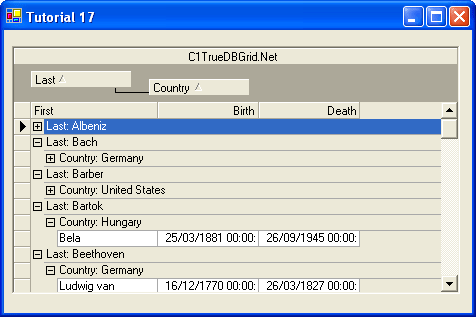
Present data in the format that’s most useful for you: standard Outlook-style grouping that dynamically sorts grid columns; Hierarchical Data Display that offers enhanced Master-Detail presentation and fully editable, dropdown views; Form View that repositions data in a standard “form” that can be modified as needed; and Inverted View that repositions rows as columns to provide a convenient “read down” format.
Microsoft Word- and Excel-like style model
Customize the grid’s appearance with font, color, picture, and formatting specifications. From column and row borders...to foreground pictures...to text wrapping, it’s easy to make the grid look the way you want it to.
Horizontal and vertical splits with customized scrolling
Split the grid horizontally, vertically, or both! Plus, you have control over scrolling behavior: choose to have scroll bars work independently in each split (great for users who need to compare field values from records in different sets of rows) or opt for one scroll bar to scroll multiple splits simultaneously, for example.
True DBGrid for .NET 2D and 3D cell display
Choose two-dimensional, three-dimensional, or a combination of the two to control cell appearance to your specifications. For example, you may wish to allow mouse-over elements to acquire a 3D appearance.
True DBGrid for .NET Excel-style cell selection
Choose not only any row or column, but also any range of cells.
ComponentOne Platinum Support Subscriptions provide a full year of Telephone and Online Technical Support. ComponentOne Technical Support Engineers are available by phone Monday through Friday, except U.S. holidays, from 9:00 a.m. to 5:00 p.m. Eastern,USA.
Customers outside the USA, please remember to check your time difference for phone support.
强力驱动