by ComponentOne - Product Type: Component / ActiveX OCX
VSFlexGrid Pro by ComponentOne
Add flexible grids for display of tabular data. VSFlexGrid Pro is an upgrade to the MSFlexGrid that comes in the box with Visual Basic that gives you a full range of features for building flexible, powerful front ends for database applications. Customize the display and presentation of dynamic data in your Windows, Internet or Intranet projects with a host of new ways to display, edit, format, organize, summarize, and print tabular data.
VSFlexGrid Pro is part of ComponentOne Studio Enterprise and the ComponentOne Studio for ActiveX
The fastest, most feature-rich solution for building flexible, powerful front ends for database applications, VSFlexGrid Pro provides new ways to display, edit, format, organize, summarize, and print tabular data. Data can be formatted conditionally, highlighting data that falls outside of designated ranges. You can customize almost every aspect of the appearance of both the entire grid and individual cells. You can even merge contiguous cells with like-valued data, making your grid easier to read.
VSFlexGrid Pro gives you several choices of data binding: ADO/OLEDB, DAO, bind to 2-D or 3-D arrays, to other VSFlexGrid controls, or create your own data source classes. You can even use the grid in unbound mode, or connect your grid to a Variant array or to a custom data source that you develop yourself. And if your application doesn't need database support at all, VSFlexGrid Pro's new unbound Light version minimizes footprint size and eliminates the need to distribute ADO DLLs with your application.
VSFlexGrid Pro allows you to save and recall multiple grid and report layouts. New printing capabilities let you print grids with a single statement, with control over paper orientation, margins, and footer text. Or show a dialog to let the user select and set up the printer.
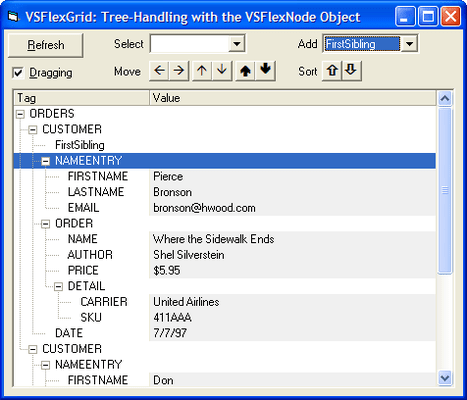
And there's more: VSFlexGrid Pro includes useful features such as sorting, masked editing, translated combo and image lists, and automatic data aggregation. You can even use VSFlexGrid Pro as an outliner for displaying data hierarchically: it behaves like a Tree control, displaying nodes that can be collapsed or expanded to show branches containing additional data.
Small in size, easy to implement and incredibly flexible, VSFlexGrid Pro is entirely dependency free, eliminating DLL versioning problems.
Just some of the features in VSFlexGrid Pro:
Support for Hierarchical Data - VSFlexGrid Pro may be used as an outliner for displaying data hierarchically: it behaves like a Tree control, displaying nodes that can be collapsed or expanded to show branches containing additional data. Outline trees can be displayed in any column, and can even be built asynchronously. The look of outline trees can be customized using the NodeOpenPicture and NodeClosedPicture properties
Light Version - If your application doesn't need database support, VSFlexGrid Pro includes a new Light version of the grid control. This minimizes footprint size and eliminates the need to distribute ADO DLLs with your application
Integrated Printing Capabilities - The new PrintGrid method allows you to print your grid with a single statement. You have control over paper orientation, margins, and footer text, or show a dialog to let the user select and set up the printer. Printing events allow you to control page breaks, add repeating header rows, or add custom elements to each page
Drop-down/Pop-up Buttons - The VSFlexGrid control displays drop-down buttons automatically for cells with associated combo boxes or drop-down lists. The user may edit the cells directly, by clicking the button with the mouse. Pop-up buttons can also be displayed in cells. If the user clicks the button, the control will fire an event to which you may respond accordingly. You can customize the images shown on the cell buttons
Translated Combos - Translated combos can be used as data dictionaries, where data field values are translated for display. For example, the integers 0, 1, and 2 can be displayed as No, Yes and Maybe
Multi-Column Combos - Multi-column lists can be displayed in the drop-down part of the list. Items may have arbitrary data items attached to them. Automatically create translated lists with multiple fields directly from any ADO or DAO recordset
FindRow - The new FindRow method allows you to look up specific rows based on their RowData values. You can also search rows based on the cell data values for a specific column
Highly Customizable Cell Formatting - VSFlexGrid Pro allows you to customize almost every aspect of the appearance of the entire grid and individual cells. There are properties that affect the whole grid. Others are specific to rows and columns. Finally, the Cell property allows you to format arbitrary ranges and individual cells. For total control over the appearance of the cells, use the OwnerDraw property and the DrawCell event to paint the cell yourself, using Windows API calls
Improved Formatting - The VSFlexGrid control allows you to format dates using Visual Basic-like formatting strings. Just set the ColFormat property to "Short Date", for example. Or define your own custom format for dates using the same familiar syntax used with Visual Basic's Format function. The VSFlexGrid control supports number scaling the same way Visual Basic does. Include a percent sign in the format and the value shown will be multiplied by 100, with a trailing percentage sign added. Include a decimal right after the thousand separator (",.") and the value will be divided by 1,000
OLE Drag and Drop - Selections may be by their edges and dropped into other applications such as Microsoft Excel. Or drag ranges from an Excel spreadsheet and drop them into the VSFlexGrid control
Compatibility with MSFlexGrid - VSFlexGrid Pro is built on the same code base as the MSFlexGrid that comes in the box with Visual Basic and is 100% backwards compatible. It includes a utility for migrating projects that use MSFlexGrid to VSFlexGrid Pro so you don't need to rewrite your code
Multiple Development Environments - VSFlexGrid Pro may be used within Visual Basic, Visual C++, or Visual J++ development environments
No External Dependencies - VSFlexGrid Pro does not depend on any MFC .DLLs or separate OCXs. This makes deployment much easier, since you need only include the VSFlexGrid OCX file with your application
Support for Internet Explorer - VSFlexGrid Pro supports IE5 and other ActiveX-compatible browsers
Complete, Comprehensive Documentation is included
Royalty-free Runtime
Export to HTML files
Plus much, much more!
PartNumbers: PC-504721-146991 504721-146991 PC-504721-146992 504721-146992 PC-504721-146993 504721-146993
Publisher PartNumbers: ENT-STUDIO-GOLD-U ENT-STUDIO-U ESD-ENT-STUDIO-GOLD-U ESD-ENT-STUDIO-U ESD-FLEX8-R
PurchaseOptions: VSFlexGrid Pro (To renew your current VSFlexGrid Pro Subscription - Minimum Quantity 5)* 1 Developer Subscription Renewal License - Minimum Quantity 5 , ComponentOne Studio Enterprise 2008 v2 (To upgrade your expired VSFlexGrid Pro Subscription to a C1 Enterprise Studio Subscription)* 1 Developer Upgrade Subscription License - from any Individual ComponentOne Product Subscription , ComponentOne Studio Enterprise 2008 v2 (To upgrade your expired VSFlexGrid Pro Subscription to a C1 Enterprise Studio Subscription)* 1 Developer Upgrade Subscription License with Platinum Support - from any Individual ComponentOne Product Subscription
Resources: Read the VSFlexGrid Pro help file, Read End-User License Agreement for ComponentOne Software, Download the ComponentOne Studio for WPF 2008 v2 evaluation on to your computer - Displays Nag Screens, Download the ComponentOne Studio for ASP.NET 2008 v2 evaluation for .NET 1.1 on to your computer - Displays Nag Screens, Download the ComponentOne Studio for ASP.NET 2008 v2 evaluation for .NET 2 and higher on to your computer - Displays Nag Screens, Download the ComponentOne Studio for WinForms 2008 v2 evaluation for .NET 2 and higher on to your computer - Displays Nag Screens, Download the ComponentOne Studio for Mobile Devices 2008 v2 for .NET 2 or higher evaluation onto your computer - Displays Nag Screens, Download the ComponentOne Studio for Mobile Devices 2008 v2 for .NET 1.1 evaluation onto your computer - Displays Nag Screens, Download the ComponentOne Studio for WinForms 2008 v2 evaluation for .NET 1.1 on to your computer - Displays Nag Screens, Download the ComponentOne Studio ActiveX 2008 v2 evaluation onto your computer - Displays Nag Screens
Operating System for Deployment: Windows Vista, Windows XP, Windows ME, Windows 2000, Windows 98, Windows NT 4.0, Windows 95, Windows NT 3.51
Architecture of Product: 32Bit
Product Type: Component
Component Type: ActiveX OCX
Built Using: ActiveX Template Library (ATL)
General: Includes Digital Signature, Supports Apartment Model Threading
Compatible Containers: Microsoft Visual Studio 6.0, Microsoft Visual Studio 97, Microsoft Visual Basic 6.0, Microsoft Visual Basic 5.0, Microsoft Visual Basic 4.0, Microsoft Visual C++ 6.0, Microsoft Visual C++ 5.0, Microsoft Visual C++ 4.0, Microsoft Visual J++ 6.0, Microsoft Visual J++ 1.1, Microsoft Visual InterDev 6.0, Microsoft Internet Explorer 4.0, Microsoft Internet Explorer 3.0
Product Class: User Interface Components
Search Items: New Version Oct 03, New Version Feb 04, New Product May 04, New Product July 04, New Product Oct 04, New Product Jan 05, New Product Feb 05, New Product May 05, New Product Sep 05
Keywords: Grid Grids Table Tables DataGrid DataGrids componentone, component1, componentone studio, component one, componentone studio enterprise, componentone com, www componentone, componentone llc, componentone review, componentone activex, component one studio, studio enterprise, studio for winforms Enterprise Partner vsflex VideoSoft VideoSoft VSFlexGrid Pro Grid Grids Spreadsheet Spreadsheets Excel Table BOUND UNBOUND CELLS COLUMN GRIDLINES FlexGrid MSFlexGrid