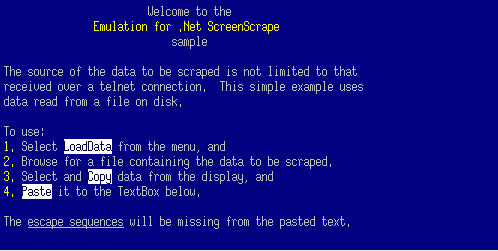
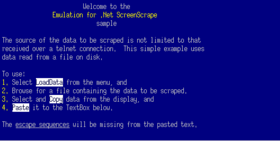
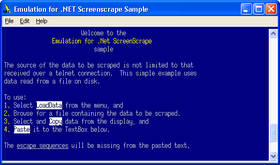
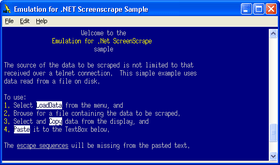
Screenshot Preview

PowerTCP Emulation for .NET

von Dart Communications - Produkttyp: Komponente / .NET WinForms / .NET Class / 100% Managed Code

Bitte beachten Sie, falls nicht andersweitig erwähnt ist dieses Produkt nur in englischer Sprache verfügbar.

*

Add terminal emulation and screen scraping to any .NET Windows or ASP .NET application. PowerTCP Emulation for .NET V1.0 allows you to communicate with legacy applications or any server that supports VT-52, VT-100, VT-220 and VT-320 terminals from .NET. The Vt control is a powerful terminal emulator that enables you to build your own custom terminal emulation applications from within .NET. Built-in Telnet capability enables the Vt control to start a session with as little as one line of code. Also includes a custom font for support of VT graphics characters, a FontDialog control that displays all fixed width raster and True-Type fonts, ability to interrogate every cell for comprehensive style information, and powerful printing capability.


Durchschnittliche Rezension:   basierend auf 1 Rezension.
Ab
$671.04
Preis in

Unsere regulären Preise werden nachstehend angezeigt. Bitte melden Sie sich an um Ihre ermäßigten Preise zu sehen.

PowerTCP Emulation for .NET V4.4.1   *

In den Einkaufswagen $ 671.04 1 Developer License - includes 30 Days Standard Support does not include Updates/Upgrades  *
Hersteller Art-Nr. P-3020-LIC
Download (4.7 MB)
In den Einkaufswagen $ 2,192.26 4 Developer License - includes 30 Days Standard Support does not include Updates/Upgrades  * Download (4.7 MB)
In den Einkaufswagen $ 3,835.72 8 Developer License - includes 30 Days Standard Support does not include Updates/Upgrades  * Download (4.7 MB)

PowerTCP Emulation for .NET V4.4.1 - Subscription   *

In den Einkaufswagen $ 930.02 1 Developer License - includes One Year Standard Support and Updates/Upgrades  *
Hersteller Art-Nr. P-3020-SUB
Download (4.7 MB)
In den Einkaufswagen $ 604.66 1 Developer Subscription Renewal - Pre Expiry - includes One Year Standard Support and Updates/Upgrades  *
Hersteller Art-Nr. P-3020-SUB-RENEW
Prüfen Download (29 KB)
In den Einkaufswagen $ 2,976.26 4 Developer License - includes One Year Standard Support and Updates/Upgrades  * Download (4.7 MB)
In den Einkaufswagen $ 1,934.52 4 Developer Subscription Renewal - Pre Expiry - includes One Year Standard Support and Updates/Upgrades  * Prüfen Download (29 KB)
In den Einkaufswagen $ 5,207.72 8 Developer License - includes One Year Standard Support and Updates/Upgrades  * Download (4.7 MB)
In den Einkaufswagen $ 3,384.92 8 Developer Subscription Renewal - Pre Expiry - includes One Year Standard Support and pdates/Upgrades  * Prüfen Download (29 KB)

PowerTCP Emulation for .NET Source Code   *

In den Einkaufswagen $ 3,430.00 Source Code - delivered separately (requires a Developer License)  *
Hersteller Art-Nr. P-3020-SOURCE
Prüfen Download (29 KB)

Unsere Preise beinhalten einen technischen Support durch ComponentSource und für die meisten herunterladbaren Produkte zusätzlich ein Online-Backup sowie eine kostenlose Aktualisierung auf die neue Version, sofern sie binnen 30 Tagen nach dem Kauf freigegeben werden. Die angezeigten Preise sind zuzüglich aller Steuern. Für mehr Information zu eventuell anfallende Steuern, gehen Sie bitte auf diese Webseite. Alle Verkäufe unterliegen unseren Standardgeschäftsbedingungen und unseren Rückgaberegeln. Treten Sie bitte mit uns in Kontakt , wenn Sie eine Lizenzierungsoption anfordern möchten, die in der obigen Liste nicht aufgeführt ist, einschließlich Mehrplatzlizenzen und ältere Versionen.

Unsere regulären Preise werden oben angezeigt. Bitte melden Sie sich an um Ihre ermäßigten Preise zu sehen.

 *

What's new in PowerTCP Emulation for .NET V4.4.1?

  • Enhanced ANSI color support for the display. Users can now select from set color schemes, or customize each normal and bold (bright) color individually.
  • Added a CursorColor property, and a new "Bar" CursorStyle.
  • Added a BoldNegativeColor property.

What's new in PowerTCP Emulation for .NET V4.4?

  • Connect methods have been updated to take a serializable Session object as a parameter, facilitating the saving of state information within an application.
  • AuthenticateClient and AuthenticateServer methods have been updated to take a serializable Security object as a parameter.
  • ReadToDelimiter, ReadToCount and ReadToEnd methods have been updated to throw a new DataException, which provides any data read up to the exception.
  • A KeyPad.Pc option has been added for emulating the PC keypad.
  • Several samples were updated with a Model-View-Controller (MVC) design

What's new in PowerTCP Emulation for .NET V4.2.1.7?

  • PowerTCP Emulation has been updated with a new install and Visual Studio 2010 integration

What's new in PowerTCP Emulation for .NET V4.2.0.3?

  • Emulation for .NET now uses native Framework classes for SSL functionality.
  • Emulation for .NET has a new licensing model. External runtime license files are no longer utilized. Instead, a license resource is generated and embedded within the executing assembly.
  • Special Graphic Character fonts have been replaced with Unicode equivalents.
  • Line drawing precision has been improved and is now more proportional to the selected font.
  • Drawing techniques have been optimized.
  • Support for the true DEC Supplemental Set has been improved.
  • Auto and Controller PrintTypes now print black-on-white instead of using the ForeColor and BackColor.

What's new in PowerTCP Emulation for .NET V4.2?

  • Several display and printing issue fixes
  • Native .NET Framework classes are now used for SSL functionality
  • PowerShell demo script included in samples

What's new in PowerTCP Emulation for .NET V4.1?

  • Added Visual C++ samples for VS.NET 2008.

Product fixes in this release:

  • Fixed an index out of bounds error that could occur when BufferRows = 0 and an area of the display was selected and extended outside the bounds of the control.
  • The default encoding is now set to ASCII to prevent unintentional encoding.
  • Fixed various issues discovered using emulation test software.
  • Fixed scrolling problem when a CRLF was displayed outside the scrolling region.
  • All data is now printed when PrintType.Controller is used.
  • Fixed various issues with the status line functionality, including making it read/write for all emulation types.
  • Fixed an index out of range issue when Encoding was set to Unicode

What's new in PowerTCP Emulation for .NET V4.0?

  • VT52, VT100, VT220, VT320 terminal support
  • Key mapping simplified with a specialized KeyDown event
  • Screen scraping functions for extracting text from the display and scroll buffer
  • Display customization with numerous options
  • International character set support
  • Double-wide Unicode character support
  • Graphic characters fully supported for all fonts
  • TrueType font support
  • Support for ClearType and standard font smoothing
  • Comprehensive style information for every cell in the display
  • Automatic HTML conversion of scraped text
  • Powerful printing capabilities, including auto-print
  • Integrated telnet option sends and receives automatically
  • 64 bit OS support

The Emulation for .NET product also includes Telnet, Rexec, Rsh and Rlogin communication components.  Features include:

  • Auto-option negotiation with easy configuration options
  • Secure SSL Telnet support
  • Blocking reads that wait for defined delimiters, specifically designed for scripting applications
  • Start method for easily implemented mult-threaded applications, including cross-threading marshaling support
  • Logging event for easy debugging and session logging
  • Proxy support Auto-login capabilities

PowerTCP for .NET 4.x was designed with the following emphases:

  • Improved Asynchronous Support
    Traditional PowerTCP asynchronous support provided a means for executing methods on worker threads, but this required a signaling mechanism indicating when operations completed. This resulted in difficult-to-maintain, event-driven code. With the new design, code is more self-documenting, uses fewer resources, and is more flexible to use.

  • Improved Re-Use of .NET 2.0 Features
    PowerTCP 4.x has taken advantage of generics, improved support for X509 certificates, and other features introduced in .NET 2.0.  Now that most users have migrated from .NET 1.x, PowerTCP can be upgraded without sacrificing backward compatibility. Of course, the .NET 1.x product line will still be licensed for use in the .NET 1.x environment to support legacy applications.

  • Integrated Security
    Secure Socket Layer (SSL) security is integrated into the core product, so that SSL encryption is included in each new product.


 *

Features:

  • Includes all the capability available in PowerTCP Telnet for .NET
  • VT control emulates VT-52, VT-100, VT-220 and VT-320 terminals
  • Interprets text and escape sequences to display a screen that can be used interactively (like a regular terminal) or invisibly (to capture reports that can subsequently be screen-scraped by your application)
  • Screen scraping returns all the text in the scroll-back buffer as well as the display
  • Telnet control can be used to provide a real-time data source, and supports rlogin, rsh and rexec.
  • Numerous display options are available to customize your screen
  • Printing of the display is fully supported, as is the printing of postscript files and auto-print (prints each line as it is received)
  • Screens can be scraped to HTML, transforming all the stylistic information into HTML tags
  • Graphic characters for box drawing are fully supported
  • Key remapping is available using native .NET capability
  • Dynamic scroll-back buffer can save hundreds (or thousands) of lines
  • Option of using built-in Telnet or accessing an external Telnet component
  • Includes a royalty-free license
  • Integrated Help 2.0 documentation includes over a dozen tutorials and a comprehensive reference guide with full support for dynamic help

Some uses of PowerTCP Emulation for .NET include:

  • From an ASP.NET back-end or a Web Service, run SQL commands on a UNIX server, and display the results within the browser
  • Create a custom .NET application front-end for Informix or any database system
  • Develop screen-scraping .NET applications that run canned reports
  • Create a remote console for network devices
  • Automate terminal sessions and file transfers
  • With only a few lines of code you can upload data to a UNIX host, process it, and bring back the results

Warnung

Übersetzungen für Produktinformationen, die noch nicht von uns übersetzt wurden, stehen über Links zu "Google Übersetzer" zur Verfügung. Bitte beachten Sie, daß automatisierte Übersetzungen nicht immer vollkommen korrekt sind.
Powered by
Flash wird in FireFox und Opera benötigt.

Produkt-Suche

Suchbegriffe eingeben:

Warum Produkte bei ComponentSource kaufen?

ComponentSource bietet einen einzigartigen, globalen Service an, der weltweit von über 1.000.000 Entwicklern benutzt wird.

Mehr Info | Über uns

Einsparungen bei Entwicklung

Lesen Sie unser Weißpapier über
die Berechnung der Investitionsrentabilität

Codezeilen: 50,676
Menschenmonate: 51
Arbeitskosten: $253,380

Funktionen benötigt:

Aufwand pro 1000 Codezeilen:

Arbeitskosten pro Monat:

Award