Screenshot Preview

Data Widgets

经 Infragistics - 产品类型: 构件 / ActiveX OCX

‏请注意: 除非另有说明,此为英语产品

*

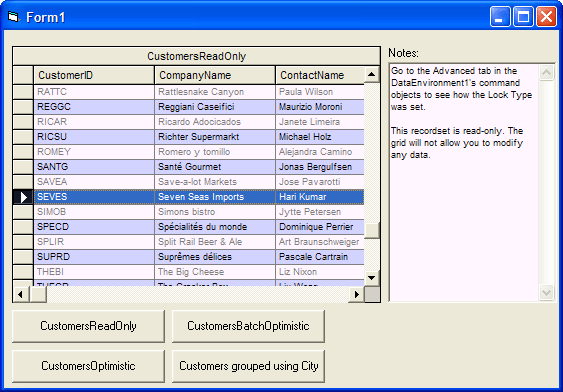
Include robust, data-bound components for accessing and displaying data. Data Widgets is a set of six bound ActiveX controls for Microsoft Visual Basic 5.0 or higher and other ActiveX host environments. Data Widgets supports OLE DB and ADO data binding methods. Featured is the DataGrid, a fully editable data grid identical in look and feel to the Access grid. The DataGrid included in Data Widgets 3, SSDBGrid, allows updating, adding and deletion of records, along with unbound columns. SSDBGrid also supports Bound, Virtual and AddItem modes. Infragistics Data Widgets was formerly called Sheridan Data Widgets.



平均评分:   基于 7 评分
$449.00
  

最多下载

价格

‏我们的常规价格如下。 请登录后查看打折后的价格。

Data Widgets V3.13   *

加入购物车 $ 449.00 1 Developer License  *
Mfr. 部件号: 04302
下载 (7.5 MB)

我们的价格包括ComponentSource的技术支持。对于大多数可下载的产品,还提供在线备份和免费升级为新版本,若新版本在购买后的30日内发布的话。  所有销售都是按照我们的标准条款 进行的,并且适用我们的退货政策. 请 联系我们 若您需要任何未在上面列出的License选择,包括批量License及以前的版本。 

‏我们的常规价格见上。 请登录后查看打折后的价格。

 *

Data Grid control

The Data Grid control is a fully editable bound grid that allows you to edit an entire record set, regardless of size, on screen without writing any code. In just a few steps, you can have a fully functional program that allows users to view, edit, add, and delete rows in a database without a single line of code! The Data Grid can operate in bound, unbound, or AddItem mode. When working in bound mode, the Data Grid communicates with the host environment's data control, which allows your grid to interact with any database the data control is capable of using.

Data Combo control

The Data Combo custom control is a combo box that can be used to display/edit a field value from one record set while providing a dropdown list of field values from another set. The Data Combo functions in bound, unbound, and AddItem modes.

Data DropDown control

The Data DropDown control can be used for attaching a Data Grid column to a dropdown list of values from another source of data. This custom control is a grid that can be linked to the cells in the Data Grid (SSDBGrid) for use as a value selection list. The Data DropDown, when used in conjunction with a cell in a Data Grid, functions very similar to the Data Combo. One of the advantages of the Data DropDown is that it allows you to cross-reference data to a value.

DataOption Set control

The DataOptionSet custom control allows you to use 3D options buttons that can be bound to a database field. Using the DataOptionSet control, you can easily incorporate option buttons for use in your database application. Instead of entering data which can lead to typographical errors, users may simply click on an option button to select a pre-defined value for a field. For example, using one DataOptionSet, you could have four option buttons to represent various credit-card payment methods.

Enhanced Data Control

The Enhanced Data Control (EDC) is an enhanced version of the Data Control that ships with Visual Basic. The EDC is used in conjunction with the data control rather than taking its place. The EDC can be oriented either horizontally or vertically, and can be sized to your liking at design time. Some of the enhancements that the EDC provides include bookmark storage allowing you to return to a particular row at a later time, next page and previous page buttons, the ability to selectively enable/disable features of the EDC, and a speed button feature allowing the user to hold down a button to repeat its function.

Data Command Button

The Data Command custom control is a 3D command button that can be bound to a data control. This button can be configured to automatically perform database actions as designated by you when clicked. The control also contains a speed button feature, allowing the user to hold the button in the down state to repeat a function. A full set of appearance properties, including the capability of placing pictures on the buttons, are available with the Data Command control. The command button can be set to perform several database actions.


 *

Features Include:

  • Print to paper
  • Automatically exports pure HTML (Platform and browser independent)
  • Export to delimited files
  • Save and restore layouts at design and run time
  • Fully integrated masked editing
  • Full Intellimouse support
  • Three data Modes Bound, Unbound and Add Item
  • Multiple column styles
  • Drag and Drop of cells
  • Individual fonts, colors, and pictures for columns, groups, rows and cells
  • Tool Tips
  • Multiple rows
  • Makes the perfect ListBox
  • And much more

注意

还未完成翻译的产品说明, 我们提供了Google 翻译的连结方便您使用. 但请注意, 自动翻译有时候可能会有翻译错误.
强力驱动
在Firefox 和Opera 需要Flash.

产品搜索

输入搜索词:

为什么从ComponentSource购买?

ComponentSource 提供独特的全球国际服务, 在世界各地共有超过1,000,000开发者客户.

更多讯息 | 关于我们

奖励 奖励