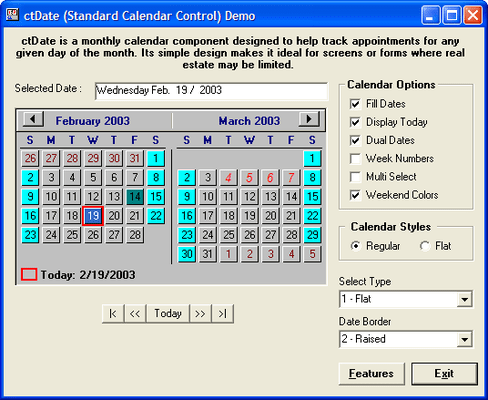
Screenshot Preview

Calendar Tools

经 DBI Technologies - 产品类型: 构件 / ActiveX OCX

Calendar Tools 是作为 Studio Controls for COM的一部分提供的

‎如果您需要了解更多信息,请访问以上网页或 联系我们 ‎以了解价格和供应方面的信息。

‏请注意: 除非另有说明,此为英语产品

*

Add calendaring functionality to your applications. Calendar Tools is a suite of six ActiveX calendaring components: ctDays offers a single day's events by various intervals. ctCalendar offers definable start and end dates, drag and drop functionality, and more. ctDropDate is a drop down calendar for date selection and date navigation. ctDate presents a month of dates with view and selection options. ctMonth provides a view of an entire month. ctYear allows viewing up to 12 months at a time.


 *

ctCalendar is a scrolling virtual calendar component that gives the developer complete control over calendar presentation with user definable start and end dates. Create and track appointments with colors, pictures, task bars, and scrolling text for each date on the calendar.

  • Start Date/End Date : Allows developer to define the calendar for any period of time
  • Edit Text : This component offers the ability to edit text directly within each date of the calendar
  • Print Methods : Formats and sends the contents of the calendar to a printer device or print window inside of a page on a printer device

ctDate is a monthly calendar component able to display one or two months at a time. Its simple design makes it ideal in situations where screen real estate is limited.

  • Multiple Styles : Independent weekend, date and week number colors. Show or hide monthly navigation buttons. Display one or two months at a time. Display week numbers and/or current date
  • Print Method : A "PrintInWindow" method allows to the calendar to be printed anywhere on a page

ctDays is a visual representation of a daily schedule planner. It is able to accept and/or display a days worth of appointments at a time. Appointments are easily created within the control by clicking and selecting a time line in the control, and then entering some text from the keyboard.

  • Appointment Management : Custom methods for programmatically adding, deleting, and changing appointments. Also includes methods for conflict checking
  • Print Methods : Formats and sends the contents of the control to a printer device or print window inside of a page on a printer device
  • Presentation Options : Define the start and and of the schedule. Display normal or military time. Place images into an appointment
  • Drag And Drop : Drag appointments into and out of the control

ctDropDate is a masked date edit control with a built in drop down calendar. Optional spin buttons within the component can be used to automatically increment or decrement the current date. Intelligent data entry fills in the date with a best guess if only part of the date is entered.

Flat Style : The component can appear flat until the mouse moves over it or until it receives focus.

  • Calendar Designer : Design and view the calendar through the controls property pages
  • Drop and Spin Buttons : Built in drop button can be used to display the drop calendar. Built in spin buttons can be used to increase and decrease the current date

ctMonth provides a view of an entire month. It allows for extensive customization and control over its graphical presentation. Each date supports independent background and text colors, images, time bars, text, and the ability to be disabled. All labels within the control (i.e. day and month names) can easily be changed so the component can be used with a variety of different languages.

  • Multiple Styles : Independent colors, text, images, time bars and disabling for each date. Display week numbers. Independent weekend colors
  • Drag And Drop : Drag appointments into and out of the control
  • Image List : Store up to 100 images in an internal image list. Support for masked bitmaps
  • Print Methods : Formats and sends the contents of the calendar to a printer device or print window inside of a page on a printer device

ctYear allows the user to view up to 12 months or one calendar at a time. It contains the ability to place independent colors on any date of the control. This can be most useful when your are trying to present a schedule of independent events that may go over many days or weeks (i.e. holidays).

  • Multiple Months : Display 3, 4, 6, or 12 months at a time
  • Definable Start Time : Define what month the calendar should start at. For example, display a fiscal year that starts in April and ends the next year at the end of March
  • Print Methods : Formats and sends the contents of the calendar to a printer device

注意

还未完成翻译的产品说明, 我们提供了Google 翻译的连结方便您使用. 但请注意, 自动翻译有时候可能会有翻译错误.
强力驱动
在Firefox 和Opera 需要Flash.

产品搜索

输入搜索词:

为什么从ComponentSource购买?

ComponentSource 提供独特的全球国际服务, 在世界各地共有超过1,000,000开发者客户.

更多讯息 | 关于我们

奖励