Desaware NT Service Toolkit

di Desaware - Tipo prodotto: Componente / DLL

Ti preghiamo di notare che, a meno che non sia altrimenti specificato, questo è un prodotto in inglese.
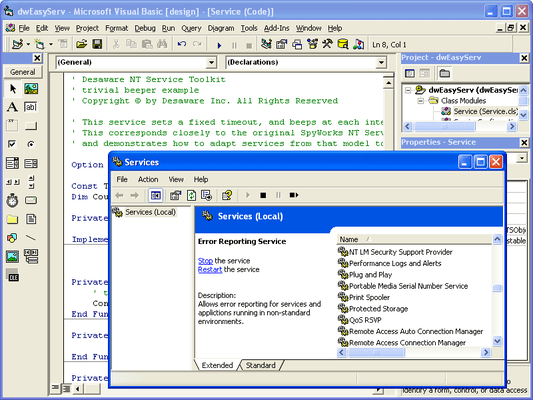
Schermata di Desaware NT Service Toolkit - DLL - V2.0Create full featured NT Services. More than just "running as a service" Desaware NT Services Toolkit allows you to build services that support all NT service options and controls. Services hold a distinct advantage over applications in the area of system monitors, background tasks, business objects, etc. Create your own Control Panel applets for service control and other purposes.


Recensione media:  Voto medio delle recensioni per Desaware NT Service Toolkit - DLL - V2.0 basata su: 1 recensione.

Da
760,300₩
Prezzo in

I nostri prezzi standard sono indicati sotto. Accedi per vedere i tuoi prezzi scontati.

Desaware NT Service Toolkit V2.0

Aggiungi al carrello ₩ 760,300 1 Developer License Download (4.2 MB)
Aggiungi al carrello ₩ 227,000 1 Developer Upgrade License from previous version Download (4.2 MB)

Questo prodotto è disponibile nei prezzi riservati al GSA schedule.I nostri prezzi comprendono l'assistenza tecnica ComponentSource e, per la maggior parte dei prodotti scaricabili, una copia di riserva online e un aggiornamento GRATUITO alla nuova versione, se questa viene lanciata entro 30 giorni dall'acquisto.  Tutte le vendite sono soggette ai nostri termini e condizioni standard ed alla nostra politica di rimborso.  Contattaci se necessiti di un'opzione di licenza non elencata sopra, comprese licenze multiple e versioni precedenti.

I nostri prezzi standard sono indicati sopra. Accedi per vedere i tuoi prezzi scontati.

What's new in V2.0?

New Service Executable Command Line options

  • User and -Password allow you to specify the account in which the service will run. This setting overrides that provided in the Service Configuration file, and is ideal for cases where the account must vary from system to system. These options are not supported for services that are set to interact with the desktop
  • Params allows you to set parameters during installation which can be read at any time by the service when it runs
  • Silent prevents any message boxes from being displayed during installation operations, improving support for remote and automated installs

New IdwServiceControl Methods and Properties

  • StartupParameters - Allows you to read parameters set during manual startup of a service via the control panel or Service Control Manager
  • InstallParameters – Allows you to read parameters specified in the command line when the service is installed
  • Trace – Allows you output arbitrary text from your service component to the framework tracing system for diagnostic purposes (see following section)
  • GetInteractiveUser – Obtains the account information for the currently logged on user

Improved Instrumentation and diagnostics

  • Framework logging – Definable trace levels control logging of detailed information about the operation of the framework to help resolve configuration issues

New features for Interactive Services

  • New IdwEasyService2 interface provides an OnLogout method that allows you to determine when an interactive user has logged off the system
  • New features allows you to determine if an interactive user is logged on and retrieve their account name and domain in most cases

Improved Error Handling

  • Robust trapping and detection of runtime errors that occur in your Visual Basic component allow cleaner shutdown of services when errors occur. Improved diagnostics allow reporting of where and when errors occur, making debugging of services much easier

Service Control Features

  • New VB6 classes demonstrate how to control services (including starting, stopping and sending information to running services). Full source code for these classes is included

Other Features

  • Improved and earlier detection and handling of System Shutdown
  • Improved default security handling reduces the amount of configuration needed in remote and DCOM based scenarios
  • Batch creation of Service executables. You can now create your Service executable files as part of a build script

Migration Support for .NET

  • Services created with the COM edition of the NT Service Toolkit can be migrated easily to the .NET edition of the NT Service Toolkit. The .NET edition uses the same overall architecture including virtually identical interfaces. Simply migrate your existing VB6 classes to VB.Net or C#, and they will plug in directly to the .NET framework. Plus, the .NET version of your services will automatically continue to support access by today’s COM and DCOM clients as well as access from .NET clients using .NET remoting

Desaware NT Services Toolkit allows you to create Professional NT Services using Visual Basic.

Why NT Services?

  • System Monitors
  • Background Tasks
  • Software Agent
  • Resource Pool
  • Business Objects

Toolkit Features

  • Debugging
  • COM/DCOM Support
  • Scalability
  • Impersonation
  • Simulation
  • Configuration
  • Synchronization
  • Control Panel Applets

Ricerca prodotti

Inserisci le tue parole chiave:

Risparmi sui costi di sviluppo

Leggi la nostra relazione tecnica su come
calcolare il ritorno sull'investimento

Righe di codice: 63,000
Mesi persona: 63
Costo del lavoro: $315,000

Funzioni richieste:

Sforzo per 1.000 righe di codice:

Costo del lavoro al mese:

Galleria immagini schermate

Award