by DEVPIA - Product Type: Component / ActiveX OCX
DEXTUploadX by DEVPIA
URLs: dextuploadx, devpia
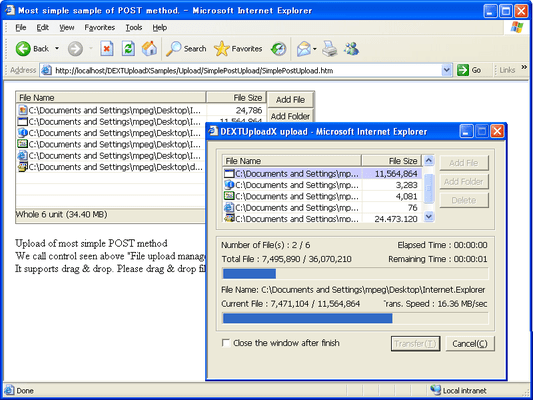
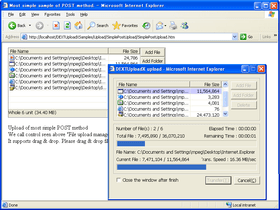
Add the ability to upload and download files to an IIS Web server. DEXTUploadX is a client-side ActiveX component that allows you to add upload and download functionalities to your server. DEXTUploadX works in the HTTP environment with RFC1867 standards. It supports unicode file name and form data and works in multilingual environments. DEXTUploadX offers an intuitive UI to users and offers various APIs and events to developers.

Functions
Perfect multilingual support
Supports Unicode file name and form data for perfect multilingual support.
Automatic selection function for language that is fit for user
If basic language setting of user is English, Korean and Japanese, it displays all messages of it fit for each language. In case of languages except that, it displays messages in English automatically, so multilingual support is offered more easily.
Support encrypted transmission
Useful when transmitting document that requires security by transmitting with AES (Advanced Encryption Standard- Rjindael) encryption.
Provide perfect API for GUI User
Provide entire API required for transmission so user can directly create optimized transmission page on their website.
Very small file (.CAB) size optimized for internet environment
For DEXTUploadX, the size of file (DEXTUploadX.Cab) to be received by the user is very small at around 346kb. Among them, 120KB is for users of Windows 98 so about 40% smaller files can be distributed according to circumstances.
Supports both Windows98/NT systems with one file (.CAB)
One file distribution is possible regardless of Windows operating system versions, so version control is done easily.
Automated form data
Recognizes data of all forms in web page automatically and transmits it.
Offers perfect HTTP uploading solution that is linked with server-side upload component
DEXTUploadX and DEXTUpload Pro series comply with international standard, RFC1867. These two components altogether offer convenient and intuitive UI to user and, at the same time, offer perfect HTTP uploading solution to server so that it can deal with files uploaded by users.
Uploading folder structure
When user adds folder, it uploads folder structure as it is like user added.(But, link with DEXTUpload Pro. series is required).
Downloading folder structure
You can designate download path about each file to download, so you can download folder structure.
Drag and Drop support
Supports Drag and Drop of file and folder.
Supports resume downloading function (Resume uploading function will be supported soon)
SSL and Proxy server support
Supports Windows Vista
Most of functions of this product are done through interaction with upload component on server side. Therefore, you can reliably use all functions when upload component such as DEXTUpload Professional is setup on server.
What is new in v3.2?
Support image preview in the FileUploadManager.
Support tooltip in image preview.
Support drag and drop to image preview.
Support execute feature when you double-click the image on image preview.
Support FileSize-Column Visible property in the ListView.
Support FileName-Column Width property in the ListView.
Support non-Header in the ListViewReport mode.
Support changing the title of Folder dialog and File dialog.
Support downloading automatically after selecting download folder.
What is new in v3.0?
Now supports dynamic size changes for ActiveX
Now supports setting up of background images for ListView
Now supports sorting ListView by column name
Support reception of HTTP status codes from the server when downloading.
What is new in v2.5.1?
Functional improvement; When selecting the cancellation button from the message box which asks the creation result folder in the download, at that time OnTransferCancel events to occur
The event addition; All operations of DEXTUploadX insides being completed event. (OnEndProc)
What is new in v2.5.1?
When applying Filter property, it offers same filtering for folder adding dialog box and Drag and Drop as well as filtering of file adding dialog box.
What is new in v2.5?
Supports changing display styles of files added on list view (ListViewFileStyle)
Provide property to activate/deactivate Drag&Drop (EnableDragDrop)
It supports POST type upload without separate Server Component (DEXTUpload Pro) by interlocking with "HTTP_POST_FILES", "_FILES" provided by PHP (EnablePHPFILES)
Modifies corresponding property value if user enters user setting information property (closing windows after completing transmission, etc) is entered even though the value of UseClientRegistry is TRUE
Add the ability to upload and download files to an IIS Web server.
Pricing: DEXTUploadX V3.2 with 1 year Maintenance 1 Server License - Includes Major Upgrade and Technical Support, DEXTUploadX V3.2 with 1 year Maintenance 1 Server License, per Server from 5 up to 10 Servers (Minimum quantity 5) - Includes Free Major Upgrades and Technical Support, DEXTUploadX V3.2 with 1 year Maintenance 1 Server License, per Server 11 or more Servers (Minimum quantity 11) - Includes Free Major Upgrades and Technical Support, DEXTUploadX Maintenance Renewal 1 Server License Maintenance Renewal
Evals & Downloads: Read the DEXTUpload Product Groups help file, Download the DEXTUploadX V3.2 evaluation on to your computer - Expires after 30 Days
Operating System for Deployment: Windows 7, Windows Server 2008, Windows Vista, Windows XP, Windows Server 2003, Windows 2000
Architecture of Product: 32Bit
Product Type: Component
Component Type: ActiveX OCX
Built Using: Visual C++ 6.0
Compatible Containers: Microsoft Visual Studio .NET 2003, Microsoft Visual Basic 6.0, Microsoft Internet Information Server 7.0, Microsoft Internet Information Server 6.0, Microsoft Internet Information Server 5.0, Microsoft Internet Explorer 8.0, Microsoft Internet Explorer 7.0, Microsoft Internet Explorer 6.0, Microsoft Internet Explorer 5.5, Microsoft Internet Explorer 5.0, Netscape Navigator
Product Class: Business Components
Keywords: DEXT Upload X Fileup Fileupload XFileUpload DEXTUploadX sample offered after installation is made as ASP page and is executed with DEXTUpload Professional. For POST upload sample using DEXTUpload.NET Professional in ASP.NET environment, please press
upload uploading uploaded download downloading downloaded transfer transferring transferred
Part numbers: PC-517226-413029 517226-413029 PC-517226-413032 517226-413032 PC-517226-413035 517226-413035 PC-517226-413038 517226-413038
ComponentSource offers a unique global service, used by over 1,000,000 software developers worldwide.