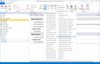
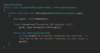
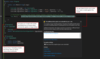
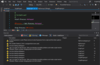
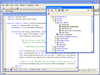
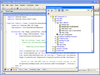
Screenshot Preview

TeamCompanion for MS Outlook

par Ekobit - Type de produit : Produit complémentaire

Veuillez noter que á moins d’être stipulé autrement, ce produit est un produit anglais.

*

Integrate e-mail and Microsoft Outlook with Work Items from Team Foundation Server. TeamCompanion for Outlook is an Add-In for Microsoft Outlook that integrates Microsoft Outlook with Microsoft Team Foundation Server, thus making anyone with Outlook and TeamCompanion a first class member of the Team System based development team. TeamCompanion improves your project communication and removes friction from it. With TeamCompanion you can access project related information using Microsoft Outlook without having to switch between applications. It enables accessing some of the most important artifacts in your Team System environment, such as team projects, work items, etc. without the need to use the Visual Studio Team Explorer or Team System Web Access.

A partir de
$132.05
Calculer le prix en

Nos prix standard sont montrés ci-dessous. Veuillez vous connecter pour voir vos prix.

TeamCompanion for Outlook 4.2 (includes downloads for multiple environments)   *

Ajouter au Caddie $ 132.05 1 User License  * Téléchargement (206.6 Mo)
Ajouter au Caddie $ 626.05 5 User License  * Téléchargement (206.6 Mo)
Ajouter au Caddie $ 1,186.55 10 User License  * Téléchargement (206.6 Mo)

Nos prix comprennent le support technique ComponentSource et, pour la majorité des produits téléchargeables, une sauvegarde en ligne ainsi qu'une mise à niveau GRATUITE si la nouvelle version est parue pendant les 30 jours consécutifs à votre achat.  Toutes les ventes sont sujettes à nos Termes et Conditions standard à notre Politique de renvoi. Veuillez nous contacter si vous avez besoin d'une option de licence (licence de volume et versions précédentes) qui ne figure pas sur la liste ci-dessus.

Nos prix standard sont montrés ci-dessus. Veuillez vous connecter pour voir vos prix.

 *

TeamCompanion 4.2 Update includes:

  • Support for Teams. Agile project management module in TeamCompanion now supports teams. Use it to manage work for each team separately, including team wise backlog management, iteration planning and progress tracking. Teams are defined by associated Areas, they have their own product and sprint backlogs, team members and set of sprints
  • Improved Backlog Capacity Chart. Within the product backlog module, charts display iteration capacity and planned work in story points
  • Various fixes and improvements. Further performance improvements. Agile PM tool handles custom process templates more graciously. Planning per Discipline supported. Over sixty issues resolved

TeamCompanion 4.1 Update includes:

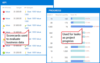
  • Additional Agile PM features. Agile PM tool now contains additional colorful statistics located in Iterations and Team panes (see Image 2 below).
  • "Save All Changes" action. "Save All Changes" action saves all pending offline changes in one simple step.
  • Work Item Query execution performance significantly improved.
  • Various fixes. Issue installing TeamCompanion on an XP machine is resolved including other minor fixes.
  • Great new UI. New first class grid with drag and drop support, grouping, filtering etc.
  • Work offline now. Save changes to work items in local database and publish them later.
  • Search offline and online. Full text search and complex search criteria supported.
  • Plan and prioritize. Efficient and comfortable tools for Agile Product and Iteration backlog Management and Work Item Prioritization. Support for Backlog management and prioritization using drag and drop. Progress tracking using Burndown chart.
  • Do it fast. Significant performance boost, especially when executing work item queries. Greatly improved startup time.

TeamCompanion 3.0 exploits the key features of Microsoft Visual Studio 2010 and Outlook 2010, making Outlook users first class Visual Studio project participants.
TeamCompanion 3.0 key features include:

  • Support for Team Foundation Server 2010 - NEW
  • Support for Office Outlook 2010 - NEW
  • Project Collections - NEW
  • Work item query folders (including security) - NEW
  • Work Item hierarchies - NEW
    • Hierarchical work item view
    • Support for editing work item hierarchies
  • SharePoint document library integration - NEW
  • Work with multiple Team Foundation Servers and multiple Projects
  • Offline work with Work Items 
  • Reports - IMPROVED
    • Work item query reports in Excel - NEW
  • View and Edit Work Items
  • Work Item Query management - IMPROVED
  • 'Query by example' Work Item Query editor (including full-text search support)
  • Powerful online and offline work item search capabilities including desktop search integration
  • Create Work Item from E-mail, attach E-mail to Work Item 
  • Attaching mails to work items using drag-n-drop
  • Create E-mail from Work Item, group of selected Work Items or Query result
  • Create Outlook Task or Meeting Request from Work Item - IMPROVED
  • Scheduled Work Item queries
  • Work item Reminders, To-Do Bar view and Favorite Folders integration
  • Integration with Excel and Project
  • Accessing the project portal
  • Add related Work Item action
  • Open Test Case for Edit in Microsoft Test Manager - NEW
  • Ribbon controls support in Outlook 2010 - NEW
  • Improved performance and usability

What's New in V2.2 of TeamCompanion for Microsoft Outlook:

  • Work with multiple Team Foundation Servers and multiple Projects
  • Offline work with Work Items improved
  • Reports (including multiple saved parameter sets for each report)
  • View and Edit Work Items
  • Work Item Query management
  • TeamCompanion is compatible with Windows 7 new
  • Support for Visual Studio Team System 2010 Beta new
  • Compatibility with Microsoft CRM Add-In for Outlook new
  • „Query by example“ Work Item Query editor (including full-text search support)
  • Powerful online and offline work item search capabilities including desktop search integration
  • Create Work Item from E-mail, attach E-mail to Work Item improved
  • Attaching mails to work items using drag-n-drop
  • Create E-mail from Work Item, group of selected Work Items or Query result  improved
  • Create Outlook Task or Meeting Request from Work Item improved
  • Scheduled Work Item queries
  • Work item Reminders, To-Do Bar view and Favorite Folders integration
  • Open related object (work item, changeset or build) action for notification mails improved
  • Bulk state change and Bulk Reassign
  • Edit areas and iterations
  • Subscription to TFS alert notification
  • Integration with Excel and Project
  • Accessing the project portal
  • Add related Work Item action
  • Various improvements (opening changeset links, attach images in work items by copying, edit grouping as a part of editing work item queries etc.) 
  • Improved performance and usability

What's New in V2.0 of TeamCompanion for Microsoft Outlook:

  • NEW - Scheduled Work Item queries
  • NEW - Work Item query management support
  • NEW - Ad-hoc queries
  • NEW - Support for Reminders, To-Do Bar view integration *
  • NEW - Bulk state change
  • NEW - Create Work Item from Task, Create Task from Work Item
  • NEW - Create Work Item from RSS feed entry, Attach RSS feed to Work Item
  • NEW - Editing areas and iterations support
  • Easy navigation through TFS Servers, Projects, Queries and Work Items
  • Desktop search integration - full text search for Work Items
  • NEW - Subscription to TFS alert notifications support
  • NEW - Integration with Excel and Project
  • NEW - Add related Work Item action support

 *

TeamCompanion for Microsoft Outlook is an ideal companion for your Microsoft Team System based team.

TeamCompanion enables you to take your work items offline; all work item data is available for read-only access, even if your Team Foundation Server is not accessible. You only need to connect to the server when editing Work Items.

By integrating standard Outlook actions, TeamCompanion increases your productivity. E-mails can be attached to existing work items directly, thereby enhancing team communication and cooperation. New work items can easily be created (from scratch or based on selected e-mails) or new appointments created from work items. With TeamCompanion you can take advantage of some standard Outlook features, such as the instant search feature which searches through all work item fields, even if you are offline, or the grouping and favorite folders features.

An new addition to the feature list of TeamCompanion is Vista desktop search integration. TeamCompanion makes it possible to simply insert a keyword in the Vista startup menu “Start search” edit box and get a full text search of work items. Click on a result link and open the work item in the familiar standard work item editor.


The TeamCompanion for Microsoft Outlook features:

  • Support for Microsoft Outlook 2007 and Outlook 2003
  • Support for Team Foundation Server 2005 and Team Foundation Server 2008
  • Support for offline work with Work Items
  • Searching Work Item queries
  • Vista desktop search integration - full text search for Work Items
  • Work Item list grouping and filtering
  • Creating new Work Items
  • Creating new Work Items out of e-mail, creating new e-mails out of Work Items**
  • Easy e-mail attaching to Work Items
  • Creating new appointments out of Work Items
  • Easy connection to multiple Team Foundation Servers
  • Send to OneNote action
  • Generate Work Item table for multiple Work Items
  • Bulk Reassign To
  • Improved New Appointment from Work Item logic

* For reminders to work you need to open Properties dialog for the TeamCompanion folder and turn the option "Display reminders and Tasks from this folder in the To-Do Bar".
**You must be connected to the TFS if you want to: edit existing Work Items, create new Work Items or attach e-mails to your Work Items.


Attention

Pour votre référence, nous avons inclus des liens á Google Translate pour les informations sur le produit qui n'ont pas encore été traduites. Veuillez noter que les traductions automatiques ne sont pas toujours complètement exactes.
Fourni par
Flash est requis dans Firefox et Opera

Recherche produit

Entrez vos critères de recherche :

Autres liens

Éditeur

Catégorie principale

Pourquoi acheter chez ComponentSource ?

ComponentSource offre un service international unique, reconnu par plus de 1 000 000 développeurs de logiciels partout dans le monde.

Complément d'informations | Notre société