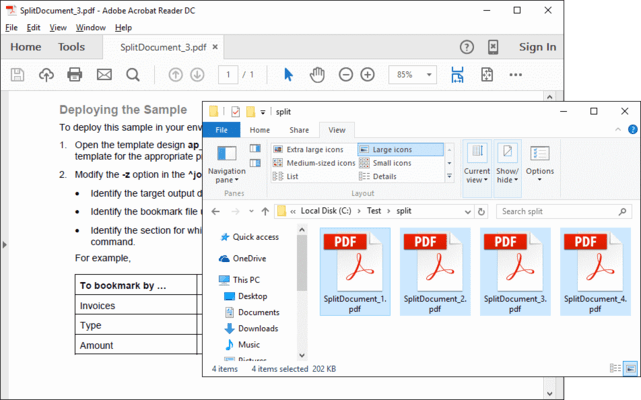
Screenshot Preview

ExpertPDF SplitPDF

经 Outside Software - 产品类型: 构件 / .NET 类 / 100% 受控代码

‏请注意: 除非另有说明,此为英语产品

*

Extract pages and split PDF files. ExpertPDF SplitPDF allows you to extract a range of pages from a PDF document. You can also split the PDF document into a number of chunks, each chunk containing a specified number of pages. ExpertPDF SplitPDF includes a ready to use command line utility for splitting and extracting your PDF documents and a .NET library for adding PDF split capabilities to your .NET,  ASP.NET and Win32 applications.

$245.00
价格

‏我们的常规价格如下。 请登录后查看打折后的价格。

ExpertPDF SplitPDF V3.0   *

加入购物车 $ 245.00 1 Developer License (Single Application Deployment)  * 下载 (1.2 MB)
加入购物车 $ 343.00 1 Developer License with Subscription (Single Application Deployment) - includes priority email support and full major and minor version upgrades for a year  * 下载 (1.2 MB)
加入购物车 $ 539.00 1 Company License with Subscription (Allows Unlimited Developers at a Single Physical Address) - Includes priority email support and full major and minor version upgrades for a year  * 下载 (1.2 MB)

ExpertPDF SplitPDF Subscription Renewal   *

加入购物车 $ 147.00 1 Developer Subscription Renewal License - priority email support and full major and minor version upgrades for a year  * 验证 下载 (29 KB)
加入购物车 $ 245.00 1 Company Subscription Renewal License - priority email support and full major and minor version upgrades for a year  * 验证 下载 (29 KB)

我们的价格包括ComponentSource的技术支持。对于大多数可下载的产品,还提供在线备份和免费升级为新版本,若新版本在购买后的30日内发布的话。  所有销售都是按照我们的标准条款 进行的,并且适用我们的退货政策. 请 联系我们 若您需要任何未在上面列出的License选择,包括批量License及以前的版本。 

‏我们的常规价格见上。 请登录后查看打折后的价格。

 *

Features

  • .NET PDF split development libraries and samples
  • Win32 PDF split command line tool
  • Split PDF documents
  • Count the number of pages from a PDF document
  • Extract specific pages from a PDF document
  • Extract pages to disk or memory stream
  • ASP.Net Support

The rendered PDF compression level can be set via the following properties:
  • AboveNormal - Better compression but takes more time to compress 
  • BelowNormal - Between normal and BestSpeed compressions 
  • Best Use - The best compression but takes more time to compress 
  • BestSpeed - The compression speed is high but the compression percentage is low 
  • NoCompression - Does not do any compression 
  • Normal Use - Normal compression, a balance between compression speed and resulted size

注意

还未完成翻译的产品说明, 我们提供了Google 翻译的连结方便您使用. 但请注意, 自动翻译有时候可能会有翻译错误.
强力驱动
在Firefox 和Opera 需要Flash.

产品搜索

输入搜索词:

为什么从ComponentSource购买?

ComponentSource 提供独特的全球国际服务, 在世界各地共有超过1,000,000开发者客户.

更多讯息 | 关于我们

节省的开发量

请阅读我们的白皮书
计算投资收益

代码的行数: 150,000
人月数: 150
人工成本: $750,000

需要的功能:

每1000行代码的工作量

每月的人工成本:

奖励