ExpressNavigationPack
by DevExpress (Developer Express) - Product Type: Component / VCL
Add Ribbon, toolbar, layout and skinning functionality to your VCL applications. ExpressNavigationPack is a suite of VCL components that includes ExpressBars Suite - MS Office Style Ribbon, Toolbars, Main Menu, Context Menu, Status Bar Controls and Visual Studio style Dock Windows. ExpressNavBar Suite - Outlook Side Bars, Windows Explorer Bars and Office 2007 Navigation Pane views available in numerous paint styles. ExpressLayout Control - Form layout customization control allowing you to easily arrange controls and make them automatically resizeable with the container. ExpressSkins Library - Application-wide skinning library providing cutting-edge look and feel options inspired by popular software products as well as unique skins designed by DevExpress. ExpressNavigationPack comes with full Source code.

Our regular prices are shown below. Please logon to see your discounted prices.
ExpressNavigationPack v2011 vol 2.6 with Source code
| Add to Cart |
$ 584.99 |
1 Developer License with Source code - includes 1 year subscription (updates and upgrades for 1 year) |
|
Download (141.4 MB) |
| Add to Cart |
$ 235.19 |
1 Developer with Source code Subscription Renewal - for Subscriptions soon to expire or just expired (updates and upgrades for 1 year) |
|
Download (141.4 MB) |
Our prices include ComponentSource technical support and, for most downloadable products, an online backup and a FREE upgrade to the new version if it is released within 30 days of your purchase. All sales are made on our standard Terms and Conditions and subject to our Return Policy. Please contact us if you require any licensing option not listed, including volume licensing and previous versions.
Our regular prices are shown above. Please logon to see your discounted prices.
What’s new in ExpressBars Suite v2011 vol 1?
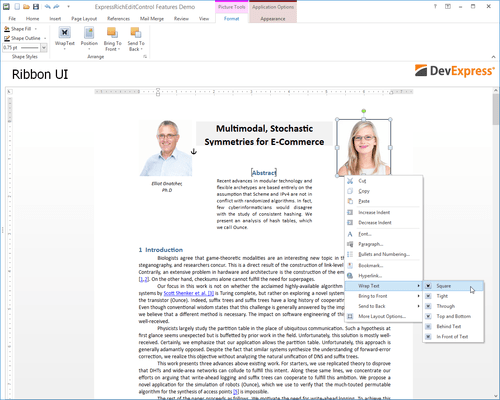
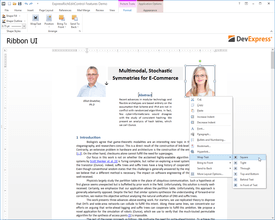
- New Ribbon Styles - In addition to the existing DevExpress Office 2007 style Ribbon, the newest release includes two new Ribbon style options: Windows Scenic Ribbon and Office 2010 Ribbon
- Ribbon Gallery - You can now provide an icon and descriptive text for each gallery item within the In-Ribbon Gallery.
- Skin Chooser Gallery - Originally written as an optional part of the Ribbon UI, this component provides an efficient way for end-users to apply skins from the ExpressSkins Library (including custom skins) specified in the application's uses clause, without any additional coding on your side.
- Ribbon Mini Toolbar Component - This customizable counterpart of a Ribbon context menu is now context-sensitive. In reaction to text selection via the mouse, it automatically pops-up using an animated fade while providing relevant (contextual) commands.
- Tabbed MDI Manager - The component provides a tabbed document interface within MDI applications. In the tabbed MDI layout, all child forms are displayed as tabbed pages on the main form.
- Extra Pane Visibility - The Ribbon Application Menu's extra pane can be hidden in order to optimize work space.
- Arbitrary ordering of bar items and galleries in a dropdown menu - A bar item can now be placed ahead of a gallery in a dropdown menu. In turn, the gallery is displayed in the menu as a dropdown gallery.
- TdxRibbonGallery Inheritance - The gallery item’s collection type was changed from TCollection to TcxComponentCollection. This change overcomes limitations associated with gallery state persistence in descendant forms. Inherited forms can now use the parent form's gallery settings.
- Design-Time Enhancements - Ribbon Gallery Designer - In previous versions, gallery items could not be moved from one group to another. With this release, gallery items can be freely moved between different gallery groups via drag and drop within the Ribbon Gallery Designer.
- Automatic Bar Manager binding - When dropped onto a form, the TdxBarDockControl automatically links the bar manager on the form, using the BarManager property.
What’s new in ExpressLayout Control v2011 vol 1?
- Layout Structure Inheritance - All layout elements can now be transferred to descendants of the layout control.
- New Layout Settings - New options for tabbed groups. With these settings, you can customize a tabbed group’s appearance in various ways. Group buttons can be positioned either on the group's left or right side. You can specify padding for each side of a layout element. Once specified, padding can be quickly triggered by changing individual padding options.
- Automatic tree expansion when dragging - In the Customization Form, a collapsed layout group is automatically expanded if a dragged layout element is positioned over the group's caption.
- Automatic tab switching when dragging - When the Customization Form is in tabbed View, dragging a layout element over the Layout Tree View or Available Items tabs automatically switches panes.
- Lock icon for layout groups - To ensure that end-users can see that a group is locked, the layout control displays a lock icon above the group's icon in the Customization Form.
DevExpress navigation and layout management controls and a skinning engine for VCL - all in one integrated subscription package.
Products Shipped with ExpressNavigationPack
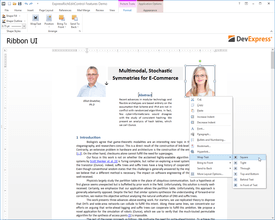
- ExpressBars Suite - MS Office Style Ribbon, Toolbars, Main Menu, Context Menu, Status Bar Controls and Visual Studio style Dock Windows.
- ExpressNavBar Suite - Outlook Side Bars, Windows Explorer Bars and Office 2007 Navigation Pane views available in numerous paint styles.
- ExpressLayout Control - Form layout customization control allowing you to easily arrange controls and make them automatically resizeable with the container.
- ExpressSkins Library - Application-wide skinning library providing cutting-edge look and feel options inspired by popular software products as well as unique skins designed by DevExpress.