ExpressPrintingSystem Suite

von Developer Express - Produkttyp: Komponente / VCL

Bitte beachten Sie, falls nicht andersweitig erwähnt ist dieses Produkt nur in englischer Sprache verfügbar.
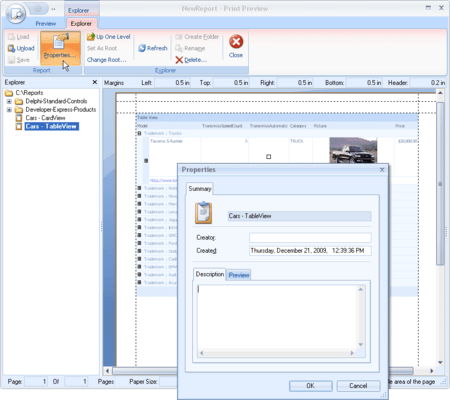
Bildschirmabzug von ExpressPrintingSystem Suite - VCL - V3.40Add data rendering and printing functionality to your applications. ExpressPrinting System is an advanced data rendering and printing system specifically designed to bring your User Interface to the printed page. Via its Report Link technology, the ExpressPrinting System allows you to output the contents of VCL controls such as the ExpressQuantumGrid and ExpressMasterView - as well as many others - to paper, while giving you and your users extensive control over print attributes such as Font, Color, Headers, and Footers.

Ab
259,300₩
Preis in

Unsere regulären Preise werden nachstehend angezeigt. Bitte melden Sie sich an um Ihre ermäßigten Preise zu sehen.

ExpressPrintingSystem Suite V3.40

In den Einkaufswagen ₩ 259,300 1 Developer License with Source
Hersteller Art-Nr. 112
Download (123.2 MB)
In den Einkaufswagen ₩ 90,800 1 Developer License with Source Upgrade from previous version
Hersteller Art-Nr. 123
Prüfen Download (123.2 MB)

Dieses Produkt ist unter der GSA Schedule Preisstaffelung verfügbarUnsere Preise beinhalten einen technischen Support durch ComponentSource und für die meisten herunterladbaren Produkte zusätzlich ein Online-Backup sowie eine kostenlose Aktualisierung auf die neue Version, sofern sie binnen 30 Tagen nach dem Kauf freigegeben werden. Die angezeigten Preise sind zuzüglich aller Steuern. Für mehr Information zu eventuell anfallende Steuern, gehen Sie bitte auf diese Webseite. Alle Verkäufe unterliegen unseren Standardgeschäftsbedingungen und unseren Rückgaberegeln. Treten Sie bitte mit uns in Kontakt , wenn Sie eine Lizenzierungsoption anfordern möchten, die in der obigen Liste nicht aufgeführt ist, einschließlich Mehrplatzlizenzen und ältere Versionen.

Unsere regulären Preise werden oben angezeigt. Bitte melden Sie sich an um Ihre ermäßigten Preise zu sehen.

When you combine the ExpressPrinting System with the ExpressQuantumGrid or ExpressMasterView, you get the threefold benefit of eliminating the tedium associated with creating traditional banded reports, greatly reducing development time, and putting flexibility back into the hands of your users. No longer will you have to create and re-create reports because of simple changes to your database or requests by users to group/sort data by new columns. By combining the ExpressPrinting System with the QuantumGrid and/or MasterView controls, your end-users can arrange data in any manner they see fit, and then print the contents of the control exactly as it appears on-screen.


Main Features Include:

  • New Report Links - The ExpressPrinting System now supports more then 30 different visual controls including Generic Containters such as Form, Frame, Panel, and ExpressLayoutControl
  • Report Persistence - you can now Save/Load to/from File/Stream. This feature is instantly available to your end-users via the ExpressPrinting System's Preview Window
  • Report Explorer Technology - Our Report Explorers allows you to review/recall reports saved either to disk or a database (File Explorer or DB Explorer). They are linked to the TdxComponentPrinter which manages the DataSource for individual ReportLinks. These Explorers can be directly embedded into the PreviewWindow
  • Thumbnail PageView within the Preview Window
  • Support for Express Styles and StyleSheets - Full native support for Styles and StyleSheets when used in association with the ExpressQuantumGrid, QuantumTreeList, and ExpressVerticalGrid
  • Unwrap "Detail views" in ExpressQuantumGrid - If a GridLevel has several SubLevels then all Levels will be printed one by one
  • 3 additional pagination modes for ExpressQuantumGrid - By Rows, By TopLevel Groups and Custom (the appropriate event is fired during processing of each row in the Grid)
  • 2 additional pagination modes for ExpressQuantumTreeList - By Nodes and Custom (the appropriate event is fired during processing of each node in the TreeList)
  • Full Custom Draw Support - Need a green bar like report? Simply use the extensive custom draw support to implement all types of effects such as green-bar, high-low threshold, and visual alerts using the rich custom draw event model of the ExpressPrinting System
  • Print Style Component - Using the new Print Style components, you can provide, several distinct presentation styles for each ReportLink. Even more, using runtime-customization, your users can create new styles on the fly and save them for later use, just like Microsoft does in Outlook
  • Header and Footer support - ExpressPrinting System gives you exquisite control over the presentation and positioning of page headers and footers. There is support for standard elements such as page numbers, dates, and times. Like all Developer Express products, the ExpressPrinting System includes extensive run-time customization, so your users can modify these headers and footers based upon their specific business needs
  • Page Setup Dialog - With the page setup dialog you can control virtually all aspects of printing. The page setup dialog supports the selection and creation of styles, selection of paper types, header/footer content and layout, and margins. No longer are these options hard or even impossible to control - the ExpressPrinting System makes it a breeze
  • Print Dialog - The enhanced print dialog gives you a high degree of control over what options are available when printing Printer selection, output to file, page selection and collation are all there. You can even control what buttons are displayed or enabled, all through a convenient non-visual component interface
  • Engine Controller - The engine controller provides a quick and easy way to centrally control global properties for all reports that may be printed using the ExpressPrinting System. From this component you can control the look & feel, the path for saving custom settings, and Help file
  • Intelli-Zoom - Using a mouse equipped with a wheel, you can zoom in and out on your reports without entering magnification manually, or selecting it from a menu
  • Scaling Support - With built in Scaling support, the ExpressPrinting System allows your users to automatically scale individual reports to fit on one or more pages, as their needs dictate
  • Color, pattern, texture, and picture fills and backgrounds
  • Multiple page viewing modes such as single, double, quad, etc
  • Custom scaling
  • Intellimouse support
  • Drag-and-drop margins
  • Transparency support
  • Open and extensible architecture

Produkt-Suche

Suchbegriffe eingeben:

Award