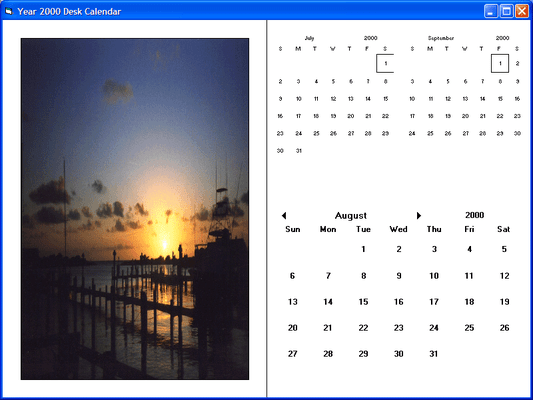
Screenshot Preview

Calendar Objx

经 GrapeCity - 产品类型: 构件 / ActiveX OCX / DLL / VBX

‏请注意: 除非另有说明,此为英语产品

*

Display or select date and/or time values in your application. Calendar Objx is an ActiveX component that allows you to create calendar and scheduling applications that can be bound to external databases. It includes Daily PlanIt to provide complete scheduling functionality including: Appointments - recurring, specific, etc., Calendar Display - by day, month, year, or single date, configurable display including color, background, alternate font color, and much more.


₩276,000
价格

‏我们的常规价格如下。 请登录后查看打折后的价格。

Calendar Objx V3.0.15   *

加入购物车 ₩ 276,000 1 Developer License  *
Mfr. 部件号: CDP01
下载 (12.6 MB)
加入购物车 ₩ 71,100 Upgrade from Calendar Objx V2.0 or Daily PlanIT V1.0 - Please Note: Requires the previous version serial number  *
Mfr. 部件号: CDP02
验证 下载 (12.6 MB)

Calendar Objx   *

加入购物车 ₩ 1,807,900 Source Code Escrow Annual Subscription - (An Escrow Agreement will be sent to you for signature - please read Licensing section below)  * 下载 (41 KB)

我们的价格包括ComponentSource的技术支持。对于大多数可下载的产品,还提供在线备份和免费升级为新版本,若新版本在购买后的30日内发布的话。  所有销售都是按照我们的标准条款 进行的,并且适用我们的退货政策. 请 联系我们 若您需要任何未在上面列出的License选择,包括批量License及以前的版本。 

‏我们的常规价格见上。 请登录后查看打折后的价格。

 *

Calendar Objx New Features:

  • The Calendar Objx ActiveX components support ActiveX Data Objects (OLE DB) data binding, as well as DAO and RDO data binding
  • Calendar Objx 3.0 ActiveX components are apartment-threaded controls
  • Three new elements have been added to the fpCalendar component: recurring days, specific days, and header buttons
  • In the fpCalendar component, selected days do not inherit settings from the lower levels in the element hierarchy. In Calendar Objx 3.0, you can use the InheritOverride property to allow selected day elements to inherit settings from lower levels in the calendar element hierarchy
  • The fpCalendar component now provides five AutoStyles (Traditional, Modern, Active, Streamlined, and Flat) to help you create commonly used calendar looks. You can modify the AutoStyles as you please
  • The fpCalendar component has a new compact format that displays a day, month, year or a single date (day, month, year) on one line, allowing you to change the date easily using drop downs. If you display a single date, you can specify the order in which the day, month, and year appear on the line
  • The default date value for the fpCalendar component is now the current system date (as determined by the Windows Control Panel setting)
  • You can now specify a mask color for element pictures in the fpCalendar component. Parts of the picture that contain pixels the same color as the mask color are transparent
  • You can now specify how and whether grid lines display. You can display only horizontal grid lines, only vertical grid lines, a full grid, or only header grid lines
  • The fpCalendar component provides two new properties that allow you to return an enumerated and string value for the element the pointer is over. For example, if the pointer is over a day in the calendar, the MouseOverValue property returns the day in the "YYYYMMDD" format and the MouseOverElement property returns a "4" indicating the pointer is over a specific day
  • You can now choose not to display buttons in the calendar month header, the year header, or both
  • The fpCalendar VBX and ActiveX components now contain the standard Visual Basic MouseDown, MouseMove, and MouseUp events
  • The fpCalendar component provides new functions and methods to enumerate recurring and specific dates and toreset specified property settings at run time
  • The fpCalendar component now follows ISO standard 8601 for week numbering
  • Calendar Objx 3.0 now uses system colors as defaults for some color property settings

Daily PlanIt New Features:

  • The Daily PlanIt ActiveX component supports ActiveX Data Objects (OLE DB) data binding, as well as DAO and RDO data binding
  • A new event has been added to the Daily Planit control: TimeIntervalChange. This event occurs when you change the setting of the time intervals by setting the TimeInterval property
  • The default values for HeaderBackColor, HeaderForeColor, TaskBackColor and TaskForeColor properties for the selected header and task now use Windows system colors
  • The data binding functionality in the Daily PlanIt control has been enhanced to provide easier implementation in multi-user applications
  • The TaskQuery method and the PlnTaskQuery function have been modified to query tasks outside of the component's viewable scope (that is, tasks that are loaded in the control, but not currently viewable because they occur prior to the component's begin time or after the component's end time)

注意

还未完成翻译的产品说明, 我们提供了Google 翻译的连结方便您使用. 但请注意, 自动翻译有时候可能会有翻译错误.
强力驱动
在Firefox 和Opera 需要Flash.

产品搜索

输入搜索词:

为什么从ComponentSource购买?

ComponentSource 提供独特的全球国际服务, 在世界各地共有超过1,000,000开发者客户.

更多讯息 | 关于我们

奖励