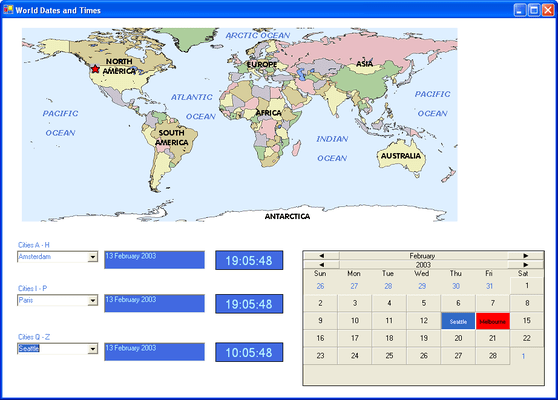
Screenshot Preview

Input Pro for Win Forms

von GrapeCity - Produkttyp: Komponente / .NET WinForms / 100% Managed Code

Bitte beachten Sie, falls nicht andersweitig erwähnt ist dieses Produkt nur in englischer Sprache verfügbar.

*

Validate data in your .NET applications. Input Pro for Win Forms includes a complete set of full-featured components that easily validate date, numeric, or text data entered from a database or via the keyboard. Based on the popular COM products, Input Pro and the calendar component from Calendar Objx, Input Pro for Win Forms has been completely rewritten in C# using 100% managed code to make it easy to build robust database front-ends, data-entry screens, or any application that requires data input.


Ab
$244.02
Preis in

Unsere regulären Preise werden nachstehend angezeigt. Bitte melden Sie sich an um Ihre ermäßigten Preise zu sehen.

Input Pro for Win Forms V1.0.13   *

In den Einkaufswagen $ 244.02 1 Developer License  *
Hersteller Art-Nr. IPW01
Download (14.1 MB)
In den Einkaufswagen $ 126.42 1 Developer License - Upgrade from Input Pro 3  *
Hersteller Art-Nr. IPW02
Prüfen Download (14.1 MB)
In den Einkaufswagen $ 185.22 1 Developer License - Upgrade from Input Pro 2  *
Hersteller Art-Nr. IPW03
Prüfen Download (14.1 MB)
In den Einkaufswagen $ 195.02 1 Developer Upgrade License from any FarPoint product  * Prüfen Download (14.1 MB)

Unsere Preise beinhalten einen technischen Support durch ComponentSource und für die meisten herunterladbaren Produkte zusätzlich ein Online-Backup sowie eine kostenlose Aktualisierung auf die neue Version, sofern sie binnen 30 Tagen nach dem Kauf freigegeben werden. Die angezeigten Preise sind zuzüglich aller Steuern. Für mehr Information zu eventuell anfallende Steuern, gehen Sie bitte auf diese Webseite. Alle Verkäufe unterliegen unseren Standardgeschäftsbedingungen und unseren Rückgaberegeln. Treten Sie bitte mit uns in Kontakt , wenn Sie eine Lizenzierungsoption anfordern möchten, die in der obigen Liste nicht aufgeführt ist, einschließlich Mehrplatzlizenzen und ältere Versionen.

Unsere regulären Preise werden oben angezeigt. Bitte melden Sie sich an um Ihre ermäßigten Preise zu sehen.

 *

What's New in Input Pro for Win Forms V1.0.13?

  • The fpDateTime control will attempt to format a date with no separators if the EasyEdit property True, UserEntry is FreeFormat, the length of the input string is 8 characters only, and the string is all digits

What's New in Input Pro for Win Forms V1.0.12?

  • The fpMask control has a MaskCharNonFocus property.
  • The fpDateTime control has a SetPopupFormatString method.
  • The fpDateTime control has a GetPopupForm method.


 *

Input Pro for Win Forms includes:

fpBoolean Control

  • The fpBoolean control adds true/false functionality to your application. Display the control as a check box or provide your own image for each control state
  • Specify user-defined text for each control state
  • Provide a custom 3-D appearance

fpCalendar Control

  • The fpCalendar control adds visible date functionality to your application. Display the control in its default state, or add your own custom appearance
  • Choose from a variety of month and year header styles, as well as docking positions for the headers
  • The elements collection allows you to define specific functionality for months, years, weekdays, recurring days, and specific days
  • Allow users to select only one day or multiple days
  • Choose to display the dates surrounding the current month in the control and customize them

fpCanvas Control

  • The fpCanvas control can be customized with different borders, buttons, text and image effects
  • Choose from a variety of button styles for the control for added functionality.
  • Use pictures and overlays for special effects

fpClock Control

  • The fpClock control adds visible time functionality to your application. Display the control in its default state, or customize it to fit your needs
  • Choose the clock face format (digital or analog, Roman or Arabic numerals)
  • Add pictures to the background and/or foreground
  • Customize the hour, minutes and seconds hands, as well as the tick marks
  • Use the mouse buttons to move the hands of the clock
  • Respond to time changed and alarm events

fpCurrency Control

  • The fpCurrency control displays monetary values, validates data and prevents users from entering invalid data
  • Define the currency format, including the currency symbol and the position of the negative sign
  • Define the maximum and minimum values. Values can be between -9,000,000,000 and 9,000,000,000
  • Provide a button to increment or decrement the value in the control

fpDateTime Control

  • The fpDateTime control displays and formats date and time values
  • Validate data and prevent users from entering invalid data
  • Choose from predefined formats, or define your own
  • Choose from four different button styles to provide either a calendar/clock or increment/decrement the date/time value in the control
  • Limit date and time values by setting the maximum and minimum dates and times

fpDouble Control

  • The fpDouble control displays floating-point numbers
  • Validate data and prevent users from entering invalid data
  • Define the maximum and minimum values. Values can be between -9,000,000,000 and 9,000,000,000
  • Specify the format to display negative values
  • Specify the character to use to separate groups of numbers
  • Provide a button to increment and decrement values

fpInteger Control

  • The fpInteger control displays integer values
  • Validate data and prevent users from entering invalid data
  • Define the maximum and minimum values. Values can be between -2,147,483,647 and 2,147,483,647
  • Provide a button to increment and decrement values
  • Specify the format for displaying negative values
  • Specify the character to use to separate groups of numbers

fpMask Control

  • The fpMask control restricts how data is entered or displayed in the control
  • Create any mask, including phone numbers or social security numbers
  • Some of the available mask characters include numbers only, letters only, any character and upper and lower case letter
  • Define the prompt character to display in the control
  • Provide literal characters in the mask

fpPercent Control

  • The fpPercent control displays percentages
  • Validate data and prevent users from entering invalid data
  • Provide a button to increment and decrement values
  • Choose the number of decimal places to display
  • Choose the character to display as the percentage sign

fpSuperEdit Control

  • The fpSuperEdit control displays values of any type
  • Allow the user to enter, manipulate, and validate all types of data
  • Define the location of the caret when the control receives focus
  • Define the control in one of several styles (read-only, static, normal, button edit)

fpText Control

  • The fpText control displays text strings
  • Automatically change text case to upper, lower, or mixed
  • Validate passwords
  • Limit the number of characters and restrict which characters the user can enter
  • Move selected text left or right with a button
  • Display multiple lines of text in the control
  • Provide scrollbars for multi-line text

Warnung

Übersetzungen für Produktinformationen, die noch nicht von uns übersetzt wurden, stehen über Links zu "Google Übersetzer" zur Verfügung. Bitte beachten Sie, daß automatisierte Übersetzungen nicht immer vollkommen korrekt sind.
Powered by
Flash wird in FireFox und Opera benötigt.

Produkt-Suche

Suchbegriffe eingeben:

Weitere Links

Hersteller

Primärkategorie

Zugehörige Produkte

Zugehörige Kategorien

Warum Produkte bei ComponentSource kaufen?

ComponentSource bietet einen einzigartigen, globalen Service an, der weltweit von über 1.000.000 Entwicklern benutzt wird.

Mehr Info | Über uns

Award