Input Pro for Win Forms - .NET Component
di FarPoint Technologies - Tipo prodotto: Componente / .NET WinForms / 100% Managed Code
Ti preghiamo di notare che le informazioni su questi prodotti non sono disponibili in italiano.
Validate data in your .NET applications. Input Pro for Win Forms includes a complete set of full-featured components that easily validate date, numeric, or text data entered from a database or via the keyboard. Based on the popular COM products, Input Pro and the calendar component from Calendar Objx, Input Pro for Win Forms has been completely rewritten in C# using 100% managed code to make it easy to build robust database front-ends, data-entry screens, or any application that requires data input.

I nostri prezzi standard sono indicati sotto. Accedi per vedere i tuoi prezzi scontati.
Input Pro for Win Forms V1.0.13
I nostri prezzi comprendono l'assistenza tecnica ComponentSource e, per la maggior parte dei prodotti scaricabili, una copia di riserva online e un aggiornamento GRATUITO alla nuova versione, se questa viene lanciata entro 30 giorni dall'acquisto. Tutte le vendite sono soggette ai nostri termini e condizioni standard ed alla nostra politica di rimborso. Contattaci se necessiti di un'opzione di licenza non elencata sopra, comprese licenze multiple e versioni precedenti.
I nostri prezzi standard sono indicati sopra. Accedi per vedere i tuoi prezzi scontati.
What's New in Input Pro for Win Forms V1.0.13?
- The fpDateTime control will attempt to format a date with no separators if the EasyEdit property True, UserEntry is FreeFormat, the length of the input string is 8 characters only, and the string is all digits
What's New in Input Pro for Win Forms V1.0.12?
- The fpMask control has a MaskCharNonFocus property.
- The fpDateTime control has a SetPopupFormatString method.
- The fpDateTime control has a GetPopupForm method.
Input Pro for Win Forms includes:
fpBoolean Control
- The fpBoolean control adds true/false functionality to your application. Display the control as a check box or provide your own image for each control state
- Specify user-defined text for each control state
- Provide a custom 3-D appearance
fpCalendar Control
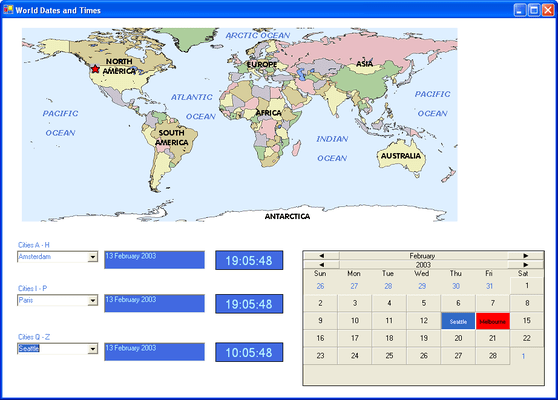
- The fpCalendar control adds visible date functionality to your application. Display the control in its default state, or add your own custom appearance
- Choose from a variety of month and year header styles, as well as docking positions for the headers
- The elements collection allows you to define specific functionality for months, years, weekdays, recurring days, and specific days
- Allow users to select only one day or multiple days
- Choose to display the dates surrounding the current month in the control and customize them
fpCanvas Control
- The fpCanvas control can be customized with different borders, buttons, text and image effects
- Choose from a variety of button styles for the control for added functionality.
- Use pictures and overlays for special effects
fpClock Control
- The fpClock control adds visible time functionality to your application. Display the control in its default state, or customize it to fit your needs
- Choose the clock face format (digital or analog, Roman or Arabic numerals)
- Add pictures to the background and/or foreground
- Customize the hour, minutes and seconds hands, as well as the tick marks
- Use the mouse buttons to move the hands of the clock
- Respond to time changed and alarm events
fpCurrency Control
- The fpCurrency control displays monetary values, validates data and prevents users from entering invalid data
- Define the currency format, including the currency symbol and the position of the negative sign
- Define the maximum and minimum values. Values can be between -9,000,000,000 and 9,000,000,000
- Provide a button to increment or decrement the value in the control
fpDateTime Control
- The fpDateTime control displays and formats date and time values
- Validate data and prevent users from entering invalid data
- Choose from predefined formats, or define your own
- Choose from four different button styles to provide either a calendar/clock or increment/decrement the date/time value in the control
- Limit date and time values by setting the maximum and minimum dates and times
fpDouble Control
- The fpDouble control displays floating-point numbers
- Validate data and prevent users from entering invalid data
- Define the maximum and minimum values. Values can be between -9,000,000,000 and 9,000,000,000
- Specify the format to display negative values
- Specify the character to use to separate groups of numbers
- Provide a button to increment and decrement values
fpInteger Control
- The fpInteger control displays integer values
- Validate data and prevent users from entering invalid data
- Define the maximum and minimum values. Values can be between -2,147,483,647 and 2,147,483,647
- Provide a button to increment and decrement values
- Specify the format for displaying negative values
- Specify the character to use to separate groups of numbers
fpMask Control
- The fpMask control restricts how data is entered or displayed in the control
- Create any mask, including phone numbers or social security numbers
- Some of the available mask characters include numbers only, letters only, any character and upper and lower case letter
- Define the prompt character to display in the control
- Provide literal characters in the mask
fpPercent Control
- The fpPercent control displays percentages
- Validate data and prevent users from entering invalid data
- Provide a button to increment and decrement values
- Choose the number of decimal places to display
- Choose the character to display as the percentage sign
fpSuperEdit Control
- The fpSuperEdit control displays values of any type
- Allow the user to enter, manipulate, and validate all types of data
- Define the location of the caret when the control receives focus
- Define the control in one of several styles (read-only, static, normal, button edit)
fpText Control
- The fpText control displays text strings
- Automatically change text case to upper, lower, or mixed
- Validate passwords
- Limit the number of characters and restrict which characters the user can enter
- Move selected text left or right with a button
- Display multiple lines of text in the control
- Provide scrollbars for multi-line text