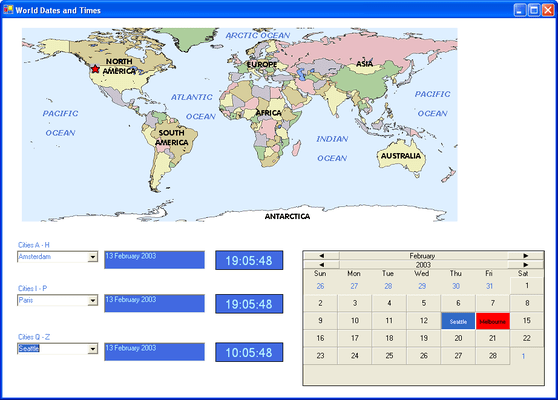
Screenshot Preview

Input Pro for Win Forms

经 GrapeCity - 产品类型: 构件 / .NET WinForms / 100% 受控代码

‏请注意: 除非另有说明,此为英语产品

*

Validate data in your .NET applications. Input Pro for Win Forms includes a complete set of full-featured components that easily validate date, numeric, or text data entered from a database or via the keyboard. Based on the popular COM products, Input Pro and the calendar component from Calendar Objx, Input Pro for Win Forms has been completely rewritten in C# using 100% managed code to make it easy to build robust database front-ends, data-entry screens, or any application that requires data input.


$244.02
价格

‏我们的常规价格如下。 请登录后查看打折后的价格。

Input Pro for Win Forms V1.0.13   *

加入购物车 $ 244.02 1 Developer License  *
Mfr. 部件号: IPW01
下载 (14.1 MB)
加入购物车 $ 126.42 1 Developer License - Upgrade from Input Pro 3  *
Mfr. 部件号: IPW02
验证 下载 (14.1 MB)
加入购物车 $ 185.22 1 Developer License - Upgrade from Input Pro 2  *
Mfr. 部件号: IPW03
验证 下载 (14.1 MB)
加入购物车 $ 195.02 1 Developer Upgrade License from any FarPoint product  * 验证 下载 (14.1 MB)

我们的价格包括ComponentSource的技术支持。对于大多数可下载的产品,还提供在线备份和免费升级为新版本,若新版本在购买后的30日内发布的话。  所有销售都是按照我们的标准条款 进行的,并且适用我们的退货政策. 请 联系我们 若您需要任何未在上面列出的License选择,包括批量License及以前的版本。 

‏我们的常规价格见上。 请登录后查看打折后的价格。

 *

What's New in Input Pro for Win Forms V1.0.13?

  • The fpDateTime control will attempt to format a date with no separators if the EasyEdit property True, UserEntry is FreeFormat, the length of the input string is 8 characters only, and the string is all digits

What's New in Input Pro for Win Forms V1.0.12?

  • The fpMask control has a MaskCharNonFocus property.
  • The fpDateTime control has a SetPopupFormatString method.
  • The fpDateTime control has a GetPopupForm method.


 *

Input Pro for Win Forms includes:

fpBoolean Control

  • The fpBoolean control adds true/false functionality to your application. Display the control as a check box or provide your own image for each control state
  • Specify user-defined text for each control state
  • Provide a custom 3-D appearance

fpCalendar Control

  • The fpCalendar control adds visible date functionality to your application. Display the control in its default state, or add your own custom appearance
  • Choose from a variety of month and year header styles, as well as docking positions for the headers
  • The elements collection allows you to define specific functionality for months, years, weekdays, recurring days, and specific days
  • Allow users to select only one day or multiple days
  • Choose to display the dates surrounding the current month in the control and customize them

fpCanvas Control

  • The fpCanvas control can be customized with different borders, buttons, text and image effects
  • Choose from a variety of button styles for the control for added functionality.
  • Use pictures and overlays for special effects

fpClock Control

  • The fpClock control adds visible time functionality to your application. Display the control in its default state, or customize it to fit your needs
  • Choose the clock face format (digital or analog, Roman or Arabic numerals)
  • Add pictures to the background and/or foreground
  • Customize the hour, minutes and seconds hands, as well as the tick marks
  • Use the mouse buttons to move the hands of the clock
  • Respond to time changed and alarm events

fpCurrency Control

  • The fpCurrency control displays monetary values, validates data and prevents users from entering invalid data
  • Define the currency format, including the currency symbol and the position of the negative sign
  • Define the maximum and minimum values. Values can be between -9,000,000,000 and 9,000,000,000
  • Provide a button to increment or decrement the value in the control

fpDateTime Control

  • The fpDateTime control displays and formats date and time values
  • Validate data and prevent users from entering invalid data
  • Choose from predefined formats, or define your own
  • Choose from four different button styles to provide either a calendar/clock or increment/decrement the date/time value in the control
  • Limit date and time values by setting the maximum and minimum dates and times

fpDouble Control

  • The fpDouble control displays floating-point numbers
  • Validate data and prevent users from entering invalid data
  • Define the maximum and minimum values. Values can be between -9,000,000,000 and 9,000,000,000
  • Specify the format to display negative values
  • Specify the character to use to separate groups of numbers
  • Provide a button to increment and decrement values

fpInteger Control

  • The fpInteger control displays integer values
  • Validate data and prevent users from entering invalid data
  • Define the maximum and minimum values. Values can be between -2,147,483,647 and 2,147,483,647
  • Provide a button to increment and decrement values
  • Specify the format for displaying negative values
  • Specify the character to use to separate groups of numbers

fpMask Control

  • The fpMask control restricts how data is entered or displayed in the control
  • Create any mask, including phone numbers or social security numbers
  • Some of the available mask characters include numbers only, letters only, any character and upper and lower case letter
  • Define the prompt character to display in the control
  • Provide literal characters in the mask

fpPercent Control

  • The fpPercent control displays percentages
  • Validate data and prevent users from entering invalid data
  • Provide a button to increment and decrement values
  • Choose the number of decimal places to display
  • Choose the character to display as the percentage sign

fpSuperEdit Control

  • The fpSuperEdit control displays values of any type
  • Allow the user to enter, manipulate, and validate all types of data
  • Define the location of the caret when the control receives focus
  • Define the control in one of several styles (read-only, static, normal, button edit)

fpText Control

  • The fpText control displays text strings
  • Automatically change text case to upper, lower, or mixed
  • Validate passwords
  • Limit the number of characters and restrict which characters the user can enter
  • Move selected text left or right with a button
  • Display multiple lines of text in the control
  • Provide scrollbars for multi-line text

注意

还未完成翻译的产品说明, 我们提供了Google 翻译的连结方便您使用. 但请注意, 自动翻译有时候可能会有翻译错误.
强力驱动
在Firefox 和Opera 需要Flash.

产品搜索

输入搜索词:

快速链接

发布者

首要类别

相关产品

相关类别

为什么从ComponentSource购买?

ComponentSource 提供独特的全球国际服务, 在世界各地共有超过1,000,000开发者客户.

更多讯息 | 关于我们

奖励