List Pro - ActiveX/DLL - V3.0
von FarPoint Technologies - Produkttyp: Komponente / ActiveX OCX / DLL
Bitte beachten Sie, diese Produktinformation ist nicht in deutscher Sprache verfügbar.
Provide robust ListBoxes and ComboBoxes to your application. List Pro features extensive properties that enable you to display information in single or multiple columns, search and sort list items, merge cells, and more. List Pro features many enhanced features including tool tips, OLE Drag-and-Drop, Microsoft Intellimouse support, in either data-bound or unbound modes. List Pro breaks the 64K boundary and supports up to 2 billion list items by using the custom InsertRow property.

Durchschnittliche Rezension:
basierend auf 3 Rezensionen.
Unsere regulären Preise werden nachstehend angezeigt. Bitte melden Sie sich an um Ihre ermäßigten Preise zu sehen.
List Pro V3.0.07
Unsere Preise beinhalten einen technischen Support durch ComponentSource und für die meisten herunterladbaren Produkte zusätzlich ein Online-Backup sowie eine kostenlose Aktualisierung auf die neue Version, sofern sie binnen 30 Tagen nach dem Kauf freigegeben werden. Die angezeigten Preise sind zuzüglich aller Steuern. Für mehr Information zu eventuell anfallende Steuern, gehen Sie bitte auf diese Webseite. Alle Verkäufe unterliegen unseren Standardgeschäftsbedingungen und unseren Rückgaberegeln. Treten Sie bitte mit uns in Kontakt , wenn Sie eine Lizenzierungsoption anfordern möchten, die in der obigen Liste nicht aufgeführt ist, einschließlich Mehrplatzlizenzen und ältere Versionen.
Unsere regulären Preise werden oben angezeigt. Bitte melden Sie sich an um Ihre ermäßigten Preise zu sehen.
New Features V3.0
- Support OLE drag-and-drop operations
- Display text tips when the pointer is over a header or list item
- Automatically adjust the height of rows to accommodate a change in font characteristics
- Display the list of a combo box above or below the edit field
- Resize the last column beyond the control border
- Use the F4 key to display and close drop-down list
- Support Microsoft's IntelliMouse® feature
- Support extended multiselect keyboard interface
- Sort date type list items by date values
- Automatically display matching list item as user types characters in the combo box edit field
- Specify the three-dimensional appearance of the drop-down button
- Query the column level number, parent group, or position in parent of the target source after a drag-and-drop operation occurs
- Specify the margin between the edit field text and the edit field borders for the combo box control
- Display ellipsis points at the end of the text line when text does not fit the column or group width
- Query the maximum height or width of a cell, column, row, or header based on the current text, current picture, or both
- Hide rows in the list, preventing it from being selected
- Use a format string for data display in bound and unbound controls (Visual Basic)
- Query whether horizontal or vertical scroll bars are visible
- Control when the combo box or list box repaints
- Specify the column or row as variants when using the ColList or List properties
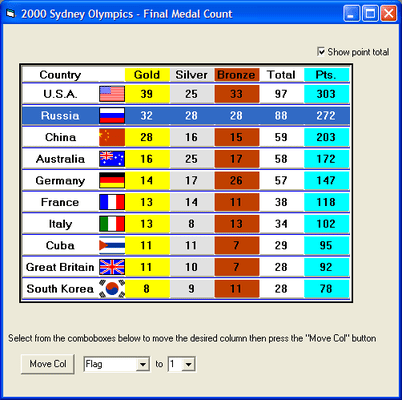
A set of customizable List Box and Combo Box controls. Create header groups and sub header groups and/ or multiple columns to create a very unique list control. Merge cells in rows with same text to make display more user friendly. Bind to supported databases using Microsoft Jet Database Engine or Microsoft Access ODBC. Virtual memory manager allows connection to any size database. Supports single or multi-select lists, embedded icons and bitmaps in columns and rows plus drag-n-drop capabilities.
Custom Appearance Properties:
- Supports up to 2 billion list items by using the custom InsertRow property
- Prevent your user from selecting any rows by putting the listbox into ReadOnly mode. The arrow keys and mouse will quickly scroll through the information, making it a powerful database viewer
- Allow the listbox to support single or multiple selection of list items
- Display data in single or multiple columns
- Insert bitmaps or icons into any columns or rows. Assign different pictures for both the selected and unselected states
- Assign different foreground or background colors for any cell, row, column, header, or group Customize any column headers by changing the text, header 3-D appearance, text 3-D style, or colors
- Assign a specific three-dimensional effect for any row, odd rows, even rows, all rows, spacing of rows, or the text
- Customize individual row heights or wrap data in each column (multi-line)
- Optionally display a control drop shadow at all times or when the control receives focus Display flat or 3-D lines between columns, rows, or both
- Choose from three different combobox styles: drop-down combo, simple combo, or drop-down list
- Includes over 200 properties for customizing the look and feel of the control
- TextOrientation supports horizontal, vertical LTR, vertical RTL, rotate down, rotate up or invert
- Easily access the features of the listbox or combobox at design-time with the List Designer (VBX and ActiveX only)
- ActiveX control is digitally signed for full Internet and Intranet development
Controlling List Pro's Behavior
- Hide entire columns or lock columns from being resized at run-time
- Allow the user to drag and drop single columns or groups of columns to different locations within the control Select rows, deselect rows, clear items in rows, delete rows, insert columns and more using Action Methods via code
- Insert new row items by either using the Visual Basic AddItem Method or the custom property InsertRow
- Display different data fields in the edit portion and drop-down list of the combobox control using Visual Basic
- Create Groups of Headers
- Create multiple levels of column or group headers Assign any number of columns or other groups as children of groups
- Allow a single record or group of data to span across multiple rows
- Optionally merge column cells that contain the same text for easier viewing of the data
Data Binding
- Use the Virtual Data Manager in bound or unbound mode to quickly display large data files
- Bind the combobox's drop-down list and edit portion to different data controls using Visual Basic
- Customize binding of individual columns by using ColDataField property
- Optimize virtual memory by specifying your own virtual paging size (number of pages that will be stored in memory)
Sort and Search
- Sort single or multiple column data in ascending or descending order or specify no sort field. These items can be sorted by alphabetical or numerical order. There is no limit to the number of sort keys
- Automatically search list items by single item, single item greater or equal to the character, or by multiple characters
- Perform manual searches by specifying the Search Method: Exact Match, Greater or Equal,or Partial Match