
Tab Pro
Add organized and professional user interfaces to your Windows applications.
由以下开发商制作:MESCIUS (formerly GrapeCity)
ComponentSource开始代理销售的日期:1996年
我们已经停止贩售这个产品。
Add organized and professional user interfaces to your Windows applications.
由以下开发商制作:MESCIUS (formerly GrapeCity)
ComponentSource开始代理销售的日期:1996年
This product is no longer available. If you require more information please contact us.
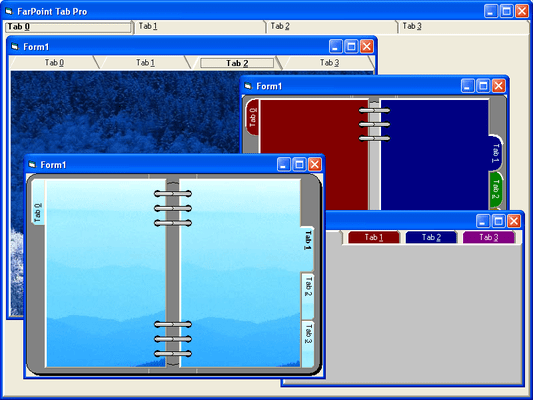
Tab Pro is an ActiveX tab component for displaying multiple pages of data within a tabbed interface. It includes seven appearance styles and numerous features for customizing your application's GUI, such as predefined appearance styles - including Notebook, Notecards, Notched, Worksheet, Personal Organizer, Property Pages, and Traditional. Also includes a 3D frame component.


图像1/5
The Tab Pro package offers a flexible, easy-to-use Tab component and a useful Imprint component that are both available as 16- and 32-bit DLL, VBX, and 16- and 32-bit ActiveX components. You can design the Tab component to look and act like a one- or two-page notebook, with a book binding that you can customize.
In addition, Tab Pro offers these new features:
ActiveX Components
The ActiveX components available with Tab Pro provide an enhanced design-time interface that includes property pages...
透过Live Chat与我们的MESCIUS (formerly GrapeCity) 专家联络!



联系电话: (888) 850 9911
传真: +1 770 250 6199


