de FMS - Tipo de producto: Aplicación
Total Access Admin by FMS
Control and manage your Access/Jet databases. Total Access Admin lets you quickly see who is currently logged into your database either directly or through linked tables. Databases can be password protected or secured through a workgroup file. You can also use Total Access Admin to prevent users from getting into a database, disconnect idle users, identify dropped connections, send messages to application users and other controls to manage your Access/Jet databases.
Monitor Your Microsoft Access/Jet Engine Databases in Real-Time
Can you see who is currently using your database? Can you identify workstations or users causing database corruption? How do you close a database for maintenance or backups when other users have it open? Do you want to automatically log off idle users? How do you communicate with your users in real-time?
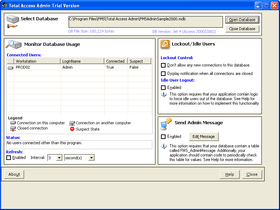
Total Access Admin solves all these problems in one easy-to-use program. Simply start the program, point to your database. You now have complete control to:
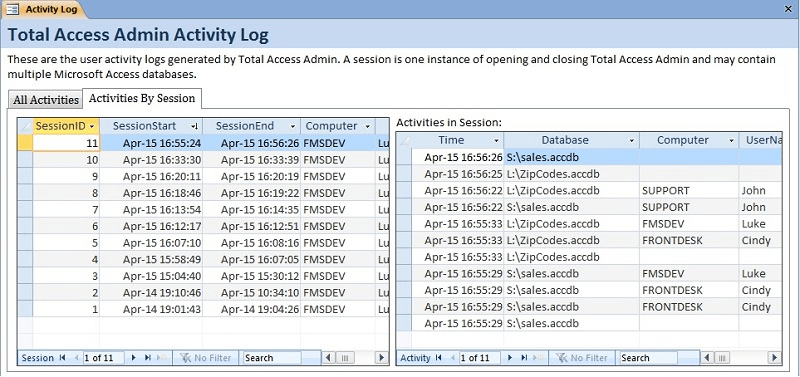
See who's in your database - Quickly see who is currently logged into your database either directly or through linked tables. Databases can be password protected or secured through a workgroup file. The machine name, their Access/Jet login name, and connection status are revealed. The latest version lets you log all the user connections and disconnects so you can record when people come in and out of the database. The information is stored in a table.
Prevent new connections to the database - This feature makes it easier than ever to prepare a database for backups, compact/repair, or other maintenance operations. Set at the Access/Jet database engine level, this option prevents new users from loading the database, giving you time to kick out the existing users. (This feature is supported in Jet 4.0 or later and is not available for Access 97 or earlier).
Automatically disconnect idle users - When a user leaves their computer on with your Access or Jet/VB database open, it can be impossible to get the database closed for maintenance until you track them down. Use Total Access Admin to automatically log users out of a database after a specified period of inactivity.
Compact database when all users exit - If you'd like, when all the users exit the database, Total Access Admin can get a full lock and compact the database.
Identify dropped or suspect connection - A dropped connection to an Access/Jet database can lead to database corruption. Total Access Admin identifies workstations or users who left the database in a suspect state. This can be invaluable for pinpointing a potential database corruption source. Not only can you use the log file to store when this occurs, you can also have Total Access Admin automatically compact the database once a suspect connection is detected and everyone else has exited.
Send messages to application users - Use Total Access Admin to communicate in real time with your application users. Simply type in a message and it appears in every instance of your application. Great for sending update or maintenance/log-out messages.
What’s new in Total Access Admin 2007?
Support for Access 2007 databases in ACCDB format - In addition to supporting all Access/Jet MDB databases from Access 97 to 2007, Total Access Admin 2007 also supports Access 2007 ACCDB format databases. Support for this format requires Access 2007 to be installed on the machine.
Save database connections and disconnects to a log file - Optionally store every connection and disconnection from a database in a log file. This is stored in a table of the LOG.MDB database where Total Access Admin is installed. It records the machine ID, user name, and time. If a suspect connection is detected, that's recorded as well.
Enhanced actions when all users exit the database - In addition to displaying a notification when all users are closed, these options are now available:
Compact the database, then close the database or exit Total Access Admin
Close Total Access Admin’s connection to the database
Exit Total Access Admin
Enhanced actions when a suspect connection occurs - If a suspect connection is detected, these options are now available:
Close Total Access Admin’s connection to the database
Display a notification on-screen
Lockout new users, and logout idle users
Lockout new users, logout idle users, then compact the database
Exit Total Access Admin
Command line support - Total Access Admin 2007 can be launched from a command line, Windows shortcut, or batch file. The database name and all the interactive selections can be set from the command line to simplify repetitive tasks.
Idle User Logout Seconds -If you implement the Idle User Logout feature in your database, there's a new option to let you specify the number of seconds it should wait before logging out the user automatically.
User Interface - In addition to supporting Microsoft Access 2007, the new version is also tested against Vista, and offers a streamlined and improved user interface:
Settings for opening a database retain the previous entries for workgroups and passwords
Most recently used list of databases
Larger form to show more connections
Support for Windows XP themes
PartNumbers: PC-513559-144446 513559-144446 PC-513559-144448 513559-144448 PC-513559-144447 513559-144447 PC-513559-144449 513559-144449
Publisher PartNumbers: TAADM TAADM-5 TAADM-U TAADM-U5
PurchaseOptions: Total Access Admin 2007 1 User License , Total Access Admin 2007 1 User Upgrade License from previous version , Total Access Admin 2007 5 User License , Total Access Admin 2007 5 User Upgrade License from previous version
Resources: Read the Total Access Admin help file, Read the Total Access Admin License Agreement, Download the Total Access Admin 2007 evaluation on to your computer - Expires After 30 Days
Operating System for Deployment: Windows Vista, Windows XP, Windows ME, Windows 2000, Windows NT 4.0
Architecture of Product: 32Bit
Product Type: Application
Compatible Containers: Microsoft Office 2007, Microsoft Office 2003, Microsoft Office XP, Microsoft Office 2000, Microsoft Office 97, Microsoft Access 2003, Microsoft Access 2002, Microsoft Access 2000, Microsoft Access 97
Product Class: Component Development Tools
Search Items: New Product Apr 03
Keywords: FMS Database DB Management Author