주의 : 이 제품정보에는 한글안내가 포함되어 있지 않습니다.
Create and send emails based on your data. Total Access Emailer allows you to generate personalized email for everyone in your table or query. Messages can be in text or HTML format with attachments. Use field values in your email subject and message to create unique, personalized emails for each recipient. You can even maintain an audit trail to know who was contacted when.
일반 적인 소비자 가격은 하기에 표시되어 있습니다. 고객님의 할인가격은 표시 하시려면 로그인 해주시기 바랍니다.
Total Access Emailer - for Access 2007 V12
| 주문 |
₩ 541,200 |
1 Developer License - Professional |
|
다운로드 (7.5 MB) |
| 주문 |
₩ 324,300 |
1 Developer License - Standard |
|
다운로드 (5.7 MB) |
Total Access Emailer - for Access 2003 V11.5
| 주문 |
₩ 541,200 |
1 Developer License - Professional |
|
다운로드 (9.3 MB) |
| 주문 |
₩ 324,300 |
1 Developer License - Standard |
|
다운로드 (7.0 MB) |
Total Access Emailer - for Access 2002 V10.5
| 주문 |
₩ 541,200 |
1 Developer License - Professional |
|
다운로드 (8.3 MB) |
| 주문 |
₩ 324,300 |
1 Developer License - Standard |
|
다운로드 (7.0 MB) |
Total Access Emailer - for Access 2000 V9.5
| 주문 |
₩ 541,200 |
1 Developer License - Professional |
|
다운로드 (8.3 MB) |
| 주문 |
₩ 324,300 |
1 Developer License - Standard |
|
다운로드 (7.0 MB) |
Total Access Emailer - for Access 97 V8.5
| 주문 |
₩ 541,200 |
1 Developer License - Professional |
|
다운로드 (8.4 MB) |
| 주문 |
₩ 324,300 |
1 Developer License - Standard |
|
다운로드 (7.0 MB) |
가격에는 ComponentSource의 기술지원 요금이 포함되어 있습니다. 또한 다운로드 판매를 하고 있는 상품의 대부분은 온라인 백업요금이 포함되어 있어서 구입날로부터 30일 이내에 새로운 버전이 발매된 경우 무료로 업그레이드해 드리고 있습니다. 모든 주문에 대해서 당사표준 계약조건 및 반품조건 의 내용이 적용됩니다. 다음의 경우,고객 서비스로연락하시기 바랍니다. (상기의 리스트에 게재되지 않은 대량의 라이센스나 구 버전 등의 라이센스 옵션이 필요한 경우)
일반 적인 소비자 가격은 상기에 표시되어 있습니다. 고객님의 할인가격은 표시 하시려면 로그인 해주시기 바랍니다.
What's new in V12?
- Support for the New Access 2007 Database Format - Total Access Emailer supports all the database formats supported by Access 2007. This includes the previous Access/Jet MDB format databases and Access Data Projects (ADP), plus the new Access 2007 ACCDB file format
- Support for the New Access 2007 Field Types - Total Access Emailer also supports the new Attachment and multi-value field types introduced with the new database format. You can reference an Attachment field to include its contents as attachments to your email
- Attach Access Reports as PDF or XPS Files - Total Access Emailer supports attaching Access reports as Adobe Portable Document Format (PDF) or XML Paper Specification (XPS) files. Just install the free download from Microsoft to enable PDF and XPS output in Office, and Total Access Emailer integrates it with your emails
- A New Microsoft Office Access 2007 User Interface - Total Access Emailer 2007 supports the new streamlined user interface of Office 2007. This includes:
- Support for your database's Document Windows Options set to traditional overlapping windows or the new tabbed object display.
- Resizable forms for either Windows option
- Use of Access system colors with support for Office color schemes.
- Use of the new Office fonts on forms
- Alternating row colors for datasheets
- Transparent buttons with graphics
What's new in V11.5?
- Use Access reports as your HTML email messages
- Embed Filtered Access Objects - Tables, queries/views, and reports can now be embedded directly in your email messages and attachments. Easily filter the data so each recipient receives their own information based on fields in your data source
- Embed Graphics in HTML Messages - HTML messages automatically embed local graphics referenced by the message. You no longer need to add the graphics as attachments - they are automatically embedded in the email message
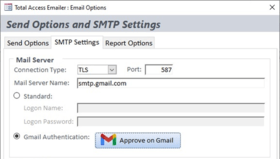
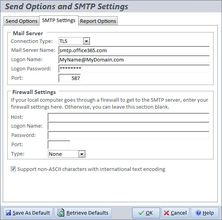
- Secure Socket Layer (SSL) Email Support - Total Access Emailer now supports sending emails through servers that require a secure or encrypted connection, using Secure Socket Layer (SSL). This provides an extra level of security, and additional support for users who exclusively use SSL mail servers
- Email Settings Report - Total Access Emailer includes a new report to print the specifications of an email blast
- Replica Database Support - Total Access Emailer now supports sending emails through Replica databases, in addition to standard MDBs and ADPs
Designed Exclusively for Microsoft Access
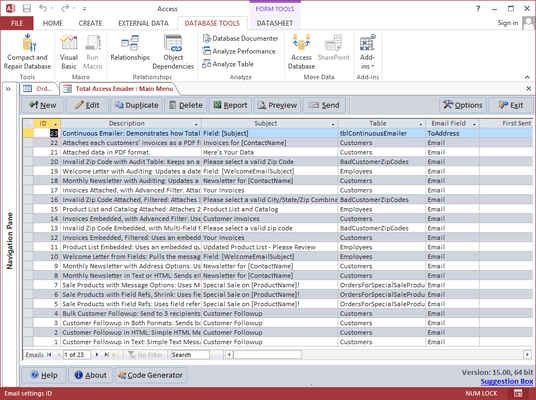
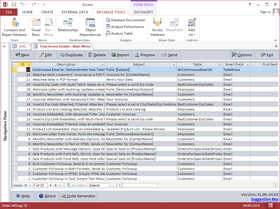
Total Access Emailer is designed specifically for Access and behaves the way you expect. Tightly integrated into Access, it runs as an Access add-in and includes an interactive, Wizard-like user interface that makes it easy to customize your email blasts in your Access environment.
Choose any table or query in your database, specify the email field and you're ready to contact everyone in your list. Your email blast settings are automatically saved in your database for reuse and sharing with other users.
Unlimited Custom Emails
- Send Email to Everyone Easily - send email to a list of email addresses from a table or query. Emails can be sent individually or in bulk as regular email or using CC or BCC
- Personalize Email Easily - customize the email subject and message for each recipient by referencing field values from your table or query. CanShrink options enhance formatting. Alternatively, you can even specify a field in your data containing the subject and/or message to send so you have complete control over each message
- Send Your Email Again - Email blast settings are automatically saved for reuse. Easily send the email again, or edit it with your latest message. Store an unlimited number of email blast settings and share them with your team
- Email People Who Weren't Previously Sent To - An optional audit trail can be maintained to know when an email was sent to each person. Easily send the same email to new people or those whom the original message skipped because the process was interrupted
- Send HTML and/or Text Messages - You can even prepare both and send one or the other depending on what your email address record specifies
- Easily Add Attachments - Each email may have multiple attachments. Use the same attachments for everyone or customize these for each message
- Custom FROM Address - Specify the FROM address for your emails. Use the same for every email or reference a field from the data source
- Preview Messages - Before you send your email blast, the powerful preview feature sends your messages to a table, the screen, or an email address you specify. Easily preview each custom message before you send it. You can test with the entire list or specify a limited number of messages
- Schedule Email Blasts - Launch the email blast and tell it to start at a later time. This is especially useful for scheduling blasts after hours when your mail server is less busy
- Send Multiple Email Blasts - Send multiple email blasts one after another. This is ideal if you have email blasts that need to go out consecutively, or use multiple data sources for related email blasts
Avoid Outlook Automation Problems
To prevent email viruses, Outlook makes it practically impossible to send multiple emails programmatically. Users either have to manually confirm messages or run very slowly.
Total Access Emailer avoids this problem by using SMTP rather than Outlook. This is fast and efficient. You can even specify the FROM email address of your messages, which can be different from your Outlook address.
Programmatic Features
A programmatic interface is available for Access developers wishing to add email blasts into applications. Give your users the power of sending custom emails at the touch of a button. Royalty-free runtime distribution rights are included.
The Standard edition does not include the ability to run Total Access Emailer in code or distribute it with your applications.