Total Access Statistics - Add-In

di FMS - Tipo prodotto: Add-in

Ti preghiamo di notare che le informazioni su questi prodotti non sono disponibili in italiano.
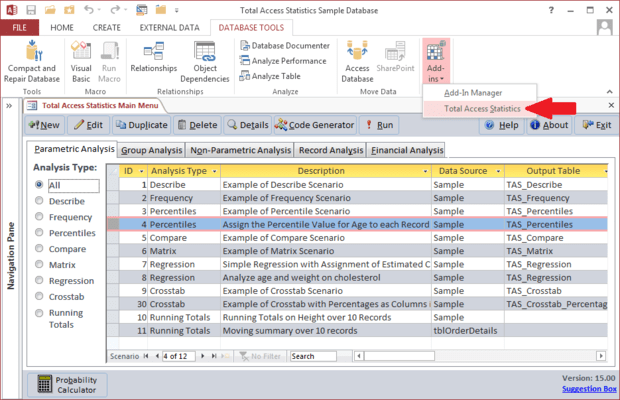
Schermata di Total Access Statistics - Add-InEasily perform a wide variety of calculations on your Access programs. Designed specifically for Access, Total Access Statistics runs as an Access add-in (from the Tools menu), and offers a wide range of statistical functions to analyze your data. Your data can be in Access tables or linked from other sources such as SQL Server. Analyze multiple fields and an unlimited number of records at one time. You can even analyze data from multi-table select queries.

Da
$587.02
Prezzo in

I nostri prezzi standard sono indicati sotto. Accedi per vedere i tuoi prezzi scontati.

Total Access Statistics - for Access 2007

Aggiungi al carrello $ 587.02 1 Developer License Download (12.1 MB)

Total Access Statistics - for Access 2003

Aggiungi al carrello $ 587.02 1 Developer License Download (11.0 MB)

Total Access Statistics - for Access 2002

Aggiungi al carrello $ 587.02 1 Developer License Download (10.3 MB)

Total Access Statistics - for Access 2000

Aggiungi al carrello $ 587.02 1 Developer License Download (10.4 MB)

Questo prodotto è disponibile nei prezzi riservati al GSA schedule.I nostri prezzi comprendono l'assistenza tecnica ComponentSource e, per la maggior parte dei prodotti scaricabili, una copia di riserva online e un aggiornamento GRATUITO alla nuova versione, se questa viene lanciata entro 30 giorni dall'acquisto.  Tutte le vendite sono soggette ai nostri termini e condizioni standard ed alla nostra politica di rimborso.  Contattaci se necessiti di un'opzione di licenza non elencata sopra, comprese licenze multiple e versioni precedenti.

I nostri prezzi standard sono indicati sopra. Accedi per vedere i tuoi prezzi scontati.

What’s new in Total Access Statistics?

Access Data Projects (ADP) Support - Data in Access Data Projects (ADP) can now be analyzed. Perform statistical analysis on your SQL Server data with results stored in SQL Server tables. Data sources can be views, stored procedures, and user defined functions. Previously, Total Access Statistics only supported Access MDB/Jet databases which could be linked to SQL Server.

Use Parameterized Data Sources - All the statistical analyses now support parameterized queries as the data source. For ADPs, data sources may be stored procedures and user defined functions with parameters.

Data Analysis Enhancements - New Running Totals Calculations - Calculate running averages, sums, counts, etc. for a sorted list of values and placing the values in a field in your table. The running value can be for all records or a moving set of records such as the running average over the last 10 records. The values are stored directly in your data source in the fields you specify. Up to five fields can be updated at one time.

Enhanced Regression Analysis - For Regressions, the estimated Y value can now be added directly into a field in your data source. This is available where there’s only one regression equation calculated at a time such as a multiple regression or a simple or polynomial regression with only one independent (X) field.

Enhanced Percentile Analysis - For Percentiles, a new option is available to assign percentile values to records. If there are multiple percentile values for the same record’s value, you can choose to assign the low or high percentile to that record. Previously, it always assigned the low value.

Programmatic Interface Enhancements - A new option is available in the Statistics Function to let you specify the table containing parameters for parameterized data sources.


Easily perform a wide variety of calculations including regressions, percentiles, frequency distributions, correlations, t-tests, confidence intervals, crosstabs, ANOVA, group analysis, non-parametrics, Chi-Square, probability, and much more. An interactive Wizard interface guides you through the process with no programming required! All results are generated in the most flexible format: Access tables. Easily display the results in your forms and reports. Your analysis settings are automatically saved so you can modify them later or run them again when your data changes.

General Features

  • Runs from Microsoft's Access Tools, Add-in menu
  • Analyze data from any Microsoft Access table or linked table
  • Analyze data from any select queries including multi-table select queries
  • Analyze an unlimited number of records and multiple fields at one time
  • Output results to Microsoft Access tables
  • Interactive Wizard interface requires no programming
  • Analysis selections are automatically saved as scenarios which can be run again or edited in the future
  • Optionally specify fields to group sets of records
  • Optionally weight records based on the value in a field
  • Optionally ignore a numeric value or range of values
  • All calculations in double-precision
  • Single user and network compatible
  • Programmatic interface to add statistical analysis to your applications
  • Royalty-free runtime license

Ricerca prodotti

Inserisci le tue parole chiave:

Award