Total Access Statistics - Add-In

by FMS - 상품타입: Add-In

주의 : 이 제품정보에는 한글안내가 포함되어 있지 않습니다.
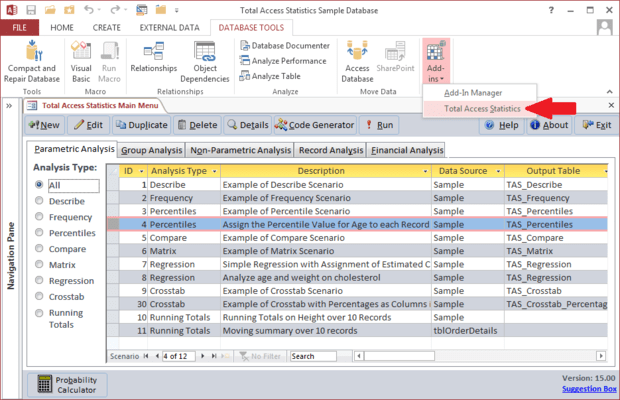
Total Access Statistics - Add-In 의 스크린샷Easily perform a wide variety of calculations on your Access programs. Designed specifically for Access, Total Access Statistics runs as an Access add-in (from the Tools menu), and offers a wide range of statistical functions to analyze your data. Your data can be in Access tables or linked from other sources such as SQL Server. Analyze multiple fields and an unlimited number of records at one time. You can even analyze data from multi-table select queries.

912,700₩
통화 선택

일반 적인 소비자 가격은 하기에 표시되어 있습니다. 고객님의 할인가격은 표시 하시려면 로그인 해주시기 바랍니다.

Total Access Statistics - for Access 2007

주문 ₩ 912,700 1 Developer License 다운로드 (12.1 MB)

Total Access Statistics - for Access 2003

주문 ₩ 912,700 1 Developer License
메이커 제품 번호: TAST11
다운로드 (11.0 MB)

Total Access Statistics - for Access 2002

주문 ₩ 912,700 1 Developer License
메이커 제품 번호: TAST105
다운로드 (10.3 MB)

Total Access Statistics - for Access 2000

주문 ₩ 912,700 1 Developer License
메이커 제품 번호: TAST95
다운로드 (10.4 MB)

본 제품은 GSA Schedule 가격으로 제공해 드릴수 있습니다.가격에는 ComponentSource의 기술지원 요금이 포함되어 있습니다. 또한 다운로드 판매를 하고 있는 상품의 대부분은 온라인 백업요금이 포함되어 있어서 구입날로부터 30일 이내에 새로운 버전이 발매된 경우 무료로 업그레이드해 드리고 있습니다.  모든 주문에 대해서 당사표준 계약조건 반품조건 의 내용이 적용됩니다. 다음의 경우,고객 서비스로연락하시기 바랍니다. (상기의 리스트에 게재되지 않은 대량의 라이센스나 구 버전 등의 라이센스 옵션이 필요한 경우)

일반 적인 소비자 가격은 상기에 표시되어 있습니다. 고객님의 할인가격은 표시 하시려면 로그인 해주시기 바랍니다.

What’s new in Total Access Statistics?

Access Data Projects (ADP) Support - Data in Access Data Projects (ADP) can now be analyzed. Perform statistical analysis on your SQL Server data with results stored in SQL Server tables. Data sources can be views, stored procedures, and user defined functions. Previously, Total Access Statistics only supported Access MDB/Jet databases which could be linked to SQL Server.

Use Parameterized Data Sources - All the statistical analyses now support parameterized queries as the data source. For ADPs, data sources may be stored procedures and user defined functions with parameters.

Data Analysis Enhancements - New Running Totals Calculations - Calculate running averages, sums, counts, etc. for a sorted list of values and placing the values in a field in your table. The running value can be for all records or a moving set of records such as the running average over the last 10 records. The values are stored directly in your data source in the fields you specify. Up to five fields can be updated at one time.

Enhanced Regression Analysis - For Regressions, the estimated Y value can now be added directly into a field in your data source. This is available where there’s only one regression equation calculated at a time such as a multiple regression or a simple or polynomial regression with only one independent (X) field.

Enhanced Percentile Analysis - For Percentiles, a new option is available to assign percentile values to records. If there are multiple percentile values for the same record’s value, you can choose to assign the low or high percentile to that record. Previously, it always assigned the low value.

Programmatic Interface Enhancements - A new option is available in the Statistics Function to let you specify the table containing parameters for parameterized data sources.


Easily perform a wide variety of calculations including regressions, percentiles, frequency distributions, correlations, t-tests, confidence intervals, crosstabs, ANOVA, group analysis, non-parametrics, Chi-Square, probability, and much more. An interactive Wizard interface guides you through the process with no programming required! All results are generated in the most flexible format: Access tables. Easily display the results in your forms and reports. Your analysis settings are automatically saved so you can modify them later or run them again when your data changes.

General Features

  • Runs from Microsoft's Access Tools, Add-in menu
  • Analyze data from any Microsoft Access table or linked table
  • Analyze data from any select queries including multi-table select queries
  • Analyze an unlimited number of records and multiple fields at one time
  • Output results to Microsoft Access tables
  • Interactive Wizard interface requires no programming
  • Analysis selections are automatically saved as scenarios which can be run again or edited in the future
  • Optionally specify fields to group sets of records
  • Optionally weight records based on the value in a field
  • Optionally ignore a numeric value or range of values
  • All calculations in double-precision
  • Single user and network compatible
  • Programmatic interface to add statistical analysis to your applications
  • Royalty-free runtime license

상품검색

검색어를 입력해주세요:

Award