Total Visual Code Tools - Summary

by FMS - Product Type: Add-In

Summary

Total Visual Code Tools by FMS

Ensure consistent coding standards across your development team. Total Visual CodeTools is a collection of 12 professional code-centric tools and utilities to help ensure standards, reduce coding time, and eliminate errors. Ideal for cleaning up code in inherited projects: automatically add error handling, standardize formatting, apply variable naming conventions, etc. Integrated into the VB IDE, Total Visual CodeTools allows your entire development team to share and enforce a consistent set of coding standards.

Total Visual CodeTools provides a robust set of tools to help you in the day-to-day development of Visual Basic (VB) and Visual Basic for Applications (VBA) code. The main features of Total Visual CodeTools are:
Code Cleanup: Modifies existing code to standardize visual style, indenting, error handling, commenting, naming conventions and more. Works according to the styles and conventions you define

Code Builders: A set of code builders that create new code using simple point and click forms. All generated code adheres to the standards you define

Code Delivery: Prepares your code base for distribution in non-compiled environments. For example, applications distributed with Microsoft Office applications are not compiled to EXE files, making it easy to break into source code. Code Delivery obfuscates and compacts code to make it run faster and more secure

Coding Tools: A variety of tools to make writing code in the Visual Basic/Office 2000 IDE easier

Enterprise Standards Management: Your organization's standards for error handling, commenting, variable naming conventions, and visual style can be centrally managed and enforced across your entire development group

Code Cleanup is one of the most powerful features of Total Visual CodeTools. Code Cleanup standardizes the code in your project to your specifications. Add error handling to procedures that lack it, standardize code indentations, apply your variable naming convention, insert comment structures, sort procedures, and many other powerful features and more. The result is code that is more readable, robust, and maintainable

Visual Style

Standardizing the visual appearance of the code is probably the single most important factor for code maintainability. Choosing this option tells Code Cleanup to do the following:

Standardize Code Indentation to a specified width with automatic indentation for programming constructs such as IF..ELSE..ENDIF, DO..LOOP, WITH..END WITH, etc

Split multiple lines on one line separated by colons into separate lines

Split single line If statements into separate lines with a closing End If

Split Dim statements for multiple variables on one line into separate lines

Standardize number of blank lines between procedures

Standardize maximum consecutive blank lines

Procedure Sorting

Procedures can be inserted in any order in VB/VBA. This may be good, but it can also create a mess. Code Cleanup makes it easy to sort the procedures in your modules including property statements in class modules.

Module Comments

Add a standard module header to the top of each module such as a project name, creation dates, copyright notices, and ownership rights. A complete list of all procedure names and procedure definitions can also be added.

Procedure Comments

Add comment headers to each procedure. Although the program cannot determine what the code is actually doing and write the comments for you, it can take much of the drudgery out of the process of creating consistent comment headers for each procedure.

Property Comments

Inserts the specified property comment template into all the property procedures.

Error Handling

Error handling is one of the key attributes of robust applications. This feature inserts error handling code into your procedures that lack error handling, and allows you to specify separate error handling routines for regular modules vs. class modules. Error handling can also be added in a way to be automatically updated in the future.

Variable Naming Conventions

Rename your existing variables to conform to naming conventions based on the variable type (Integer, String, etc.). Every variable is given a prefix or suffix identifying its type with additional options for global and module level variables.

Option Explicit

Insert "Option Explicit" into the declarations section of every module that lacks it. One of the cardinal rules of writing reliable and maintainable code is to explicitly declare all of your variables. By adding "Option Explicit" to your module, you are telling Access to require variable declaration.

Remove Line Numbers

Removes the line numbers in your code. This is useful if line numbers were added to your code (say with the Code Delivery feature), and you now want to remove it.

Total Visual CodeTools 2000 provides several useful builders for your day-to-day development efforts. These builders allow you to automate and simplify the following processes:

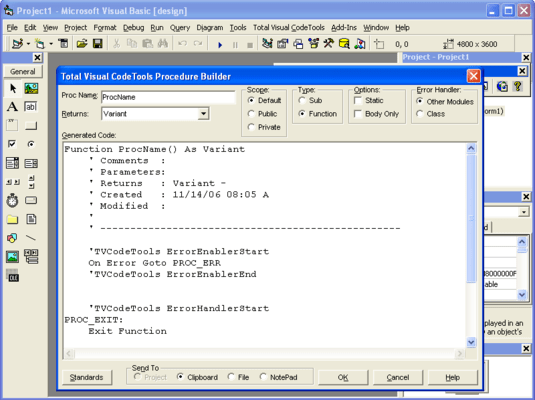
Procedure Builder

This builder allows you to quickly create new procedures that adhere to a set of standards that you define. It allows you to specify comment headers, error handling, indentation, naming conventions, and global procedure identifiers.

Property Builder

You can write property procedures in VBA that allow you to define properties of the objects you define in class modules. The process of creating such procedures can be difficult. You can use the Total Visual CodeTools Property builder to quickly build the property procedures necessary to implement a property in a class module.

Long Text/SQL Builder

Adding long SQL strings into a module and easily viewing it usually requires breaking it into a multi-line statement. The SQL Builder automates this by automatically converting a SQL string to a series of VBA lines that assign the string to a variable. Like SQL text, you may need to assign a long text string to a variable in your code. The Long Text Builder takes a string and automatically generates the multi-line code necessary to assign the text to a variable.

Message Box Builder

Message boxes are a common feature in VBA driven applications. Unfortunately, VBA does not provide tools for visually creating message boxes. Even experienced developers need to refer to the manual or help system to determine the values of icons and button options. The Message Box builder lets you visually create a message box statement or function.

Recordset Builder

Creating recordsets against a table or stored procedure is another of those routine tasks, which could be error prone. The SQL Builder generates code for you depending upon your chosen table object or stored procedure object.

Select Case Builder

Typing Select...Case statements can be a tedious process, especially when there are many conditions. The Select Case Builder allows you to quickly create such statements.

Code Delivery provides the tools for the final preparation of your code before distribution. Easily add line numbers to all of your code so you can take advantage of VB/VBA's ability to pinpoint the exact line where an error occurs. You can also obfuscate your code for situations where you need to distribute your source code, but are concerned about its misuse. Code Delivery provides the following code operations:

Line Numbering adds line numbers to every line of code. With this, if your error handler uses the ERL function, it can detect the exact line where a crash occurs

Variable Scrambling lets you rename all your variables, constants, user defined types, and enum to nonsense names that another user would have great difficulty deciphering. An option is available to not modify public variables

Remove Comments removes all your comments. There is a way to not delete certain comments if they are tagged

Remove Blank Lines removes all blank lines

Remove Indentations makes your code flush left

Remove Debug Statements removes this debugging code

Remove Stop statements removes stop commands

In addition to Builders, Cleanup and Deliver, Total Visual CodeTools 2000 offers additional tools to help your coding work

Close Code Windows: This tool makes it easy clean your development environment of code windows

Clear Immediate Window: This tool makes it simple to clear the content of the Immediate window

Block Commenter: This utility provides a better option to comment your code

VBE Color Schemes: A tool which helps to visually organize the appearance of your Visual Basic Editor

Total Visual CodeTools 2007: New Features

Supports Microsoft Access/Office 2007 - Total Visual CodeTools is fully supported under Access/Office 2007, and supports the new VBA syntax.

Unused Variable Analysis - The new Unused Variable Analysis feature helps you detect and eliminate unnecessary code from your project. Not only does it make your code more compact, the analysis may highlight problems where you thought the code should be doing or tracking something that it is not.

Code Builder Enhancements - Total Visual CodeTools 2007 includes various improvements that make the Code Builders more effective and easier to use, including:

The New Procedure Builder has options to add comments and error handling.

The New Property Builder offers options to include or exclude comments and error handling.

The Long Text/SQL Builder includes options for word wrapping SQL text on AND/OR and JOIN syntax.

The Recordset Builder has been completely redesigned to support Access 2007 ACCDBs; support Access database and project objects; support selecting the current and shared databases; support browse, add or edit recordsets; include options to use the field collections, and more.

The Message Box Builder has an easier selection of icons, and a reorganized set of options for the return variable.

The Select Case Builder lets you assign a variable for each case value, and automatically assign it a value with automatic incremental assignment for numbers.

The Copy Control Code Builder includes a Generated Text section so you can preview the new code before adding it.

The Format Builder is organized into tabs and allows you to add and save your own formats.

Builders automatically generate new code as you change options.

Coding Tool Enhancements -Total Visual CodeTools' Coding Tools have been improved with the following enhancements:

The Macro Recorder captures control key combinations, including clipboard operations. You can also record keystrokes in one module and play them in another.

Close Code Windows includes an option to close only code or object windows in Visual Basic.

The Block Commenter includes options to put the block of code in IF FALSE blocks, and allows you to add your comment text and remove indentations.

Code Cleanup and Delivery Enhancements - Total Visual CodeTools Code Cleanup and Delivery features are enhanced with the following new features:

Support for the new Access/Office 2007 Syntax

Improved viewing and searching of preview

Messages, including alerts, are stored in an HTML report

Option to permanently hide the initial warning screen (stored under Standards)

Improved performance

Improved Standards Section -Total Visual CodeTools has a revised Standards section with:

More control offered to individual builders

New error handing templates for forms/reports

Ability to add new data types for naming conventions

Consolidated Recordset Builder variables under naming conventions

A New Microsoft Office Access 2007 User Interface - Total Visual CodeTools 2007 has a more modern user interface including support for Windows XP Themes, Windows Vista, and manifest files in VB 6.0.

PartNumbers: PC-510665-158439 510665-158439 PC-510665-158442 510665-158442 PC-510665-158440 510665-158440 PC-510665-158443 510665-158443 PC-510665-158441 510665-158441

Publisher PartNumbers: VSCT11 VSCT11-25 VSCT11-5 VSCT11-U VSCT11-U5

PurchaseOptions: Total Visual Code Tools 2007 1 Developer License , Total Visual Code Tools 2007 1 Developer License Upgrade from Previous Version , Total Visual Code Tools 2007 5 Developer License , Total Visual Code Tools 2007 5 Developer License Upgrade from Previous Version , Total Visual Code Tools 2007 25 Developer License

Resources: Download the Total Visual Code Tools 2007 evaluation on to your computer - Expires After 14 Days

Operating System for Deployment: Windows 2000, Windows 98, Windows NT 4.0, Windows 95

Architecture of Product: 32Bit

Product Type: Add-In

Built Using: ActiveX Template Library (ATL)

General: Internet Enhanced, Includes Digital Signature

Compatible Containers: Microsoft Visual Studio 6.0, Microsoft Visual Basic 6.0, Microsoft Office 2007, Microsoft Office 2003, Microsoft Office XP, Microsoft Office 2000, Microsoft Access 2003, Microsoft Access 2002, Microsoft Access 2000

Product Class: Component Development Tools, Component Building Tools

Search Items: New Product Dec 04

Keywords: FMS Code Creation Editing Author

Product Search

Enter search words:

Award