ViewPro

by HexaTech - Product Type: Component / ActiveX OCX

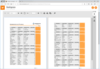
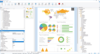
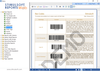
Build sophisticated runtime reports or technical drawings. ViewPro is a dynamic report generator for building reports or drawings that are difficult or impossible to achieve with a static report writer. It lets you place tables, graphs, pictures, and drawings onto text report pages, and allows you to visually or programmatically edit or modify reports that have been already generated at runtime. This allows you to generate reports that are unknown until being customized at runtime.

Average Review:  Average Review score for ViewPro - ActiveX/OCX - V7.0 based on 6 reviews.

From
$440.02
Price in

Our regular prices are shown below. Please logon to see your discounted prices.

ViewPro Standard Edition V7.0

Add to Cart $ 440.02 1 Developer License
Mfr. Part No: HT01S
Download (2.5 MB)
Add to Cart $ 146.02 Upgrade from ViewPro Standard Edition V6.0 or below
Mfr. Part No: HT01SU1
Verify Download (2.5 MB)

ViewPro Advanced Edition V7.0

Add to Cart $ 479.22 1 Developer License
Mfr. Part No: HT01A
Download (2.8 MB)
Add to Cart $ 185.22 Upgrade from ViewPro Advanced Edition V6.0 or below
Mfr. Part No: HT01AU1
Verify Download (2.8 MB)
Add to Cart $ 244.02 Upgrade from ViewPro Standard Edition V6.0 or below
Mfr. Part No: HT01AU2
Verify Download (2.8 MB)

Our prices include ComponentSource technical support and, for most downloadable products, an online backup and a FREE upgrade to the new version if it is released within 30 days of your purchase.  All sales are made on our standard Terms and Conditions and subject to our Return Policy. Please contact us if you require any licensing option not listed above including volume licensing and previous versions.

Our regular prices are shown above. Please logon to see your discounted prices.

ViewPro is a print preview control and report generator that you can integrate into your .NET and traditional applications. You can use ViewPro to build graphics and text-based reports or technical drawings, display the results in a scrolling and zooming viewer on your form and then print it.

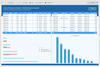
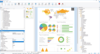
You can use ViewPro to create sophisticated run-time reports or technical drawings that are difficult or impossible to achieve with a static report writer. ViewPro lets you place tables, graphs, pictures and drawings onto text report pages. Furthermore, ViewPro lets you use RTF (rich text) strings to build complex text reports; and you can even embed RTF text inside table cells.

Visual Report or Layout Design

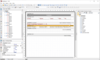
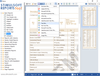
ViewPro Advanced even allows you to create your own run-time report designer. ViewPro also provides HexaTech Report Designer to allow you to visually design your report layouts. The source code for the Report Designer is also provided for you to modify and include into your own apps.

Application Areas

  • ViewPro can be used as a powerful print engine and report viewer for an enormously wide variety of printing and reporting applications. The following is just a partial list.
  • Produce text or graphics reports
  • Produce technical drawings
  • Produce charts, diagrams or graphs
  • Perform for publication automation
  • Visually fill out virtually any pre-printed forms such as bank checks, air flight tickets, medical bills, state and federal government forms etc.
  • Produce documents for faxing
  • Print .NET or VB forms in vector or bitmap format
  • Print mailing labels
  • Print tables or spreadsheets

Usage Description

The control has a single absolute coordinate system, with (MarginLeft, MarginTop) as the origin. It utilizes Twips as units (by default, 1 inch = 1440 Twips; one point = 20 Twips). The exception is font size, which uses points as units.

Text, paragraph, table, and picture are treated as objects, with their top-left corners and sizes specified by CurrentX, CurrentY, ObjectWidth, and ObjectHeight properties. Their other attribute properties may include object background color, object forecolor, object border color, and object border style etc. The control automatically takes care of the text wrapping and alignment.

ViewPro also supports a drawing object, which is a combination of polylines and polygons. Such a combination can form a very complicated drawing object. A drawing object can be scaled, rotated and translated. Data for a drawing object can be stored in a file, and retrieved using ObjectPath and GetObject properties.

What's the difference between Standard and Advanced?

ViewPro Standard is already very flexible for generating reports. But, if you find it is difficult (although not impossible) to use ViewPro to edit or modify a report that has already been generated or if you want to generate reports that are unknown until being customized by your users at runtime, you may like to use ViewPro Advanced (VPA) (32-bit only).

VPA supports all the features of ViewPro. The key difference is that VPA supports the AddObject method and keeps track of all objects that have been added to your report by the method. Because VPA knows what objects have been used in your report, it allows you to edit or modify the objects as well as export or convert your report to different file formats.

VPA can also be used to develop run-time report designers or editors, layout editors, or other visual editing tools. In fact, the HexaTech Report Designer was developed with VPA (the VB source code is included with the package).

Following are the feature summary for VPA.

  • Support drag-and-drop objects, which include Text, Paragraph, TextRTF, Table, TableRTF, pictures, and graphic primitives
  • Allow you to define your own custom drag-and-drop objects
  • Allow you to Copy, Paste, Delete, and Undo objects
  • Add or delete report pages
  • Save report design as ViewPro script file
  • Save report design as VPA Object script file
  • Save report design as templates in WMF or EMF Windows metafiles
  • Export or convert report to different file formats

Product Search

Enter search words:

Quick Links

Publisher

Primary Category

Related Products

Related Categories

Why buy from ComponentSource?

ComponentSource offers a unique global service, used by over 1,000,000 software developers worldwide.

More Info | About Us