by Pegasus Imaging Corporation - 상품타입: Component / .NET WinForms / ActiveX OCX / VCL / VC++ Class Library
ImagXpress Document by Pegasus Imaging Corporation
A comprehensive document imaging toolkit. ImagXpress Document, replacing ImagXpress Professional, is ideal for document imaging and forms processing application development. As a .NET and COM toolkit, it delivers single and multi-page TIFF support, embedded-image PDF support, TIFF tag handling, EXIF tag handling, file conversion, and support for 1 to 16-bit images. Build applications displaying documents and thumbnail images with fine details enhanced. ImagXpress Document provides sophisticated TWAIN scanning support, image editing and clean up (including image binarization, thresholding, anti-aliasing, deskew, despeckle, line removal, hole punch removal, blank page detection, scale to gray, save as grayscale, crop, rotate, scale, zoom), annotation/redaction capabilities, and advanced printing capabilities beyond Internet Explorer. ImagXpress Document includes ImagXpress, NotateXpress, TwainPRO, PrintPRO, and ThumbnailXpress.

Technical Notes
Programming environments: Win32 visual development environments
Sample code is included for: VB.NET, C#, VB, Delphi, VC++, HTML, Access
Deploys within .NET as a managed control and is fully compliant with .NET 1.0 and above
Can be used in any development environment that hosts ActiveX/COM controls
Includes 5 controls: ImagXpress, NotateXpress, TwainPRO, ThumbnailXpress, PrintPRO
Optimized for speed
Client/server Web development capabilities
Streaming image support from the Internet, allowing progressive image viewing online
Increased image processing speed available via an easy to use multiple image buffering mechanism
Synchronous or asynchronous multi-threaded control
BLOB database support
Compression & File Formats
Over thirty image formats are supported from files, memory and URLs
Read and write multi-page TIFF, PDF, ICO, DCX, and MO:DCA images
Multi-page TIFF support, including compacting of multiple page files, TIFF tag editing, Wang TIFF annotation compatibility, and 9 to 16-bit grayscale
TIFF format support includes Group 3 and Group 4, JPEG, JPEG Type 7, CCITT RLE, LZW, Pack Bits, and Deflate
Multi-page PDF support (embedded image PDF only - containing bitonal, grayscale, and color image data) including adding new pages into existing PDF files, and viewing pages from PDF files
Full Adobe PDF support is available by adding on the PDFXpress toolkit
Read and write single-page PDF, TIFF, JPG, GIF, RAW, BMP, WBMP, PNG, DCX, DIB, PIC, PBM, PCX, PGM, PPM, TGA, ICO, RLE, and more
Read WSQ and WMF image files
JPEG 2000, lossless JPEG, JPEG-LS, JBIG2, and WSQ compression support available as add ons
EXIF tag editing
Support for 1, 4, 8, 16, 24, 32-bit images
Support for 2 to 16-bit grayscale images, including window leveling
Beyond 8-bit, grayscale lossy JPEG image compression and decompression
Password protect images using .pic, a Pegasus Imaging Corporation format that allows greater compression and password capability. These files require Pegasus Imaging products to view and manipulate them
Thumbnail Image Support
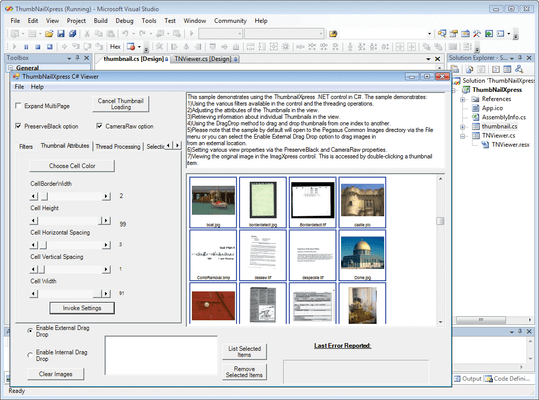
An easy, flexible, memory-friendly way to add thumbnail image display is provided by the included ThumbnailXpress control
Support a wide range of file formats (all those supported by ImagXpress and PDFXpress)
Multi-Page Image Support
Display thumbnails of directories and/or multi-page image files
Filter the contents of directories based on attributes such as file name, extension, date and time or size
Rapid Display
Generate thumbnails asynchronously to provide the fastest display of thumbnail images possible
Cache thumbnail images for quick scrolling and redisplay
Caching support provides options to control the amount of memory used
Horizontal or Vertical Scrolling
Create thumbnails in either vertical or horizontal mode (only one scroll bar will be active)
Scroll bar methods and events are available for creating custom solutions
Set the size of the container for thumbnail images
Flexible Captions
Set thumbnail display options, including spacing between thumbnails, border width, border color, background color and painting order
Set labels displayed with each thumbnail, either by automatically deriving from filenames, or programmatically controlled.
Take advantage of extensive font formatting options
Flexible Image File Selection
Select one or multiple thumbnails using the mouse
Create custom actions using mouse methods and events
Retrieve information about the thumbnail image including its height, width, and current status
Retrieve the name of the original image used to create the thumbnail
Document Image Processing and Editing
Comprehensive set of over 80 image processing functions
Automated 1 bpp image cleanup
Configurable Binarization and Half Toning
Anti-alias and scale to gray
Advanced merging capabilities
Autocrop
Automatic Deskew - Automatically detect and remove skew from bitonal images. Detection focuses on the content of the image, such as text and drawings, rather than the border. You can also specify acceptable skew angle, quality, and confidence levels
Despeckle - Use advanced technology to remove specks from bitonal images, including specification of speck size and reporting of number of specks removed
Line Removal - Remove lines of defined size, thickness, and other specifications, from bitonal images. Report the number of lines removed
Dilate - Add black pixels to extend objects vertically, horizontally, or diagonally
Erode - Remove black pixels from objects in bitonal images vertically, horizontally, or diagonally
Smooth Zoom - Enhance character clarity, using Smooth Zoom. Replace an image with a new image with width and height doubled and with pixels smoothed
Shear - Apply rotation of bitonal images, along only the vertical or horizontal axis, by the specified angle in degrees. Allow the user to specify the color with which to pad the image
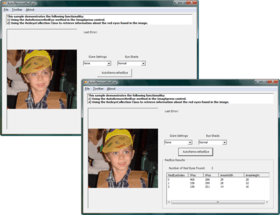
Hole Punch & Blob Removal - Locate and remove all black blobs (e.g. hole punch marks) in bitonal images, within a defined search area, based on size or density. Detect and report the number of blobs found within the search area
Blank Page Detection - Automatically determine that a page is blank within a set of bitonal images, by detecting if no objects are found to exceed the minimum object dimension. A border (top margin, left margin, right margin, bottom margin) within which to test for blank page, and minimum confidence, can be specified
Border Crop - Remove the black border around a bitonal image
"Preserve Dark" Detail Enhancement
Ideal for enhancing thumbnail images or images that are zoomed out
Preserve the dark pixels of an image when an image is scaled at ratios less than 1:1 (many pixels are averaged for the one displayed)
Avoid losing details in fine lines or fine text
Retention of image transparency
Color anti-aliasing and smoothing for zoomed
Adjust contrast, brightness, hue, saturation, gamma, and more (Display adjustment of contrast, brightness, and gamma)
24, 8, 4, and 1-bit color depth conversions with advanced palette control
Area and region processing
TWAIN Scanning
Acquire images from TWAIN scanners and digital cameras
Data source enumeration and selection
Enable/disable data source user interface
Multiple image acquisition
Read and Write basic G3/G4 TIFF, JPEG, BMP and PackBits
FTP upload capability
Specify image resolution, image scaling, units, and color depth
Negotiate for all standard device features such as image dimensions, location and resolution
Negotiate for optional device features such as: autofeeder enabling, brightness, contrast, image layout/frame, maximum image transfers, progress indicators, resolution, scaling, and units
Scan images faster and use less memory by transferring images from the data source in either Native or Buffered Memory transfer mode
Provides support for advanced TWAIN capabilities like barcode or patchcode detection and compressed data transfer directly from the scanner
Reduce data transferred between the scanner and the PC by transferring images from high-end scanners using the scanner's built-in compression
Catch illegal operations from errant TWAIN Data Sources before they crash the application. TwainPRO will return an error back to the application letting the application safely exit or continue
Tools
Built in tools with the ability to reassign key sequences to different tools, including hand tool, magnifying glass, pan and zoom, rubber band, rectangle (area and region), elliptical and free hand selection
Create customized interactive toolbar
Right click pop up menu, including image information dialog, tool selection, zoom
Automated support to maintain the Aspect Ratio for images with differing horizontal and vertical resolutions
Multiple image scaling algorithms
Advanced scrollbar and autosize features
Capture the contents of any window or section of any window
Built in timer with TimerTick event
Image property interface
Programmable image alignment within the control
1/1000 degree rotation increments
Annotation
Fully-programmable annotation support through NotateXpress
Add annotation and redaction capability to applications
Standard annotation objects include ruler, freehand, text, rectangle, ellipse, polygon, line, polyline, image and rubber-stamp
Create, display, save, restore, and password-protect annotations in independent layers
Brand annotations into images
Print annotations with the image
Add, delete, query, and manipulate annotation elements programmatically
Read and write the Wang/Kodak TIFF annotation format, and store all annotations in either TIFF files or in external files
Unicode (double-byte) characters are supported for languages with extended character sets
Supports opaque, translucent, and fully transparent backgrounds for notations
Supports opaque and translucent notations, useful for watermarking
Multiple layer support
.ANN annotation file format support (a proprietary format of TMSSequoia that was used in the ViewDirector SDK, providing a clear upgrade path to ImagXpress, and allowing for conversion from .ANN to the corresponding NotateXpress type)
Lock and unlock annotation data to the control rather than the image, enabling navigation of medical images (and others) without moving the annotations, such as patient name and ID
Printing
Advanced printing support through PrintPRO
Add printing features to applications with just a few lines of code
Create a custom printing interface for Internet Explorer to bypass I.E.'s printing interface
Print Preview is provided
Print to File, including multi-page TIFF and multi-page PDF output (containing G4 compressed image data)
Print text and graphic bitmaps
Print binary data
Print formatted and unformatted text, rotated text, graphics, margins, and any number of images on one or more pages
Text Capabilities - Set properties including location, alignment, font, rotation, attributes, color, background transparency and more
Set font objects in containers like Visual C++ using the Font Method
Graphics Capabilities - Line, point, circle, ellipse, rectangle, rounded rectangle, curve, arc, polygon, pie shapes and more
Provides complete control over how the graphics are drawn and filled including draw mode, draw style, width, fill color, and fill style
Printer Property Capabilities - View and change printer properties including the bin, paper size, print quality, orientation, duplex mode, etc.
Supports single and multi-page documents
Cancel print jobs that have been previously sent to the printer
Provides access to the printer's device context (DC) for custom control
Print single or multiple Device Independent Bitmaps (DIB) and Device Dependent Bitmaps (DDB) on any page
Bitmaps can be resized inside a rectangular area with or without maintaining the aspect ratio
Automatically maintain the bitmap's aspect ratio to print large images at any size
Set the system default printer
Select and set up a printer from a dialog box or query system printers
Print images transparently
Print collages, including precise placement of borders and other images by specifying pixels, twips, points, millimeters, centimeters, character or inches
What's New in ImagXpress V9.0
The components within the ImagXpress v9 SDK are updated to provide greater usability, functionality, flexibility, and performance.
Features Include:
Additional File Format Support
AutoCAD 2000 - DWG, DXF, DXB, DWF
HD Photo (JPEG XR) - HDP, WDP
More Camera RAW Formats
PTOCA – IBM’s AFP format with Presentation Text
ABIC– IBM compression format for check images
IPTC metadata support within TIFF and JPEG files
TIFF with intrinsic orientation (the file itself contains a rotation angle that can be interpreted during display)
JPEG 2000 images within PDFs
Compress to PSNR value in JPEG 2000 (to specify the amount of compression by quality rather than by target file size)
JPEG 2000 multithreading support for faster compression & decompression
Improved Rendering
Enhanced ability to load and process large images and files
Improved viewing of large PDF or CAD images
Query from Memory
Query image data (e.g. tags) from memory buffer or IO.Stream without loading the entire image
Save image data (e.g. tags) to memory buffer or IO.Stream without saving the entire image
New XML and XFDF Annotation Support
XML multi-page support for import and export of annotations via file or memory
PDF annotation import and export using XFDF via file or memory
Use with PDF Xpress to annotate PDF files
New Annotation Features
Note tool
Block highlight tool
Tooltip text support for individual annotations
Custom cursors
New arrowheads
Improved autosizing
Improved Unicode Support
Annotations
File names
Text
Printing
TWAIN Scanning
Enhanced TWAIN Scanning & Capture Support
New object-oriented .NET interface
Access to device’s capability settings and configuration dialog
Ability to maintain scanner settings for each session
JPG, J2K, JBIG2, TIFF-G4 compression types added to PDF save
TIFF write optimization (faster to write large multi-page TIFFs)
TW_STR32 type support
Save to stream or buffer
Unicode support
Enhanced Thumbnail Image Support
Directory drill down
Drag and drop thumbnails within and between thumbnail windows, and from other applications
Programmatic scrolling
Mousewheel support
Keyboard navigation
Load thumbnails from memory buffer or IO.Stream
Save thumbnail image as Bitmap, HBitmap, or Picture object
Set component, cell, text, and background colors
Associate user-defined data with thumbnail images
Generate thumbnails of CAD images
Improved Printing Support
New object-oriented .NET interface
Unicode support
Enhanced access – select printer by name
New User Interface Features
Smooth scroll
Mouse wheel support
Custom cursors
Easier Integration with Pegasus Imaging’s ISIS Xpress Toolkit
ISIS scanning and image capture is now included in the download and available for purchase separately as an add-on. Sample code is included
What's New in V8.0
Improved .NET Support - The ImagXpress, NotateXpress, and ThumbnailXpress .NET components use a newly designed object-oriented interface. These components are fully compliant with .NET 1.0 and above. The documentation for these components is fully integrated with Visual Studio
New Thumbnail Control - ThumbnailXpress provides developers with an easy, flexible, memory-friendly way to add thumbnail image display to applications. ThumbnailXpress is delivered as both a .NET component and COM control
Enhanced Document Imaging Features - ImagXpress v8.0 builds on previous technology to offer further enhanced document image processing features, including a subset of Pegasus Imaging's ScanFix technology
New Photo Editing Features - Includes Advanced Auto Red Eye Removal, Alpha Channel Support and Advanced Auto Color Correction and Auto Lightness Correction
New Compression and File Formats - Includes support for 9 to 16 Bit Gray TIFF, vendor-Specific Camera RAW Formats, TIFF JPEG Compression Type 7 and WSQ Fingerprint Decompression Added as Standard
New Annotation Features - Includes .ANN Annotation File Format Support and Medical Annotation Data Locking
Available in four editions;
Photo - includes ImagXpress, NotateXpress, TwainPRO, PrintPRO, and ThumbnailXpress
Document (formerly Professional in V7) - includes ImagXpress, NotateXpress, TwainPRO, PrintPRO, and ThumbnailXpress
View - includes ImagXpress, NotateXpress (Viewing functionality only), PrintPRO, and ThumbnailXpress
Standard - includes ImagXpress and TwainPRO
PartNumbers: PC-506212-156685 506212-156685 PC-506212-156689 506212-156689 PC-506212-156697 506212-156697 PC-506212-156693 506212-156693 PC-506212-156700 506212-156700 PC-506212-156701 506212-156701 PC-506212-156705 506212-156705
PurchaseOptions: ImagXpress Document V9.0 1 Developer License , ImagXpress Document V9.0 - Upgrades 1 Developer Upgrade License from ImagXpress Document V8.x , ImagXpress Document V9.0 - Upgrades 1 Developer Upgrade License from ImagXpress Professional V7.x , ImagXpress Document V9.0 - Upgrades 1 Developer Upgrade License from ImagXpress Professional V6.x , ImagXpress Document V9.0 - Runtime Licenses 1-4 Installations (Price per CPU) , ImagXpress Document V9.0 - Runtime Licenses 5 or more Installations (Price per CPU, Minimum quantity 5) , ImagXpress Document V9.0 - Server License 1 Server (CPU) License
Resources: See the ImagXpress Comparison Matrix, Read the ImagXpress ActiveX help file, Read the ImagXpress .NET help file, Read the ThumbnailXpress ActiveX help file, Read the ThumbnailXpress .NET help file, Read the TwainPRO ActiveX help file, Read the TwainPRO .NET help file, Read the PrintPRO ActiveX help file, Read the PrintPRO .NET help file, Read the NotateXpress ActiveX help file, Read the NotateXpress .NET help file, Read the Pegasus Licensing Information, Download the ImagXpress V9.0 ActiveX evaluation on to your computer - Displays Nag Screens, Download the ImagXpress V9.0 .NET evaluation on to your computer - Displays Nag Screens
Operating System for Deployment: Windows Vista, Windows XP, Windows Server 2003, Windows ME, Windows 2000, Windows 98, Windows NT 4.0, Windows 95, Windows NT 3.51
Architecture of Product: 32Bit
Product Type: Component
Component Type: .NET WinForms, ActiveX OCX, VCL, VC++ Class Library
Built Using: ActiveX Template Library (ATL)
General: Internet Enhanced, Includes Digital Signature, Marked as Safe for Scripting, Marked as Safe for Initialization, OCX96 Compatible, Supports Component Categories, Supports Apartment Model Threading
Compatible Containers: Microsoft Visual Studio 2005, Microsoft Visual Studio .NET 2003, Microsoft Visual Studio .NET, Microsoft Visual Studio 6.0, Microsoft Visual Studio 97, Microsoft Visual Basic 2005, Microsoft Visual Basic .NET 2003, Microsoft Visual Basic .NET, Microsoft Visual Basic 6.0, Microsoft Visual Basic 5.0, Microsoft Visual Basic 4.0, Microsoft Visual C++ 2005, Microsoft Visual C++ .NET 2003, Microsoft Visual C++ .NET, Microsoft Visual C++ 6.0, Microsoft Visual C++ 5.0, Microsoft Visual C++ 4.0, Microsoft Visual C# 2005, Microsoft Visual C# .NET 2003, Microsoft Visual C# .NET, Microsoft Visual InterDev 6.0, Microsoft Visual FoxPro 6.0, Microsoft Visual FoxPro 5.0, Microsoft ActiveX Control Pad, Microsoft Access 2003, Microsoft Access 2002, Microsoft Access 2000, Microsoft Internet Explorer 5.0, Microsoft Internet Explorer 4.0, Microsoft Internet Explorer 3.0, C++Builder 4, C++Builder 3, Delphi 7.0, Delphi 6.0, Delphi 5.0, IBM VisualAge for Basic, IBM VisualAge C++, Sybase PowerBuilder 7.0, Sybase PowerBuilder 6.0, Sybase PowerBuilder 5.0, Watcom C/C++, .NET Framework 2.0, .NET Framework 1.1, .NET Framework 1.0
Product Class: User Interface Components
Keywords: Scan scanning scanned scanner scans OCR optical character recognition Image images Compression compress compresses Conversion convert converting converts conversions image images processing imaging Pegasus Image Imaging Imaging image images Compression Compress compresses compressed ZIP Zipped zips decompress unpack pack Professional Partner Pegasus Imaging ImagXpress Activex com vcl Image Picture Bitmap processing graphic document scan view edit print annotation conversion Barcode ICR ISIS JPEG 2000 lossless JPEG TWAIN BMP DCX DIB PIC GIF JIF JPG PBM PCX PGM PNG PPM TGA TIFF WPG CCITT RLE G3/G4 LZW Pack Bits Deflate Multi-page TIFF tag editing ICO RLE WMF deskew despeckle brightness flip rotate contrast ImageXpress Express Xpress
개발처/발매처
주요 카테고리
관련 상품
관련 카테고리