Infragistics NetAdvantage AppStylist

by Infragistics - Product Type: Application

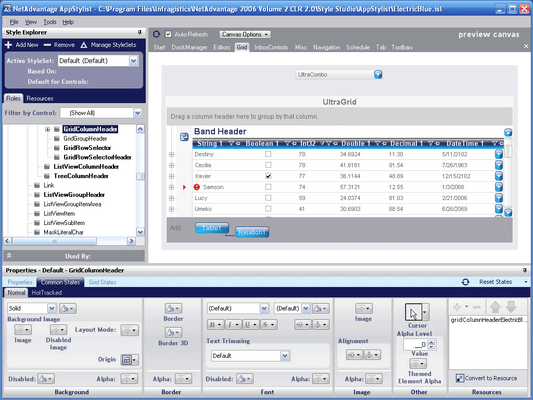
Screenshot of Infragistics NetAdvantage AppStylist - Application - 2008 Volume 2Easily create styles to be applied to applications. Infragistics NetAdvantage AppStylist is a stand-alone application that works outside of the Visual Studio IDE, and therefore allows visual designers to create and edit style libraries, effortlessly and intuitively. Infragistics NetAdvantage AppStylist styles every minute detail of your application with the help of the Appearance object and Presentation Layer Framework. Use the simple point-and-click interface and watch the styles change on the canvas.

From
$590.75
Price in

Our regular prices are shown below. Please logon to see your discounted prices.

Infragistics NetAdvantage AppStylist 2008 Volume 2

Add to Cart $ 590.75 1 Developer License with Subscription Download (27.1 MB)
Add to Cart $ 1,015.75 1 Developer License with Subscription and Priority Support Download (27.1 MB)

This product is available on the GSA Pricing ScheduleOur prices include ComponentSource technical support and, for most downloadable products, an online backup and a FREE upgrade to the new version if it is released within 30 days of your purchase.  All sales are made on our standard Terms and Conditions and subject to our Return Policy. Please contact us if you require any licensing option not listed above including volume licensing and previous versions.

Our regular prices are shown above. Please logon to see your discounted prices.

Infragistics NetAdvantage AppStylist is a stand-alone application that works outside of the Microsoft Visual Studio IDE, and therefore allows visual designers to create and edit style libraries, effortlessly and intuitively. Infragistics NetAdvantage AppStylist styles every minute detail of your application with the help of our unique Appearance object and Presentation Layer Framework. Use the simple point-and-click interface and watch the styles change on the canvas.

The user interface is divided into three intuitive, familiar sections:

  • Canvas - This section shows an example of your current style while dynamically updating whenever you change the style's settings
  • Style Explorer - This section lets you select styles that you want to modify as well as change those styles based on the role they will play in either a user interface or as an individual component
  • Properties - This section will be where most of your design efforts will take place, as it is the core section for changing the look and feel of different states

Using styles in your application is even easier than creating a custom style itself – simply load your style library. After loading the style library, the NetAdvantage controls will pick up their default StyleSets or use a StyleSet targeted specifically for that control. You don't really have to set anything else to make it work. However, if you need the exacting precision you can customize each control by setting its StyleSetName property to a custom StyleSet. You can also track if and when a StyleSet has been loaded with the StyleChanged event.

NetAdvantage AppStylist works across Infragistics Windows Forms controls in a single application or multiple applications powered by NetAdvantage.


Product Search

Enter search words:

Screenshot Gallery

Award