by Infragistics - Product Type: Component / ASP.NET MVC / .NET Class / HTML5 / jQuery
What’s new in Infragistics NetAdvantage for jQuery 2012 Volume 2?
- New Chart Series Types – Bubble, Polar, Spline, SplineArea, Scatter Line, Scatter Spline and Radial Area
- The new jQuery Chart includes – CategoryDateTimeXAxis, Axis Label Templating, Financial Indicators, Value Overlays and Motion Framework
- Merged Cells - The feature allows for sorted cells which have the same values to be merged into a single visual cell, for easier and more context-oriented data visualization.
- Checkbox Editor - New column format type “checkbox” automatically renders true/false boolean values as checkboxes. Moreover if you have Updating enabled, you can interact with the checkboxes to change the cell values.
- Outlook Group By - Combine and customize data for your applications by simply grouping (and ungrouping) common values or conditions – just drag and drop the column header to the group-by area.
- Row Selectors - Use the row selectors to quickly select a row to perform an operation.
- HTML5 Mobile – Several Mobile specific controls added, based on jQuery Mobile, specifically optimized for mobile devices.
- Mobile List/Grid Control – The List control allows you to show one column of data, drill down into details, have detailed templates, load items on demand, set various presets for filtering and sorting, and filter by keyword.
- Mobile Rating Control – The mobile Rating control has been written and adapted specifically for mobile form factors, allowing for easy interaction with touch gestures
- Metro Style – Get the sleek, sophisticated, modern look your users expect. The new metro theme, optimized for touch and touch targets, incorporates a precisely aligned type-based layout and high-contrast simple icons.
- Touch Support – Flick, pinch, pan, and zoom your way to the right data. It's easy to move between mobile devices and desktop applications when all of the controls are Touch enabled. All of the buttons and UI elements are bigger, and speical UI for features like Grouping, Multiple Sorting, and Mutliple Selection, among others. We’ve added panning, pinching support, as well as introduced the IG Scroller plugin, which provided a great touch scrolling experience with a custom scrollbar and acceleration/interia effects for controls such as the Grid, Tree, and Combo.
- Templating Engine – Use the fast, high performance Templating Engine with the Grid or Tree controls.
- Grid Virtualization – Seamlessly and continuously scroll both hierarchical Grid (when rows are being expanded and collapsed), and when columns are grouped with our newly implemented grid virtualization feature. The continuous virtualization also allows rows to have variable height.
- Support for MVC Validation – You’ll save time validating user input with enhanced support for MVC Validation. While improving the way your editors work, the MVC Data Annotations decorate your model classes with validation parameters. When bound to those model objects, the editors’ controls use those validation rules to verify any user input.
- MVVM Support with Knockout - KnockoutJS is an extremely popular MVVM framework among JavaScript and jQuery developers. Integration of Knockout with the jQuery grids lets you take advantage of the MVVM pattern within your web applications. This implies full two-way databinding support, both for cell/row updates, as well as add row/delete row.
- ComboBox – Load on DemandThis release you can control how the data gets loaded into the combo and make your applications.
What’s new NetAdvantage for jQuery 2011 Volume 2?
The continued focus on grid performance improves the grid’s data display and new features like Outlook GroupBy and hierarchy have been added. This release also includes an intuitive auto-suggest ComboBox, a Tree with checkboxes to simplify the display of hierarchical data and an HTML Editor.
Data Grid
Use the jQuery grid to get more interactivity out of your static HTML tables and data. The latest iteration offers more line of business features.
- Group By - Users can customize and combine data for their Outlook applications simply by dragging and dropping the column header to group (and ungroup) common values and conditions.
- Editing - Enter data within the cell, using templates with custom editors that match the column’s data type. This allows for adding new rows and deleting rows within the grid. In addition, validations can be done real-time within the grid cell.
- Column Hiding - Don’t want particular columns to be visible on the grid, but still would like them to be accessible from the data source? Users can now simply hide them.
- Column Resizing - Users can easily customize widths to alter their grid views to their preference.
- Row Selectors - Use the row selectors to quickly select a row to perform an operation.
- Column Summaries - Display column summaries showing aggregates of values in the cell. It comes with the standard sum, average, max, min and count aggregate formulas built-in.
- Tooltips - Easily enable tooltips over cells that contain lengthy data.
- Feature Chooser - Users can now choose features they want the grid to support by using the new feature chooser.
Hierarchical Grid
Show multiple parent-child relationships in an expandable, hierarchical data grid. Users can drill down, as well as add, edit, delete, select, sort, group and filter rows using their mouse or keyboard.
- Group By - Combine and customize data for your Outlook applications by simply grouping (and ungrouping) common values or conditions by simply dragging and dropping the column header to the group-by area.
- Editing - Enter data within a cell, using templates with custom editors that match the column’s data type. You can also easily add new rows or delete rows within the grid. In addition, validations can be done real-time within the grid cell.
- Column Hiding - Don’t want particular columns to be visible on the grid, but still would like them to be accessible from the data source? Users can now simply hide them.
- Column Resizing - Users can now easily customize column widths, to alter the views to their preference.
- Column Summaries - Display column summaries showing aggregates on the value of cells in that column. It comes with the standard sum, average, max, min and count aggregates built-in.
- Tootips - Easily enable tooltips over calls that contain lengthy data.
- Row Selectors - Use the row selectors to quickly select a row to perform an operation.
- Feature Chooser - Users can now choose feature they want the grid to support by using the new feature chooser.
- Selection - Full selection capability is built in the hierarchical grid, allowing users to select a row, cell or column to trigger an action in the application.
- Load on Demand - Smart-load on-demand and lazy creation of elements are part of the control. Data can be fetched on the fly when the user expands a row that contains child records. Similarly, the client elements are created only when there is a need for it, optimally utilizing both bandwidth and client memory.
- Animations - When the user expands or contracts a row, animations are used to visually enhance the user experience when working with the hierarchical grid control.
- Multiple Band Hierarchy - No need to stop at one parent-child data relationship. The Hierarchical Grid lets you have as many as you want, related by a data key from one level to the next.
- jQuery Theme Roller Support - Whether you use a style from the Theme Roller library, or find something in the open source community and it adheres to jQuery standards, you can apply it to the Hierarchical Grid control.
ComboBox
Using this fully featured Combo Box control with intuitive Auto-Suggest, Auto-Complete and Auto-Filtering built-in, your users will be able to find the choices they are looking for much more quickly. Single/Multi-Select capabilities are also available with the Combo Box.
- Auto-Suggest - As the user types, the Combo's auto-suggest picks up the entered text and displays a list of suggested values.
- Auto-Complete - The Combo can auto-complete the text for the user in the input area, without the user having to type the whole word.
- Single/Multi-Select - The Combo Box can be used as a single selection or a multi-select drop down list, using checkboxes via both keyboard and mouse.
- Match Text Highlighting - As the user enters value in the edit box, the Combo Box also highlights the text within the suggested list items.
- Items Templates - Customize every item in the drop down list by using templates.
- Single/Multi-Columns - Use the Combo Box as a single list item display, or make it a multi-column combo. Both states are easy to configure and use.
Tree
Simplify the look of your hierarchical data into a web-based tree, depicting familiar parent-child relationships between nodes of information. Sporting a responsive user experience and high performance design, your users will love its comprehensive function features like checkbox selection, node templates and more.
- Load on Demand - Smart load on demand and lazy creation of elements is built in to the tree control. Data can be fetched on the fly when the user expands a node. Similarly, the client elements are created only when there is a need for it, optimally utilizing both bandwidth and client memory.
- Node Templates - Tree nodes can be fully customized via templates to display much more, including images.
- Checkboxes - Enable checkboxes to let the user check and uncheck nodes.
- Keyboard Navigation - Use only the keyboard to navigate within the tree control. Expand, collapse, select, check or uncheck all node actions can be performed using a key press.
- Excel Library
- Import and export Microsoft Excel workbooks in high-fidelity XLS/XLSX/ExcelML file formats. With absolutely no Excel dependency, your jQuery application can run completely independent of Excel, and Excel does not have to be installed alongside your application.
- Shapes Support - Flip simple shape types - such as rectangles, right triangles and line shapes - horizontally or vertically, or change their outline or fill colors.
- Data Validations - Constraints can now be placed on the values entered by users in Microsoft Excel. All data validations, including drop down lists and custom formula validations, are supported.
- Print Titles - Groups of rows and columns can now be set to be repeated on each printed page, when a user prints the worksheet in Microsoft Excel.
- Print Area - Rectangular ranges of cells can now be set to be printed on their own pages, when a user prints the worksheet in Microsoft Excel.
- Page Breaks - Horizontal and vertical page breaks can now be added to the worksheets.
HTML5 Charts
New chart functionality offers support for a full range of business, scientific and financial charting scenarios, as well as animations and trend line capabilities.
- Chart Types - The jQuery Chart control offers a full set of dynamic HTML5 business charts right out of the box, including bar, line, polar, range, step, spline, OHLC and candlestick charts, as well as technical indicators.
- Panning & Zooming - Full support for panning & zooming chart data using the mouse and keyboard.
- Multiple Series - Compare data from two difference sources. The control makes it easy to bind the chart to more than one series.
- Live Updating - Update the data as it happens with the live updating feature. The chart will automatically update based on the new data feeds as they are added to the data source.
- Legend - A legend can be applied to help with the understanding of data being presented from different series.
- Trend Lines - Built into the charts, trend lines show visual projections of data based on the trend formula selected, making it easy for the reader to get a snapshot of the trending data.
- Animations - Charts can animate when using the motion framework to help the data tell the story over time. Animations can be used to smoothly transition between binding charts to different data sources.
- Motion Framework - The motion framework helps the data tell a story over time, by reading through the data and updating the data points as they happen.
- High Performance Rendering - The charts can display millions of data points, and update with high frequency to hand real-time data feeds.
HTML Editor
Give your end users a comprehensive HTML editing experience with their web browser by adding the jQuery WYSIWYG editing tool to your applications. The WYSIWYG editor offers rich text formatting, the ability to insert images, links, lists and tables; clipboard support and source and design views.
- Rich Text Formatting - Standard rich text formatting capabilities are available in the jQuery HTML Editor. Formatting options available include picking font family and font size, and altering text to be bold, underlined or italicize, in addition to changing text alignment settings.
- Insert Images, Links, Lists and Tables - Add images, links, lists and tables directly within the content area of the editor.
- Clipboard Support - Support for cut, copy and paste is built into the HTML Editor control, making it easier for users to work interchangeably with other rich formatting editing tools.
- Source & Design Views - The WYSIWIG design surface makes it easy to do rich content editing for any type of user. Those who understand HTML constructs can switch to source view and make content edits there as well.
ASP.NET MVC and jQuery Controls for Web Developers
NetAdvantage for jQuery is a suite of lightweight, high performance jQuery controls (as well as controls for ASP.NET MVC) for the client-side that enable developers to create better Web site experiences in browsers across platforms and on devices backed by any server as their data endpoint.
Data Source - The jQuery data source is the brain behind all data operations and manipulation (i.e., paging, sorting, filtering, etc.) taking place for data bound views (our jQuery grid, for example) in your NetAdvantage for jQuery-powered user interface. The jQuery data source understands the data operations, and depending on your Web application's connectivity, takes all necessary steps to provide your data back to the data bound view. You can easily consume this data source yourself in jQuery or ASP.NET MVC to handle many of your own application's data access scenarios. With the jQuery data source, you can take your static HTML tables that exist on your Web pages today and with as little as one line of script, present them to users as new, dynamic jQuery grid views. It can even handle mashup scenarios with its local paging, sorting and filtering, as well as hierarchical data through its primary/foreign key constraints and indexing ability.
Date Picker - By combining all of the capabilities of the jQuery date picker with all of the enhanced date editing functionality of the date editor control, your Web applications gain a lightweight dropdown jQuery date picker (with accompanying controls for ASP.NET MVC) that's fully stylable and works across browsers. Deliver this dual functionality (of an inline date edit field with the option to click on a date from a monthly calendar) anywhere you need to within your Web applications and data grids to improve the user experience.
Editors
- igCurrencyEditor
- igDateEditor
- igMaskEditor
- igNumericEditor
- igPercentEditor
- igTextEditor
File Upload - Upload file contents to your server with this jQuery file upload control with accompanying controls for ASP.NET MVC 2 and 3. Your Web application users can upload single or multiple files simultaneously using AJAX. Their user interface remains responsive and their work is never interrupted since their file transfer takes place asynchronously. A built-in progress indicator will let users know how far along their file upload operation is. This file upload control has highly configurable settings, so you have complete flexibility over customizing the file upload experience.
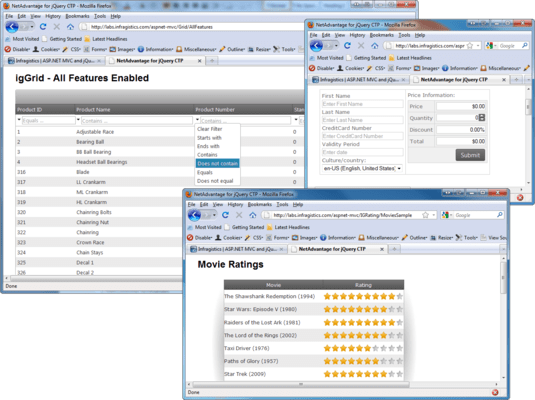
Grid - The jQuery data grid control can take the tables on your Web pages and display them with rich interactivity to give your users a far superior user experience compared to what they had with static HTML tables. This jQuery grid control is high performance, with built-in DOM virtualization so it can show millions of records instantly, by rendering only the HTML necessary to show the table on-screen. It adds dynamic paging, sorting and filtering behavior that's driven entirely on the client-side, as it's a jQuery control (with accompanying controls for ASP.NET MVC 2 and 3), and it supports jQuery standards like jQuery Client Template support and Theme Roller stylability with CSS.
Rating - The jQuery rating control provides a lightweight, jQuery control (along with controls for ASP.NET MVC 2 and 3) with HTML5 support for use when collecting ratings from end users. Frequently found on today's collaborative, social media sites and Web 2.0 applications, ratings like those displayed in a flexible jQuery rating control like igRating are useful whenever you're collecting feedback from your users on products, services or other points of interest. Harvest crowd opinion today to separate the good from the bad, with this jQuery rating control.
Video Player - The jQuery video player control (and accompanying controls for ASP.NET MVC 2 and 3) gives you the ability to play streaming video in your Web applications. Using the new HTML5 video tag supported by modern browsers and its ability to play streaming video in many different standard formats, this jQuery video player control lets your users interact with online streaming video content. It includes standard video playing options like play, pause, display in full screen and volume control. Its slider in the control bar reflects key information about your video content and where in the video's playback the user is. including a thumb pad showing where in the video the current playback is, and bookmarks that identify key frames to which the user can jump.
Highlighted Features
NetAdvantage for jQuery is not tied to the ASP.NET platform, it's what is called server-agnostic, positioning you so that your Web applications can capitalize on the trends emerging in what users expect from their Web-based solutions. Standards compliance for accessibility from any device, collaboration through controls like the jQuery rating control, and streaming video like that provided by the jQuery video player are increasingly important today--and into the future. It's exactly what you need if you're using jQuery and JavaScript to build applications targeting Web browsers.
- Pure Client-side Controls - Pure client-side controls that are server framework-agnostic and target desktop browsers.
- Data Templates - Use the latest jQuery client template support within the data grid which you won't find anywhere else.
- DOM Virtualization - Within the jQuery data grid it uses DOM virtualization so you can load and scroll very large data sets without lag or a huge memory footprint. This is unlike ordinary virtual scrolling where data is fetched through AJAX.
- HTML 5 - Include a HTML 5 video player control that works in both ASP.NET MVC and Web Forms applications.
- CSS 3 - Improve performance by eliminating img tags and making extensive use of CSS 3 image sprites for fewer HTTP requests and faster page loads. All controls render jQuery UI Theme Roller-compatible CSS class names enabling complete stylability.
- Controls for ASP.NET MVC - Provide you with a full set of extensions to the client controls enabling ASP.NET MVC applications to take full advantage of Microsoft Visual Studio IDE features like LINQ data binding, Fluent syntax support, paging, sorting and filtering to build full blown MVC applications--all out of the box. This is "MVC done right," you are never forced to compromise your architecture because the UI controls are designed for the platform from the beginning.