von Infragistics - Produkttyp: Komponente / ASP.NET WebForms / ASP.NET AJAX (ATLAS) / .NET WinForms / .NET Class / .NET WPF / 100% Managed Code / AJAX
Bitte beachten Sie, NetAdvantage for .NET + WPF ist umbenannt wurden und heißt jetzt NetAdvantage for .NET.
Infragistics NetAdvantage for .NET + WPF by Infragistics
Add WPF (Windows Presentation Foundation) and .NET user interface functionality to your applications. NetAdvantage for .NET + WPF includes controls, designed and developed specifically for the Windows Presentation Foundation (WPF) platform plus you also get NetAdvantage for .NET which is a comprehensive presentation layer toolset for designing commercial class user interfaces for Windows Forms, ASP.NET, Tablet PC. Infragistics NetAdvantage for .NET include grids, scheduling, charting, toolbars, menus, listbars, trees, tabs, explorer bars, UI and editors. NetAdvantage for WPF includes business-grade developer components for WPF, including datagrids, carousels and editors, with built-in visual themes including Windows Vista Aero and Office 2007. Developers can start building with WPF toolset now and can take advantage of the pure WPF platform features including: high resolution graphics, rich styling and animation capabilities and integrated UI virtualization technology.

Below is an introduction to the NetAdvantage for .WPF components:
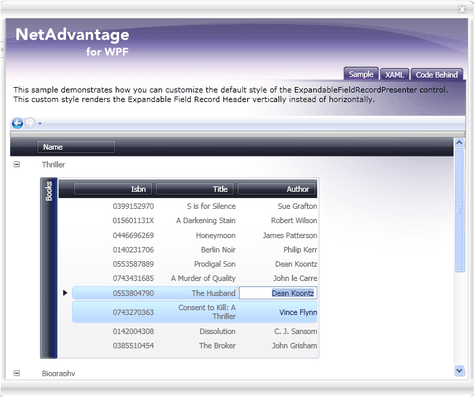
xamDataGrid – a flexible WPF data grid, the xamDataGrid brings the time honored familiarity of tabular style data presentation and infuses it into WPF.
Data binding - simplify development with a single data binding property that supports a wide variety of data sources, including the XmlDataProvider and ObjectDataProvider, and more traditional objects such as DataSets, Arrays or Collections
True hierarchical data rendering - automatically detect and display complex, hierarchical data structures
Field sorting, grouping and resizing - all of the basic data organization features your users expect
Seamless data editing experience - easy new record creation, inline data editing, and convenient data editing controls
Performance - utilizing WPF’s native UI Virtualization technology, combined with Infragistics Lazy Loading technology, the xamDataGrid can handle thousands of data records, letting your users consume volumes of information
Presentation - designers can leverage the styling and layout capabilities of the xamDataGrid to design applications with highly stylized, immersive user interfaces
xamCarouselPanel - highly flexible layout control, which can best be used for simplified object layouts such as for navigation. The xamCarouselPanel gives developers and designers alike a tool with which to create unique, interactive and immersive applications.
Path-based layout - based on the WPF Path object, the xamCarouselPanel gives you layout flexibility
Path Effects - utilize five types of Path Effects to add flair to your user interface
xamCarouselListBox - the familiarity of the ListBox control meets the innovative layout capabilities of the xamCarouselPanel.
Simple and familiar object model of the standard ListBox control, including basic data binding capabilities
Leverages the xamCarouselPanel for layout, giving you the flexibility you need
xamDataCarousel - the xamDataCarousel is a flexible data layout control.
Based on the same data architecture as the xamDataGrid, giving you databinding capabilities, including hierarchical data layout. Also includes Grouping and Sorting capabilities
Leverages the layout capabilities of the xamCarouselPanel allowing you to create modern data-driven user interfaces
xamDataPresenter - the xamDataPresenter combines the xamDataGrid and the xamDataCarousel into a single control, allowing you to provide a flexible and customizable user interface to your users.
Utilizing the xamDataGrid and xamDataCarousel to give you all the data management and layout features you need
Allow your users to choose their data View with a single property setting. Easily change from traditional tabular view to carousel view
xamEditors - included in this release are the xamTextEditor and xamMaskedEditor data editing controls. Use as stand-alone editors, or easily integrate into the xamDataGrid, the xamEditor controls help you ensure the validity of your user-entered data.
Template based architecture gives you maximum control over the control's user interface
Easily integrated into the xamDataGrid to extend the data editing experience through your application
xamChart - The xamChart is a visual WPF control that presents your heavy-duty data using graphics to enable users to more quickly analyze and understand its relevance. This WPF chart control displays values using columns, pie wedges, cylinders and more using the advanced graphics rendering capabilities inherent in the WPF platform.
Chart Types - The xamChart control supports 25 different chart types, which will allow you to select the perfect look to accent the data in your application.
xamChart includes all of the following chart types:
Area chart
Bar chart
Bubble chart
Candle chart
Column chart
Cylinder bar chart
Cylinder chart
Doughnut chart
Line chart
Pie chart
Point chart
Scatter chart
Scatter line chart
Spline chart
Stacked 100% area chart
Stacked 100% bar chart
Stacked 100% column chart
Stacked 100% cylinder bar chart
Stacked 100% cylinder chart
Stacked area chart
Stacked bar chart
Stacked column chart
Stacked cylinder bar chart
Stock chart (OHLC bar)
3D Rendering - 3D graphics rendering can be turned on for many chart types. Control the perspective, texture and lighting to make an affective display that impresses while it also informs.
Composite Charts - Simply add a couple series to the xamChart control and bind them to your data. By making each series render using a different chart type you can create complex composite charts that combine all the points of view that you need to best describe the data's importance.
xamRibbon - The xamRibbon control is a menu control that replicates the Microsoft Office 2007 Ribbon functionality in a Microsoft Windows Presentation Foundation (WPF) application. Instead of using the plain, default, drop-down menu of decades past, you can use xamRibbon to give your application a stylish look and feel. Not only can you improve your application's look and feel, you can also improve usability by using xamRibbon's many features.
Application Menu - The application menu is the main menu of the application. The application menu is divided into three separate areas:
The left area displays buttons intended for file operations
The right area displays buttons similarly to the left area. Another use for the right area might be a most recently used list
The bottom area displays buttons such as application options or an exit button
Quick Access Toolbar - The Quick Access Toolbar (QAT) is a small, user-configurable toolbar that is always visible either above (default) or below the Ribbon control. The QAT's versatility is shown when adding any of the Ribbon tools to it; in fact, you can add an entire Ribbon group to the QAT with ease.
Tabs and Tab Groups - If you have ever used a Tab in an application, xamRibbon's object model will quickly become familiar to you. The xamRibbon control includes a collection of tabs, each with a collection of groups, each group with a collection of tools. This structure allows you to organize tools into functionally-related application tasks that your end users can easily discover.
xamComboEditor - The xamComboEditor is an editor control that provides a drop-down list from which your users can select an item. As with the other xamEditors, the xamComboEditor can be plugged in to the xamDataGrid for use as an in-line data editor with drop-down list capabilities. Now it's easy for your users to edit the value of a data grid or data presenter cell from an enumerable collection. This can help make your WPF data-driven applications more user friendly, and decrease the risk of typographic errors during data entry.
Theme Packs - NetAdvantage for WPF includes 15 Theme Packs, designed by the Infragistics Visual Design Group, making it easy for you to give the controls a clean and modern look with a single property setting.
Windows Themes including Luna (Windows XP), Aero (Windows Vista) and Royale (Windows Media Center Edition)
Office 2007 Themes including Office 2007 Black, Office 2007 Blue and Office 2007 Silver
Infragistics designed Themes include: Hulk, Leaf, Fall, Lipstick, Wind, Water, and Onyx
Fully supporting the Windows Presentation Foundation (WPF) platform, NetAdvantage for WPF controls enable a clear separation of application look & feel from behaviour, allowing teams of visual designers and software developers to collaborate more naturally. Visual Designers can style NetAdvantage for WPF control’s look and feel using XAML and Microsoft Expression Blend and software developers can define control behaviour using managed C# or VB.NET code with Visual Studio.
Infragistics NetAdvantage for .NET includes:
Windows Forms Rich Client Components
WinGrid
WinCalcManager
WinChart
WinCombo
WinTrackBar
WinDataSource
WinDockManager
WinExtras
WinAnimation
WinButton
WinCalculator
WinDropdownButton
WinPopupContainer
WinLabel
WinFormattedLinkLabel
WinFormattedTextEditor
WinProgressBar
WinScrollBar
WinStatusBar
WinTooltipManager
WinEditors
WinCalculator
WinCalculatorDropdown
WinCheckEditor
WinColorPicker
WinComboEditor
WinCurrencyEditor
WinDateTimeEditor
WinFontNameEditor
WinFormattedLinkLabel
WinMaskedEdit
WinNumericEditor
WinOptionSet
WinProgressBar
WinTextEditor
WinExplorerBar
WinGridExcelExporter
WinGroupBox
WinInkProvider
WinLayoutManagers
WinListbar
WinListView
WinPrinting
WinPrintDocument
WinPrintPreviewControl
WinPrintPreviewThumbnail
WinGridPrintDocument
WinSchedulePrintDocument
WinSchedule
WinDayView
WinWeekView
WinMonthViewSingle
WinMonthViewMulti
WinCalendarCombo
WinCalendarInfo
WinCalendarLook
WinSpellChecker
WinTabbedMdi
WinTabs
WinToolbars
WinTree
Web Forms Components
WebAsyncRefreshPanel
WebGrid
WebCalcManager
WebDialogWindow
WebImageViewer
WebSplitter
WebChart
WebCombo
WebDateChooser
WebEditors
WebCurrencyEdit
WebDateTimeEdit
WebMaskEdit
WebNumericEdit
WebPercentEdit
WebTextEdit
WebGridExcelExporter
WebGroupBox
WebHtmlEditor
WebImageButton
WebListbar
WebMenu
WebNavBar
WebPanel
WebSpellChecker
WebTab
WebToolbar
WebTree
WebResizingExtender
WebSchedule
WebCalendar
WebCalendarView
WebDayView
WebMonthView
WebScheduleInfo
WebScheduleSqlClientProvider
WebScheduleOleDbProvider
WebWeekView
NetAdvantge also includes NetAdvantage AppStylist.
What’s new in NetAdvantage for WPF 2008 Volume 1?
xamDockManager - NEW!
Enable end users to reconfigure their work environment in ways that make the most effective layout of screen real estate by docking, un-docking and repositioning panels.
Easily deliver rich and usable UIs with an easy-to-use docking manager control that handles all of the layout mechanics for you.
xamDataGrid adds Summary Fields
The xamDataGrid and xamDataPresenter GridView feature new row aggregation features that allow your data-intensive grids to summarize values calculated with any of several mathematical calculations such as min, max and average.
Summary fields have been designed with the extensibility to allow developers to plug-in their own calculation logic, enabling summary calculations of arbitrary complexity.
What’s new in NetAdvantage for .NET 2008 Volume 2?
Windows Forms:
Infragistics WinGrid - Enhanced
CardView Printing – CardView is a display mechanism in the WinGrid that enables developers to provide an alternate view of data, similar to that of the Microsoft Office business cards view. This added functionality provides an easy mechanism for the developer to print the grid while in this display mode.
Rotated Column Headers – Now you can create new column arrangements by rotating the column header.
Row Edit Templates – Provides a dialog box that has knowledge of the underlying WinGrid leading it to give your end users an easy mechanism for entering information.
WinChart - Enhanced
TreeMap – TreeMap is a new chart type providing visualization of hierarchical and relational data through nested rectangles.
WinCombo - Enhanced
AutoComplete Mode – New ways to filter through data in a mechanism that can be compared to the intuitive suggest mode popularized by Google® and now enabled in the WinCombo control.
WinValidator - NEW
The WinValidator is an extender control enhancing the experience of working with editable fields by helping developers with their validation logic. This greatly reduces the amount of code developers must write, and improves the validity of data submitted by end users.
WinDockingManager - Enhanced
Visual Studio 2008 Docking Style – End users can now Control-Tab through their application and get the same rich, live preview in their line of business solutions to which developers using the Visual Studio 2008 IDE have become accustomed.
ASP.NET:
WebSlider - NEW
WebSlider is a light-weight, easy-to-use ASP.NET-based slider (a.k.a. track bar) control. Designed to enable developers to add another familiar UX pattern to their application.
WebHierarchicalDataSource- NEW
The WebHierarchicalDataSource control aims to simplify shaping data to fit hierarchical UI displays by leveraging the familiar Data Source control pattern, and allows developers to easily construct complex hierarchical data views from standard flat data sources such as the SqlDataSource or the ObjectDataSource controls.
What’s new in Infragistics NetAdvantage for .NET 2008 Volume 1?
Windows Forms:
Now with full compatibility for Visual Studio 2008
WinTrackBar – NEW - The TrackBar enables users to select an item in scale by sliding a tickmark across a line. Its value can be used for setting colors or other items that may be on a numeric line
WinTree - Enhanced - The TreeView in Vista took on an animation as the user scrolls to deeper levels. This negates the need for a horizontal scrollbar and allows the end user to focus purely on the node they have selected. This enhancement increases the usability of the tree
WinListView – Enhanced - An additional setting has been added to WinListView that enables auto resizing of columns which is consistent with functionality found in the Microsoft ListView
ASP.NET:
Now with full compatibility for Visual Studio 2008
WebDialogWindow – NEW - The WebDialogWindow is an ASP.NET-based dialog window control. Designed to replicate the functionality of a traditional standard Windows Forms dialog window, the control allows developers to easily include both modal and non-modal dialog window functionality in their Web applications
WebImageViewer – NEW - The WebImageViewer control is a simple ASP.NET-based control which allows developers to easily add image display capabilities to their Web applications. Images are displayed in an image strip fashion, horizontally or vertically, and can be scrolled or dragged by the end user using a smooth animation to transition the image strip. The control is useful both in basic image gallery scenarios, as well as image-based navigation scenarios
WebSplitter – NEW - The WebSplitter control is an ASP.NET-based control that allows developers to easily subdivide sections of their web page, which end users can then resize or even collapse. The control simulates the familiar splitter user interface found in many modern Rich Client applications and allows an end user to control the layout of their workspace, optimizing it for their tastes and performance. The control also allows developers to avoid the use of HTML frames in applications which provide the end user pods of information
What's new in Infragistics NetAdvantage for .NET 2007 Volume 3?
Windows Forms:
Infragistics WinNavigationBar™ - The new WinNavigationBar breadcrumb control drives users through any hierarchical navigation model your application uses, without the need for multiple wizard dialogs
Navigation Toolbar - WinToolbars™ enhancement - delivers ready-made forward, back, and recent history navigation
Vista Look without Vista OS - Get the look of Vista without WPF due to Vista-style enhancements to the WinEditors™ and WinScrollbar™ controls
WinChart™ - Export your charts to PDF or XLS, now with NEW Histogram chart type. Plus many more enhancements
ASP.NET:
WebChart™ - Export your charts to PDF or XLS, now with NEW Histogram chart type. Plus many more enhancements
WebHTMLEditor - New features in the WYSIWYG (What You See Is What You Get) HTML editor enhance the user experience, and give you greater control over the text and action event handlers you can write in JavaScript on the client
Document Sharing
The document export engine delivers XPS and PDF export capabilities that enable new document sharing and reporting
The new WebGridDocumentExporter™ component can quickly and easily export your WebGrid™ data into workbooks
This release enhanced the Infragistics Excel class library to handle formulas, images, and the import of Excel workbooks on the Web
What’s new in NetAdvantage 2007 Volume 2?
Windows Forms:
Infragistics Document Exporting Engine - NEW
Infragistics Document Exporting Engine enables the creation of both PDF and XPS documents
New Excel Exporting capabilities - Enhanced
Improved workflow by enabling more grid-to-excel exporting capabilities
Desktop Alert Control - NEW
Notification – The new Infragistics WinDesktopAlert enables peripheral notifications in your applications
Gridbag Layout Panel - Enhanced
The GridBagLayoutPanel allows developers to arrange their forms with freedom from worrying about resizing
Gauges – NEW
KPI Visualization – Gauges give you a clear and quick means of understanding Key Performance Indicators. The WinGauge combines separate visual components and graphics to create multifaceted gauges for 3 main types of visual display: Radial, Linear and Digital
ASP.NET
Gauges - NEW!
KPI Visualization – Gauges give you a clear and quick means of understanding Key Performance Indicators. The WinGauge combines separate visual components and graphics to create multifaceted gauges for 3 main types of visual display: Radial, Linear and Digital
Search Engine Crawler Enhancements - NEW
Search Engine Friendly Output – Improve website visibility by increasing your search engine ranking
PartNumbers:
PurchaseOptions:
Resources: Read the Infragistics NetAdvantage End User License Agreement, Read the NetAdvantage for WPF License Agreement, Download the NetAdvantage Select 2008 Volume 2 evaluation on to your computer - Expires After 15 Days, Download the Infragistics NetAdvantage for WPF 2008 Volume 1 evaluation on to your computer - Expires After 20 Days
Operating System for Deployment: Windows Vista, Windows XP
Architecture of Product: 32Bit, 64Bit
Product Type: Component
Component Type: ASP.NET WebForms, ASP.NET AJAX (ATLAS), .NET WinForms, .NET Class, .NET WPF, 100% Managed Code, AJAX
Compatible Containers: Microsoft Visual Studio 2008, Microsoft Visual Studio 2005, Microsoft Visual Basic 2008, Microsoft Visual Basic 2005, Microsoft Visual C++ 2008, Microsoft Visual C++ 2005, Microsoft Visual C# 2008, Microsoft Visual C# 2005, Microsoft Windows SharePoint Services, .NET Framework 3.0, .NET Framework 2.0
Product Class: User Interface Components
Search Items: New Version Mar 03, New Version Jun 03, New Version Oct 03, New Version Feb 04, New Product June 04, New Product Oct 04, New Product Feb 05, New Product Mar 05, New Product June 05, New Product Oct 05
Keywords: User Interface Collections UI User Interface UI Toolbar tool bar tool-bar Toolbars Menu Menus Ribbon Ribbonbar Product Suites Suite bundles bundle Infragistics Sheridan Protoview Grid Grids Table Tables DataGrid DataGrids Entry data-entry Enterprise Partner
Hersteller
Primärkategorie
Zugehörige Produkte
Zugehörige Kategorien