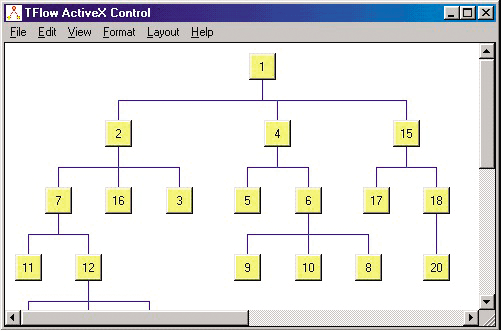
Screenshot Preview

LayoutFlow

经 Lassalle Technologies - 产品类型: 构件 / ActiveX OCX

‏请注意: 除非另有说明,此为英语产品

*

A set of graph drawing algorithms. LayoutFlow is a collection of 4 layout components to enable you to automatically display graphs or flow charts following some aesthetic rules. Includes: HFlow (hierarchical), SFlow (symmetric), TFlow (tree) and OFlow (orthogonal). These controls are AddFlow extensions. Each of these controls allows performing a graph layout automatically, positioning its vertices (also called nodes) and edges (also called links) on a form containing an AddFlow control.


$587.02
价格

‏我们的常规价格如下。 请登录后查看打折后的价格。

LayoutFlow V1.0   *

加入购物车 $ 587.02 1 Developer License (AddFlow ActiveX Required)  * 验证 下载 (3.6 MB)
加入购物车 $ 1,175.02 4 Developer Team License (AddFlow ActiveX Required)  * 验证 下载 (3.6 MB)
加入购物车 $ 3,527.02 1 Site Wide License (Allows Unlimited Developers at a Single Physical Address) (AddFlow ActiveX Required)  * 验证 下载 (3.6 MB)
加入购物车 $ 293.02 1 Developer License upgrade from SFlow, TFlow, HFlow  * 验证 下载 (3.6 MB)
加入购物车 $ 587.02 4 Developer Team License upgrade from SFlow, TFlow, HFlow Team License  * 验证 下载 (3.6 MB)
加入购物车 $ 1,763.02 1 Site License upgrade from SFlow, TFlow, HFlow Site License  * 验证 下载 (3.6 MB)

LayoutFlow V1.0 Academic License   *

加入购物车 $ 293.02 1 Developer License (AddFlow ActiveX Required)  * 验证 下载 (3.6 MB)

我们的价格包括ComponentSource的技术支持。对于大多数可下载的产品,还提供在线备份和免费升级为新版本,若新版本在购买后的30日内发布的话。  所有销售都是按照我们的标准条款 进行的,并且适用我们的退货政策. 请 联系我们 若您需要任何未在上面列出的License选择,包括批量License及以前的版本。 

‏我们的常规价格见上。 请登录后查看打折后的价格。

 *

LayoutFlow is a set of four graph layout controls:

  • HFlow (hierarchical layout)
  • OFlow (orthogonal layout)
  • SFlow (symmetric force directed layout)
  • TFlow (tree or radial layout)

A demonstration of each of these products is available in the LayoutDemo sample provided with AddFlow.

HFlow, OFlow, SFlow and TFlow are AddFlow extensions and you cannot use them without AddFlow. Typically, you can first create your nodes and links inside AddFlow, using the AddFlow API, giving each node a random or a (0,0) position. Then you call the layout method of the graph layout control of your choice. This method will position the nodes and the links in a reasonable manner in the AddFlow control, following some aesthetic rules that depend on the chosen control (hierarchical with HFlow, symmetric with SFlow, orthogonal with OFlow...)

If the AddFlow LogicalOnly property is true, then only the logical vertices of the AddFlow control are involved in this layout. This will allow you to apply the layout only to important vertices. For instance, you will be able to exclude a node just used to display a label by setting its Logical property to false.

1) HFlow

The HFlow layout algorithm arranges vertices in horizontal layers. The orders of the vertices are chosen so that the number of crossings is kept small.

HFlow just produces a reasonable solution, not the optimum solution.

2) OFlow

The OFlow layout algorithm allows performing an orthogonal layout on a graph. The layout is orthogonal since it produces an orthogonal drawing where each edge is drawn as a polygonal chain of alternating horizontal and vertical segments.

OFlow works with any graphs, connected or not. In the resulting drawing, if the graph is a graph of maximum degree four, then each node has the same size. If the degree of a node is higher than four, then the height of the node is expanded.

3) SFlow

The SFlow layout algorithm allows performing a symmetric layout on a graph. The symmetric layout produces a high degree of symmetry and is particularly useful for undirected graphs, where the directions of the edge are not important.

The resulting layout is often good. However it requires considerable computational resources and therefore should be used for small graphs (less than 300 nodes).

Using the animation mode you can see of SFlow is working.

4) TFlow

The TFlow layout algorithm allows performing a tree layout on a graph. The tree layout applies only to a specific subset of graphs: rooted trees. In such a graph, no vertice may have more than one parent.

The drawing of the tree occupies as little space as possible while satisfying certain aesthetics. If the DrawingStyle property is "Layered":

  • vertices at the same level of the tree are placed on the same line
  • a parent is centered over its childs

If the DrawingStyle property is "Radial":

  • the root is placed at the origin
  • the layers are concentric circles centered at the origin

注意

还未完成翻译的产品说明, 我们提供了Google 翻译的连结方便您使用. 但请注意, 自动翻译有时候可能会有翻译错误.
强力驱动
在Firefox 和Opera 需要Flash.

产品搜索

输入搜索词:

为什么从ComponentSource购买?

ComponentSource 提供独特的全球国际服务, 在世界各地共有超过1,000,000开发者客户.

更多讯息 | 关于我们

节省的开发量

请阅读我们的白皮书
计算投资收益

代码的行数: 2,618
人月数: 3
人工成本: $13,090

需要的功能:

每1000行代码的工作量

每月的人工成本:

奖励