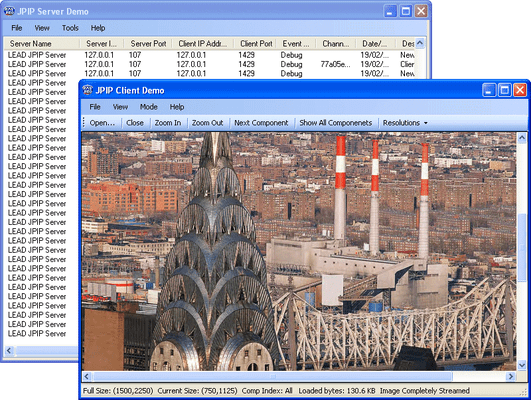
Screenshot Preview

LEADTOOLS JPIP Module - Summary

by LEAD Technologies - Product Type: Component / Add-In / .NET WinForms / .NET Class / DLL / VC++ Class Library

LEADTOOLS JPIP Module is no longer offered as an add on. It is now included in the LEADTOOLS Document Imaging and LEADTOOLS Medical Imaging lines.

Summary

LEADTOOLS JPIP Module by LEAD Technologies

URLs: leadtools-jpip-module, leadtools jpip module, leadtoolsjpipmodule, leadtools

Create JPIP client and server applications. The LEADTOOLS JPIP (JPEG 2000 Interactive Protocol) Module supports interactive streaming of large images and associated image data using the minimum possible bandwidth. It is especially well-suited to using internet connections for viewing and manipulating large medical, geospatial, and very-high-resolution camera images stored on remote servers. It is an implementation of the JPEG2000, part 9 standard (ISO/IEC 15444-9), including both meta-data and code-stream elements.

LEADTOOLS JPIP client/server architecture allows storage of very large, compressed JPEG2000 images at the server, plus transmission of image resolution, quality and region of interest (ROI) as specified by a client. This allows client applications to interact with a stored image without transmitting the entire image, or decoding the entire image code-stream. The server and client components include a number of options for controlling this image streaming and decoding.

The LEADTOOLS JPIP SDK comprises high level components that developers can easily plug into enterprise client/server applications, allowing them to immediately start streaming high-resolution images under low HTTP bandwidth connections.

LEADTOOLS JPIP Client/Server Key Features:

Optimizes network efficiency through progressive image transmission, without sending redundant data

Fast image viewing through progressive decoding of images resolutions, tiles, and components

Fast, flexible code updates: LEAD's managed code does not depend on third-party libraries

Comprehensive client and server demos with ability to browse files on the server side

Suitable for browsing lossless high-resolution medical and geospatial images

Supports JPEG2000 code-streams and multiple file formats (J2K, JP2 and JPX)

Supports streaming over HTTP V1.1 transport protocol

Server Component:

Give fine control over the allocated server bandwidth, total server bandwidth, client connections bandwidth and chunk size

Enables conservation of server resources through setting the maximum number of client connections, client lifetime, and timeouts

Enables performance enhancement through splitting the streaming process among multiple servers running on different machines

Supports interactive client requests and server response handling

Support configuring aliases for images folders to support hosting in web servers as virtual directories

Support streaming of JPX metadata boxes with several partitioning options

Built in support for writing and filtering server event logs to a disk file or any custom data storage

Client Component:

Decodes low image resolutions and progressively decodes higher resolutions on user request

Built in user interactive viewer control which is capable of requesting, decoding and displaying users preferred region of interest

Decodes user-requested regions of interest (ROI), component, and quality

Enables local caching of images information for faster future viewing

Controls the amount of data delivered for each request

LEAD Releases Major Update to LEADTOOLS v16.5 SDKs

Many new features have been added to LEADTOOLS

General Imaging

Added region of interest compression level support to JPEG 2000.

New Fast Magic Wand region selection function.

New rubberband multi-selection feature in LEADTOOLS WPF Image List control.

New feature to load images faster.

PACS & Medical Imaging

New PACS Workstation Framework. The LEADTOOLS PACS Workstation Framework is a set of .NET PACS components to build a complete PACS Workstation system. To speed up development, a medical workstation viewer application with source code is included.

Create, load and save all IOD classes defined in the 2008 base standard and final 2008 DICOM text supplements.

New Auto Segment Bitmap function. Segments objects in CT/MRI images by shrinking a defined rectangular region onto the objects.

New Tissue Equalize Bitmap function. Equalizes between hard and soft tissue in x-ray images resulting in an enhanced image.

New DICOM HD MPEG-2 support.

New support for 16 bit grayscale images in WPF.

New Scroll event in the Medical Image Viewer control.

New Point to Client method in the Medical Viewer Cell class.

New DICOMDIR dialog.

OCR and Forms Recognition

Improved OCR Advantage recognition algorithm to improve accuracy.

New MICR support in OCR Advantage engine.

New XML output from OCR.

New Forms Recognition Only demo.

Improved Forms Recognition documentation including new topics, best practices and examples.

New Rake Remove Bitmap function to remove data rakes from form images.

PDF Imaging

New searchable and editable PDF save features including encryption, fast web viewing, size optimization, document author properties, and PDF profiles.

New PDF Dynamic Resolution demo.

Document Imaging

New Document Writers for XPS and DOCX.

New Empty Pages support for Document Writers.

New Vertical Text support for Document Writers.

New support for DPI in Document Writers.

Improved output for text flow formats such as TXT and DOC.

New support to rasterize Excel XLS files.

New C DLL snap to grid functionality for annotations.

Improved Auto Zone function algorithm.

New Get Background Color function.

New Sigma Filter Bitmap function to smooth images while maintaining sharp edges.

New Object Counter function that counts the number of binary objects in an image.

Barcode

New .NET assembiles for Barcode.

Improved QR Code error correction algorithm.

Web Imaging

New functionality to set text in the LEADTOOLS Web Thumbnail Viewer.

New functionality to clear the Web Image Viewer.

New Web Forms demo to call LEADTOOLS OCR WCF web service.

Updated Silverlight Image controls to Silverlight 3.0.

LEADTOOLS JPIP Module is no longer offered as an add on. It is now included in the LEADTOOLS Document Imaging and LEADTOOLS Medical Imaging lines.

Create JPIP client and server applications.

Evals & Downloads: Read the LEADTOOLS products range overview Help file, Read the LEADTOOLS products Help files, Read the LEADTOOLS Licensing Help file

Operating System for Deployment: Windows Vista, Windows XP, Windows 2000, Windows 98, Windows NT 4.0

Architecture of Product: 32Bit, 64Bit

Product Type: Component, Add-In

Component Type: .NET WinForms, .NET Class, DLL, VC++ Class Library

Compatible Containers: Microsoft Visual Studio 2005, Microsoft Visual Studio .NET 2003, Microsoft Visual Studio .NET, Microsoft Visual Studio 6.0, Microsoft Visual Studio 97, Microsoft Visual Basic 2005, Microsoft Visual Basic .NET 2003, Microsoft Visual Basic .NET, Microsoft Visual C++ 2005, Microsoft Visual C++ .NET 2003, Microsoft Visual C++ .NET, Microsoft Visual C++ 6.0, Microsoft Visual C++ 5.0, Microsoft Visual C++ 4.0, Microsoft Visual C# 2005, Microsoft Visual C# .NET 2003, Microsoft Visual C# .NET, Microsoft FrontPage, Microsoft Internet Explorer 7.0, Microsoft Internet Explorer 6.0, Microsoft Internet Explorer 5.5, Microsoft Internet Explorer 5.0, CodeGear C++ 5.0 (formerly Borland), CodeGear C++ (formerly Borland), C++Builder 4, Visual dBase 7.0, Sybase PowerBuilder 6.0, Sybase PowerBuilder 5.0, Watcom C/C++, .NET Framework 2.0, .NET Framework 1.1, .NET Framework 1.0

Keywords: interactive streaming of large images and associated image data using the minimum LEADTOOLS JPIP Module internet connections viewing manipulating manipulate large medical, geospatial, high-resolution camera images stored on remote servers. JPEG2000, part

LEAD Technologies Image+50 Imaging+50 Toolkit+8 SDK+8, leadtools 17, leadtools V17, lead 17, lead v17, lead tools, lead tools 17, lead tools v17, lead tools v17.0, lead technologies

Image images Compression compress compresses Conversion convert converting converts conversions

Imaging image images

Product Search

Enter search words:

Why buy from ComponentSource?

ComponentSource offers a unique global service, used by over 1,000,000 software developers worldwide.

More Info | About Us

Award Award