by LEAD Technologies - Product Type: Component / Add-In / .NET WinForms / .NET Class / DLL / VC++ Class Library
LEADTOOLS Raster Imaging Pro - .NET Class/C++ Class/DLL Imaging API - V15.0 by LEAD Technologies
Add professional imaging libraries and controls to your application. LEADTOOLS Raster Imaging Pro is a NET Class Library, C++ Class Library and DLL Imaging API SDK with 150+ raster file formats (JPEG, GIF, TIFF...), image processing with 2000+ effects, Image transforms and filters, extensive loading and viewing options, TWAIN scanning, printing, thumbnail browser, Internet and database imaging functions, compression, screen capture, drawing, color conversion, Internet/intranet imaging, graphics conversion, common dialogs, etc. Also includes digital paint functionality for developers who need to incorporate paint capability into their applications. Please note that Raster Imaging Pro and Raster Imaging Pro for .NET have been combined into one SDK.
LEADTOOLS Raster Imaging Pro SDK gives developers the tools to create powerful imaging applications. Become an imaging expert instantly using LEADTOOLS components. Take advantage of LEAD's 16 years of imaging experience in a comprehensive SDK and cut your programming time.
Extend and simplify the .NET framework and GDI+ with LEADTOOLS. Get support for color conversion, display, compression (JPEG, JPEG2000, TIFF, CCITT G4 and LEAD's proprietary CMP), image processing, TWAIN scanning, color conversion, display, special effects, (2000+ effects), image format support ( 150+ image file formats ), printing, Internet/intranet imaging, database imaging, imaging common dialogs, screen capture and much more in a fully managed SDK which leverages LEAD’s 16 years of imaging toolkit technology.
Key Features:
Image Format SupportImaging Common Dialogs
Compression SupportScreen Capture
TWAIN Scanning SupportDatabase Support
Display and Special EffectsInternet Support
Image ProcessingImage Optimizer
Color Space ConversionsWeb Forms
Printing SupportDigital Paint
Image Format Support
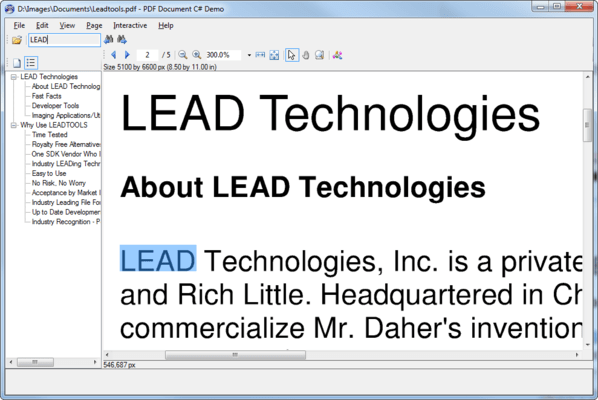
Load, save and convert 150+ image file formats and sub-formats using both industry standard and proprietary compressions. Additionally, with LEADTOOLS you can add even more format support with the LEADTOOLS PDF Plug-in. It adds support for loading, saving and converting PDF files.
Compression Support
Support s many of the industry standard compression techniques including JPEG, JPEG2000, CCITT, LZW (used in GIF and some TIFF files), ZIPLIB (used in PNG files), Huffman, Arithmetic, RLE and Packbits.
TWAIN Scanning Support
TWAIN drivers are included with almost all scanner and other image acquisition hardware. Also, with recent advancements TWAIN is the driver of choice for performance and reliability. LEADTOOLS Raster Imaging products currently support all functionality included in the TWAIN v1.9 specification.
Display and Special Effects
Complete control of how the image is displayed including zooming, stretching, region of the image to display, and over 2000 paint effects. LEADTOOLS even includes a Pan Window; so, you can easily show an image overview and an alternative method of scrolling and panning to your end users.
Image Processing
Over 200 image processing functions divided into four basic categories: filters, transforms color conversion, and drawing. Most of the image processing functions in LEADTOOLS support region of interest, allowing only a portion of an image to be processed. To add on even more functionality specific to digital painting, LEAD offers Digital Paint functionality in the Raster Imaging Pro that includes a variety of functions for digital painting including the creation and use of brushes, shapes, textures and more.
Color Space Conversions
To ensure that you can convert images from one format to another or display images to any display device, LEADTOOLS includes powerful color conversion functionality. The color conversion functions include support for over 8 different dithering methods, many palette options and the ability to convert image data to any supported bits per pixel to any other support bits per pixel. Supported values are 1-8 bit color or grayscale, 16 bit color, 24 bit color and 32 bit color. If you need 12 or 16 bit grayscale or 48 and 64 bit color support, check out one of the Medical Imaging products.
Printing Support
Printing is just as easy as displaying an image because can use the same code to print that you use to display an image. You control the size and location that the image should be printed. Additionally, Windows GDI functions can be used in conjunction with LEADTOOLS printing providing the flexibility to print text and multiple images on the same page.
Imaging Common Dialogs
LEADTOOLS Imaging Common Dialog boxes save hours of tedious programming and provide your end-users with a consistent look and feel by extending Windows common dialogs to provide imaging specific capabilities. The Common Dialogs provide professional imaging common dialogs for image processing, conversion and effects.
Screen Capture
Powerful screen capture functionality that can capture resources from files, menus, windows, clients, areas of screen in different shapes, etc. The screen capture tools are extremely useful, especially for documentation and provide another means of image input.
Database Support
Provides both high level and low level database support including the ability to bind to a VB data control, an OLEDB interface, an ODBC interface and low level functions to load and save images to memory.
Internet Support
Several different levels of Internet support including ASP.NET (AJAX) and Web Forms, objects that can be packaged into CAB files, objects that can be created on a web server, functions to load images from a URL or memory stream, controls for HTTP and FTP support, control to parse files uploaded to a web server and controls to create powerful client server applications that send remote procedure calls via TCP/IP.
Image Optimizer
LEADTOOLS provides functionality to optimize certain image file formats and reduces the size by saving images using the optimal bits per pixel, based on specific optimization options.
Web Forms
LEADTOOLS Raster Imaging Pro includes a Web ImageViewer control for displaying an image on an ASP.NET 2.0 web form. The ImageViewer is used to display any image file format supported by web browsers (JPEG, GIF, PNG and BMP) and can automatically handle zooming and scrolling. It includes an HTTP handler to serve non-browser supported formats and to get file information for files on the server or accessible via http.
Digital Paint
A must for anyone who wants to add digital painting functionality to their application. With the LEADTOOLS Digital Paint feature, a developer can create an entire image editing or design application, or simply add pieces of those types of functionality into an existing application.
Programming Interfaces
Included programming interfaces: A low level API, C++ Class Library and .NET Class Libraries. LEADTOOLS Raster Imaging Pro ships with sample source code for C/C++, Visual C++ (MFC), C# and VB.NET.
LEADTOOLS now includes Unicode support.
What's New in V15.0
64 Bit Support - In addition to Win32 support, LEADTOOLS Raster, Document, Medical and Vector toolkits now provide support for developing applications to target Windows XP 64-bit and Windows Vista 64-bit. The toolkit includes 32 and 64-bit API, C++ Class Library and .NET Class Library interfaces
Dramatically Improved Performance - Increased speed of the LEADTOOLS engines including encoders/decoders (CCITT G3, CCITT G4, JBIG, ABC, JPEG, etc) and many of the image processing functions
Web Forms - Develop rich interactive web-based applications using ASP .NET
A Web ImageViewer control for displaying an image on an ASP.NET 2.0 web form
The ImageViewer is used to display any image file format supported by web browsers (JPEG, GIF, PNG and BMP)
Includes an HTTP handler to serve non-browser supported formats
Large image support through tiling
Includes an HTTP handler to get file information for files on the server or accessible via http
The ImageViewer control can automatically handle zooming and scrolling
New Features Added to the .NET Library
Special Effects for image display
Screen Capture
DICOM and DICOM Communication
Barcode reading and writing
New File Formats in .NET
DJV
SID
TFX
PCT
FPX
WMZ
.NET Viewer and ImageList Enhancements
Multi-select with mouse
Rubberband select
Pan window with Annotations
Magnifying Glass with Annotations
Color Conversion Enhancements - Read and write ICC Profiles from images
Databind Support for .NET Viewer Control – Use the .NET database engine to store and retrieve images to/from any database supported by .NET.
New interpolation options for image resize:
Triangular-peaked weighting
Hermite
Bell
Quadratic B-Spline
Cubic B-Spline
BoxFilter (Nearest Neighbor)
Lanczos
Michell
Cosize
CatmullRom
Quadratic
Cubic Convolution
Bilinear
Bresenham
Image Histogram Dialog - Medical Imaging demo that shows how LEADTOOLS functionality can segment, redistribute, and remove noise from the image data. This demo supports most Medical image types including 12 and 16-bit grayscale images, images with signed or un-signed data, and images with a LUT
Printing function using GDI+ - A new function which uses GDI+ for optimized and fast printing of images. It produces a smaller spooler file size, which will increase the speed of the printing over a network
PartNumbers: PC-510486-112042 510486-112042 PC-510486-160291 510486-160291 PC-510486-112046 510486-112046 PC-510486-112050 510486-112050
Publisher PartNumbers: RASTPRO15 URASTPRO14.5
PurchaseOptions: LEADTOOLS Raster Imaging Pro V15.0 1 Developer License , LEADTOOLS Raster Imaging Pro V15.0 5 Developer License , LEADTOOLS Raster Imaging Pro V15.0 1 Developer Upgrade License from previous versions , LEADTOOLS Raster Imaging Pro V15.0 Annual Maintenance for 1 year
Resources: Read the LEADTOOLS Imaging help file, Read the LEADTOOLS Licensing help file, Download the LEADTOOLS V15.0 evaluation on to your computer - Expires after 60 days
Operating System for Deployment: Windows Vista, Windows XP, Windows 2000, Windows 98, Windows NT 4.0
Architecture of Product: 32Bit, 64Bit
Product Type: Component, Add-In
Component Type: .NET WinForms, .NET Class, DLL, VC++ Class Library
Built Using: MFC V4.2 / V6.0, ActiveX Template Library (ATL)
Compatible Containers: Microsoft Visual Studio 2005, Microsoft Visual Studio .NET 2003, Microsoft Visual Studio .NET, Microsoft Visual Studio 6.0, Microsoft Visual Studio 97, Microsoft Visual Basic 2005, Microsoft Visual Basic .NET 2003, Microsoft Visual Basic .NET, Microsoft Visual C++ 2005, Microsoft Visual C++ .NET 2003, Microsoft Visual C++ .NET, Microsoft Visual C++ 6.0, Microsoft Visual C++ 5.0, Microsoft Visual C++ 4.0, Microsoft Visual C# 2005, Microsoft Visual C# .NET 2003, Microsoft Visual C# .NET, Microsoft FrontPage, Microsoft Internet Explorer 7.0, Microsoft Internet Explorer 6.0, Microsoft Internet Explorer 5.5, Microsoft Internet Explorer 5.0, CodeGear C++ 5.0 (formerly Borland), CodeGear C++ (formerly Borland), C++Builder 4, Visual dBase 7.0, Sybase PowerBuilder 6.0, Sybase PowerBuilder 5.0, Watcom C/C++, .NET Framework 2.0, .NET Framework 1.1, .NET Framework 1.0
Product Class: User Interface Components
Search Items: New Version Dec 03
Keywords: Scan scanning scanned scanner scans OCR optical character recognition Image images Compression compress compresses Conversion convert converting converts conversions Drawing Draw draws image images processing imaging LEAD Technologies ImageImagingToolkitSDKImaging image images Corporate Partner Raster Picture Format Scan Twain image processing capture jpeg 2000 jpeg2000 C# Delphi CMP TIFF anti-aliasing Bitmap draw art processing graphic conversion IBM AFP WBMP CIT SMP G3 G4 LZW CMYK JTIF PNG BMP MODCA IOCA PCX TGA
Publisher
Primary Category
Related Products
Related Categories