Screenshot Preview

FlowChartX Professional

von MindFusion Group - Produkttyp: Komponente / ActiveX OCX / ActiveX DLL / Source Code

Bitte beachten Sie, falls nicht andersweitig erwähnt ist dieses Produkt nur in englischer Sprache verfügbar.

*

Enrich your application with flowchart / workflow / organizational diagramming. FlowChartX Pro is an ActiveX control that helps you create and present workflow, flowchart and process diagrams, database entity-relationship diagrams, organizational, hierarchy and relationship charts, network schemes, graphs, and trees. VB, C++ , VB.NET and MFC Samples included. FlowChartX Pro Source Code available. Buy MindFusion FlowChartX Pro and obtain 12 months of free upgrades. MindFusion FlowChartX renewals will extend your FlowChartX subscription for another year. FlowChartX Enterprise and FlowChartX Site Licenses also available.


Durchschnittliche Rezension:   basierend auf 1 Rezension.
Ab
$588.00
Preis in

Unsere regulären Preise werden nachstehend angezeigt. Bitte melden Sie sich an um Ihre ermäßigten Preise zu sehen.

FlowChartX Professional Edition V4.5   *

In den Einkaufswagen $ 588.00 1 Developer Subscription License (12 Months Subscription Included)  * Download (5.8 MB)
In den Einkaufswagen $ 1,078.00 4 Developer Team Subscription License (12 Months Subscription Included)  * Download (5.8 MB)
In den Einkaufswagen $ 1,862.00 8 Developer Team Subscription License (12 Months Subscription Included)  * Download (5.8 MB)
In den Einkaufswagen $ 3,430.00 1 Site Wide Subscription License (Allows Unlimited Developers at a Single Physical Address) (12 Months Subscription Included)  * Download (5.8 MB)
In den Einkaufswagen $ 6,223.00 1 Enterprise Subscription License (Unlimited number of developers of an enterprise at all its physical addresses) - (12 Months Subscription Included)  * Download (5.8 MB)

FlowChartX Professional Edition V4.5 - with Source Code   *

In den Einkaufswagen $ 1,127.00 1 Developer Subscription License - with Source Code (12 Months Subscription Included)  * Download (6.7 MB)
In den Einkaufswagen $ 1,617.00 4 Developer Team Subscription License - with Source Code (12 Months Subscription Included)  * Download (6.7 MB)
In den Einkaufswagen $ 2,401.00 8 Developer Team Subscription License - with Source Code (12 Months Subscription Included)  * Download (6.7 MB)
In den Einkaufswagen $ 3,969.00 1 Site Wide Subscription License (Allows Unlimited Developers at a Single Physical Address) - with Source Code (12 Months Subscription Included)  * Download (6.7 MB)
In den Einkaufswagen $ 6,762.00 1 Enterprise Subscription License (Unlimited number of developers of an enterprise at all its physical addresses) - with Source Code (12 Months Subscription Included)  * Download (6.7 MB)

FlowChartX Professional Edition Upgrade/1 Year Subscription Renewal   *

In den Einkaufswagen $ 235.20 1 Developer Subscription Renewal License (12 Months Subscription Included)  * Prüfen Download (5.8 MB)
In den Einkaufswagen $ 431.20 4 Developer Team Subscription Renewal License (12 Months Subscription Included)  * Prüfen Download (5.8 MB)
In den Einkaufswagen $ 744.80 8 Developer Team Subscription Renewal License (12 Months Subscription Included)  * Prüfen Download (5.8 MB)
In den Einkaufswagen $ 1,372.00 1 Site Wide Subscription Renewal License (Allows Unlimited Developers at a Single Physical Address) (12 Months Subscription Included)  * Prüfen Download (5.8 MB)
In den Einkaufswagen $ 2,489.20 1 Enterprise Subscription Renewal License (Unlimited number of developers of an enterprise at all its physical addresses) - (12 Months Subscription Included)  * Prüfen Download (5.8 MB)

FlowChartX Professional Edition with Source Code Upgrade/1 Year Subscription Renewal   *

In den Einkaufswagen $ 450.80 1 Developer Subscription Renewal License - with Source Code (12 Months Subscription Included)  * Prüfen Download (6.7 MB)
In den Einkaufswagen $ 646.80 4 Developer Team Subscription Renewal License - with Source Code (12 Months Subscription Included)  * Prüfen Download (6.7 MB)
In den Einkaufswagen $ 960.40 8 Developer Team Subscription Renewal License - with Source Code (12 Months Subscription Included)  * Prüfen Download (6.7 MB)
In den Einkaufswagen $ 1,587.60 1 Site Wide Subscription Renewal License (Allows Unlimited Developers at a Single Physical Address) - with Source Code (12 Months Subscription Included)  * Prüfen Download (6.7 MB)
In den Einkaufswagen $ 2,704.80 1 Enterprise Subscription Renewal License (Unlimited number of developers of an enterprise at all its physical addresses) - with Source Code (12 Months Subscription Included)  * Prüfen Download (6.7 MB)

Unsere Preise beinhalten einen technischen Support durch ComponentSource und für die meisten herunterladbaren Produkte zusätzlich ein Online-Backup sowie eine kostenlose Aktualisierung auf die neue Version, sofern sie binnen 30 Tagen nach dem Kauf freigegeben werden. Die angezeigten Preise sind zuzüglich aller Steuern. Für mehr Information zu eventuell anfallende Steuern, gehen Sie bitte auf diese Webseite. Alle Verkäufe unterliegen unseren Standardgeschäftsbedingungen und unseren Rückgaberegeln. Treten Sie bitte mit uns in Kontakt , wenn Sie eine Lizenzierungsoption anfordern möchten, die in der obigen Liste nicht aufgeführt ist, einschließlich Mehrplatzlizenzen und ältere Versionen.

Unsere regulären Preise werden oben angezeigt. Bitte melden Sie sich an um Ihre ermäßigten Preise zu sehen.

 *

What’s new in FlowChartX V4.5?

  • FractalLayout tree layout algorithm
  • Specify start and end nodes for LayeredLayout
  • LayeredLayout.EnforceLinkFlow property
  • Interactive node alignment via alignment guides
  • Display checkboxes in table cells
  • Fill a table's caption bar with a gradient

What’s new in FlowChartX V4.4?

  • Simulated Annealing graph layout algorithm
  • LayeredLayout.StraightenLongLinks limits the number of links bends
  • TrackingRectColor property added to Overview
  • More precise text measuring in GDI+ mode

What’s new in FlowChartX V4.3.1?

This version adds predefined ShapeTemplate definitions that implement the Object Management Group / Business Process Management notation. They are available as members of the Shapes collection and have names that start with a Bpmn prefix.

What’s new in FlowChartX V4.3?

  • MultipleGraphsPlacement specifies how layout algorithms place independent subgraphs relatively to each other
  • SplitGraph specifies whether unconnected subgraphs are laid out independently from each other
  • DecorationLine objects
  • custom layout of container boxes possible
  • AutoResizeContainer specifies whether containers should resize to fit their children
  • containers can be resized to fit child nodes using the ResizeToFitChildren method
  • items border color can be made semi-transparent by setting FrameColorAlpha
  • text antialising can be enabled for individual boxes by setting their TextAntiAliasing property
  • arrows and tables can be custom-drawn
  • tooltips auto-pop time can be set through the ToolTipAutoPop property
  • the DocBoundsChanged event is raised when the flowchart document area is resized
  • HtmlBuilder now exports items in reverse Z order to fix hit-testing of overlapping areas

What’s new in FlowChartX V4.2.1?

  • Circular graph layout algorithm
  • The LayoutProgress event lets you track the progress of layout algorithms
  • LayeredLayout can arrange nodes of varying size without overlapping 
  • The ChangeRelation method lets you change the origin or destination row of an arrow 
  • The tsBelow text style can be used with tables
  • EnableShadows and EnableSelHandles properties added to ImageExportOptions
  • Flowchart items can be cloned using their Clone method

What’s new in FlowChartX V4.X?

  • Native 64-bit support
  • Improved binary serialization
  • XML serialization based on MSXML6
  • Table cell tooltips
  • PrintOptions.HeaderTextStyle lets you set the header text alignment 
  • Custom label position for Arrow objects 
  • Speed of the GridLayout has been greatly improved
  •  Boxes whose Style is set to bsShape can be rotated
  •  Spanning table cells

 *

FlowChartX Overview

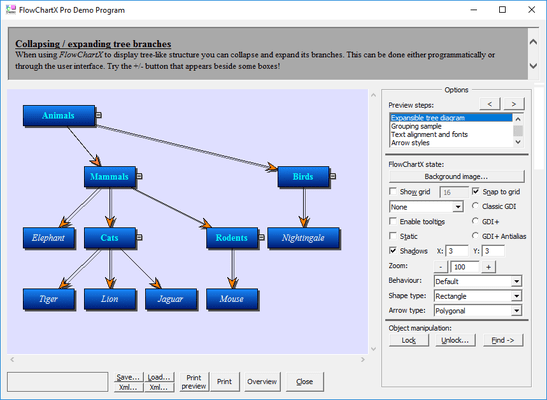
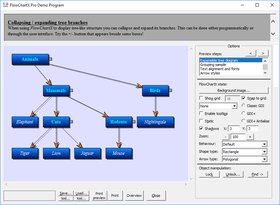
FlowChartX programming model is based on three classes of objects: boxes, tables and arrows. Boxes and tables can represent diagram nodes in various kinds of diagrams; arrows represent links and relations between nodes. Every object type available in FlowChartX is exposed as a COM class with properties and methods controlling its look and behavior. Through these classes the FCX objects can be programmatically moved and resized, locked in place, repositioned in the Z-order, grouped and attached; their text, color, font, style and other visual attributes are exposed as properties.

Every object type available in FlowChartX is exposed as a COM class with properties and methods controlling its look and behavior. Through these classes the FCX objects can be programmatically moved and resized, locked in place, repositioned in the Z-order, grouped and attached; their text, color, font, style and other visual attributes are exposed as properties.

A brief description of the basic FlowChartX types follows below:

Boxes can represent classes in class-hierarchies, flowchart elements, icons in network diagrams, etc. They can hold both graphics and text in different fonts, sizes and colors. Box objects can have any polygonal shape. There are more than 50 predefined box shapes. Apart from them FlowChartX offers you very easy and quick way to define your own shape as you like it. Furthermore boxes support two forms of custom painting. The first type gives you full control over the painting, while in the second one your painting code is performed additionally to the basic painting.

Tables can be used in database diagrams as well as in any other kind of charts that need table representation. They display grids of cells and every cell contains text. Cells, columns and rows can be customized in various ways there are properties available for setting their extents, style and text alignment. Tables dimensions can be programmatically changed; inserting, appending or deleting rows and columns can be done in a very comprehensive, intuitive way whenever you might need it. Tables can also display background images and graphics. The file formats supported are BMP, GIF, JPEG, ICO and WMF (same applies for boxes).

Arrows are used to represent various types of connections and relations in diagrams. FlowChartX offers three basic arrow-types:

  • poly-line arrows composed of straight-line segments
  • curved arrows composed of Bezier-spline segments
  • arrows composed of horizontal and vertical segments, alternating their orientation so that every segment is perpendicular to its neighbor

Each arrow has to be connected to a box or a table object. You can use transparent boxes on any side of an arrow to make it appear as hanging. Some customizable arrows properties are: tip styles, colors, text, pen width and style, modification behavior and number of segments.

Global appearance and functionality features include: scrolling and zooming, printing, serialization to streams and files, visual effects like shadows and gradients. The control provides built-in support for layout and arrangement of its diagram nodes.

FlowChartX is written in C++ using the ATL libraries to implement the needed ActiveX control interfaces. The source code is included in the site-wide version, and also is optionally available with the single-developer version.

The professional edition of FlowChartX has these additional features:

  • clipboard operations
  • undo/redo
  • containers: objects that can hold other objects
  • snapping objects one to another
  • support for shape libraries

Warnung

Übersetzungen für Produktinformationen, die noch nicht von uns übersetzt wurden, stehen über Links zu "Google Übersetzer" zur Verfügung. Bitte beachten Sie, daß automatisierte Übersetzungen nicht immer vollkommen korrekt sind.
Powered by
Flash wird in FireFox und Opera benötigt.

Produkt-Suche

Suchbegriffe eingeben:

Warum Produkte bei ComponentSource kaufen?

ComponentSource bietet einen einzigartigen, globalen Service an, der weltweit von über 1.000.000 Entwicklern benutzt wird.

Mehr Info | Über uns

Award