di MindFusion Group - Tipo prodotto: Componente / ActiveX OCX / ActiveX DLL / Source Code
MindFusion FlowChartX Professional by MindFusion Group
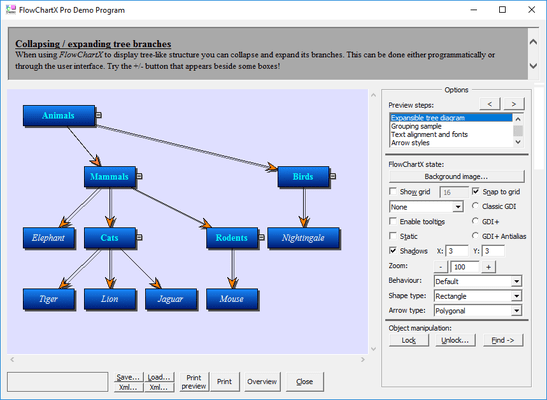
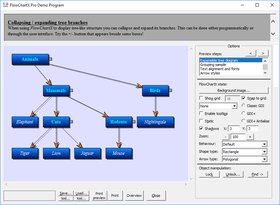
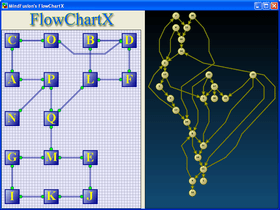
Enrich your application with flowchart / workflow / organizational diagramming. FlowChartX Pro is an ActiveX control that helps you create and present workflow, flowchart and process diagrams, database entity-relationship diagrams, organizational, hierarchy and relationship charts, network schemes, graphs, and trees. VB, C++ , VB.NET and MFC Samples included. Source Code available.
OVERVIEW
FlowChartX programming model is based on three classes of objects: boxes, tables and arrows. Boxes and tables can represent diagram nodes in various kinds of diagrams; arrows represent links and relations between nodes. Every object type available in FlowChartX is exposed as a COM class with properties and methods controlling its look and behavior. Through these classes the FCX objects can be programmatically moved and resized, locked in place, repositioned in the Z-order, grouped and attached; their text, color, font, style and other visual attributes are exposed as properties.
Every object type available in FlowChartX is exposed as a COM class with properties and methods controlling its look and behavior. Through these classes the FCX objects can be programmatically moved and resized, locked in place, repositioned in the Z-order, grouped and attached; their text, color, font, style and other visual attributes are exposed as properties.
A brief description of the basic FlowChartX types follows below:
Boxes can represent classes in class-hierarchies, flowchart elements, icons in network diagrams, etc. They can hold both graphics and text in different fonts, sizes and colors. Box objects can have any polygonal shape. There are more than 50 predefined box shapes. Apart from them FlowChartX offers you very easy and quick way to define your own shape as you like it. Furthermore boxes support two forms of custom painting. The first type gives you full control over the painting, while in the second one your painting code is performed additionally to the basic painting.
Tables can be used in database diagrams as well as in any other kind of charts that need table representation. They display grids of cells and every cell contains text. Cells, columns and rows can be customized in various ways there are properties available for setting their extents, style and text alignment. Tables dimensions can be programmatically changed; inserting, appending or deleting rows and columns can be done in a very comprehensive, intuitive way whenever you might need it. Tables can also display background images and graphics. The file formats supported are BMP, GIF, JPEG, ICO and WMF (same applies for boxes).
Arrows are used to represent various types of connections and relations in diagrams. FlowChartX offers three basic arrow-types:
poly-line arrows composed of straight-line segments
curved arrows composed of Bezier-spline segments
arrows composed of horizontal and vertical segments, alternating their orientation so that every segment is perpendicular to its neighbor
Each arrow has to be connected to a box or a table object. You can use transparent boxes on any side of an arrow to make it appear as hanging. Some customizable arrows properties are: tip styles, colors, text, pen width and style, modification behavior and number of segments.
Global appearance and functionality features include: scrolling and zooming, printing, serialization to streams and files, visual effects like shadows and gradients. The control provides built-in support for layout and arrangement of its diagram nodes.
FlowChartX is written in C++ using the ATL libraries to implement the needed ActiveX control interfaces. The source code is included in the site-wide version, and also is optionally available with the single-developer version.
The professional edition of FlowChartX has these additional features:
clipboard operations
undo/redo
containers: objects that can hold other objects
snapping objects one to another
support for shape libraries
What’s New in V4.X?
Boxes whose Style is set to bsShape can be rotated
The GDI+ rendering engine has been optimized
Improved refresh rate when auto-scrolling
VisioExporter improvements
Spanning table cells
Logical measure units can be set via the MeasureUnit property
Grid graph layout implemented by the GridLayout class
Export SVG drawings
Clipboard and undo operations affect hosted ActiveX controls
SelHandleSize lets you set the size of selection handles
Groups of table rows can be expanded or collapsed
SelectionOnTop specifies if selected items are painted on top
GetArrowAt method added
Memory usage decreased with about 50 bytes per diagram item
Modification cursor is displayed while modifying an item
SvgExporter does not export invisible items anymore
Picture and SetPictureRect members added to ShapeTemplate
DecorationColor property added to boxes
Shape decorations can be rendered for Transparent boxes
Users can change the orientation of cascading arrows
New arrows can be routed while users draw them
Initialization events are raised when users start drawing items
The Anchoring property added to RoutingOptions
The speed of the routing algorithm has been improved
OrgnAnchor and DestAnchor properties added to the Arrow class
AllowIncomingArrows and AllowOutgoingArrows added to node classes
ToolTipDelay specifies the delay before a tool tip pops up
BoxPicture and BoxPicturePos properties added
The LayeredLayout speed has been improved
Improved support for hosting MFC ActiveX controls
The ControlPadding property added
Now the Overview control can be used in HTML pages
Now VisioImporter can import UML activity diagrams
The Overview control is now marked as safe for scripting
PartNumbers: PC-514448-114413 514448-114413 PC-514448-114419 514448-114419 PC-514448-114425 514448-114425 PC-514448-114421 514448-114421 PC-514448-114433 514448-114433 PC-514448-114415 514448-114415 PC-514448-114423 514448-114423 PC-514448-114427 514448-114427 PC-514448-114417 514448-114417 PC-514448-114429 514448-114429 PC-514448-114431 514448-114431
PurchaseOptions: FlowChartX Professional Edition V4.1.5 1 Developer License (12 Months Subscription Included) , FlowChartX Professional Edition V4.1.5 4 Developer Team License (12 Months Subscription Included) , FlowChartX Professional Edition V4.1.5 8 Developer Team License (12 Months Subscription Included) , FlowChartX Professional Edition V4.1.5 1 Site Wide License (Allows Unlimited Developers at a Single Physical Address) (12 Months Subscription Included) , FlowChartX Professional Edition V4.1.5 1 Enterprise Subscription License (Unlimited number of developers of an enterprise at all its physical addresses) - (12 Months Subscription Included) , FlowChartX Professional Edition V4.1.5 - with Source Code 1 Developer License - with Source Code (12 Months Subscription Included) , FlowChartX Professional Edition V4.1.5 - with Source Code 4 Developer Team License - with Source Code (12 Months Subscription Included) , FlowChartX Professional Edition V4.1.5 - with Source Code 8 Developer Team License - with Source Code (12 Months Subscription Included) , FlowChartX Professional Edition V4.1.5 - with Source Code 1 Site Wide License (Allows Unlimited Developers at a Single Physical Address) - with Source Code (12 Months Subscription Included) , FlowChartX Professional Edition V4.1.5 - with Source Code 1 Enterprise Subscription License (Unlimited number of developers of an enterprise at all its physical addresses) - with Source Code (12 Months Subscription Included) , FlowChartX Professional Edition - Upgrade / Subscription Renewal 1 Upgrade / Subscription Renewal (12 months subscription, for all license types)
Resources: Read the FlowChartX help file, Browse the differences between FlowChartX editions Web pages, Browse the FlowChartX ActiveX License Agreement Web pages, Download the FlowChartX Professional V4.1.5 evaluation on to your computer - Displays Nag Screens
Operating System for Deployment: Windows Vista, Windows XP, Windows ME, Windows 2000, Windows 98, Windows NT 4.0, Windows 95
Architecture of Product: 32Bit
Product Type: Component
Component Type: ActiveX OCX, ActiveX DLL, Source Code
Built Using: ActiveX Template Library (ATL)
Compatible Containers: Microsoft Visual Studio .NET 2003, Microsoft Visual Studio .NET, Microsoft Visual Studio 6.0, Microsoft Visual Studio 97, Microsoft Visual Basic .NET 2003, Microsoft Visual Basic .NET, Microsoft Visual Basic 6.0, Microsoft Visual Basic 5.0, Microsoft Visual C++ .NET 2003, Microsoft Visual C++ .NET, Microsoft Visual C++ 6.0, Microsoft Visual C++ 5.0, Microsoft Visual C# .NET 2003, Microsoft Visual C# .NET, Microsoft Visual J++ 6.0, Microsoft Visual FoxPro 6.0, Microsoft Visual FoxPro 5.0, Microsoft Office 2000, Microsoft Office 97, Microsoft Outlook 2002, Microsoft Outlook 2000, Microsoft Internet Explorer 6.0, Microsoft Internet Explorer 5.5, Microsoft Internet Explorer 5.0, Microsoft Internet Explorer 4.0, C++Builder 6, C++Builder 5, C++Builder 4, C++Builder 3, Delphi 8.0, Delphi 7.0, Delphi 6.0, Delphi 5.0, C#Builder, .NET Framework 1.1, .NET Framework 1.0
Product Class: User Interface Components
Search Items: New Product Nov 03, New Version Jan 04, New Version Feb 04, New Product Apr 04, New Version Apr 04, New Product Aug 04, New Product Oct 04, New Product Nov 04, New Product Jan 05, New Product May 05, New Product July 05, New Product Sep 05
Keywords: Flow Diagramming diagram diagrams flowchart Professional Partner MindFusion FlowChartX Professional