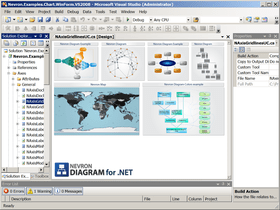
de Nevron - Tipo de producto: Componente / ASP.NET WebForms / ASP.NET AJAX (ATLAS) / .NET WinForms / .NET Class / 100% Managed Code / AJAX
Por favor note que la información sobre este producto no está disponible en español.
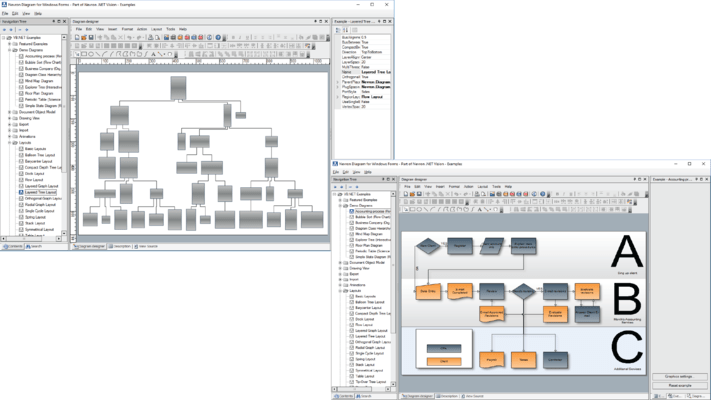
Add quality diagramming and graphing capabilities to your WinForms applications. Nevron Diagram for .NET helps you to integrate and display sophisticated diagrams in your .NET Windows Forms and ASP.NET applications quickly and easily. It is a complete diagramming solution, packed with many interactivity features, shapes, automatic layouts, stunning visual effects and comes equipped with ready to use controls to help you boost your application development. Carefully crafted to meet different requirements, it provides unmatched extensibility options, which will help you to integrate the solution better into the context of your particular application. Nevron Diagram for .NET provides advanced support for interactivity, behavior customization of different diagram elements, automatic layouts, graphs and trees, support for different measurement units, visual effects and decorations, different image formats and more. With Nevron Diagram you will be able to produce any type of diagrams and flowcharts, hundreds of intuitive samples and examples with source code are included to speed up your development time.
Nuestros precios Standard están indicados abajo. Inicia una sesión para ver sus precios con descuento.
| Añadir a la Cesta | $ 577.22 | 1 Developer License | Descarga (312.6 MB) | |
| Añadir a la Cesta | $ 461.78 | 1 Developer License, per Developer from 5 up to 9 Developers (Minimum quantity 5) | Descarga (312.6 MB) |
| Añadir a la Cesta | $ 812.42 | 1 Developer License with Subscription | Descarga (312.6 MB) | |
| Añadir a la Cesta | $ 649.94 | 1 Developer License with Subscription, per Developer from 5 up to 9 Developers (Minimum quantity 5) | Descarga (312.6 MB) |
| Añadir a la Cesta | $ 1,165.22 | 1 Developer Subscription License + Priority Support Service for 1 year | Descarga (312.6 MB) | |
| Añadir a la Cesta | $ 932.18 | 1 Developer License with Subscription + Priority Support Service for 1 year, per Developer from 5 up to 9 Developers (Minimum quantity 5) | Descarga (312.6 MB) | |
| Añadir a la Cesta | $ 1,400.42 | 1 Developer License with Subscription + Premium Support Service for 1 year | Descarga (312.6 MB) | |
| Añadir a la Cesta | $ 1,120.34 | 1 Developer License with Subscription + Premium Support Service for 1 year, per Developer from 5 up to 9 Developers (Minimum quantity 5) | Descarga (312.6 MB) |
| Añadir a la Cesta | $ 293.02 | 1 Developer Renewal Subscription License | Verificar | Descarga (29 KB) |
| Añadir a la Cesta | $ 234.42 | 1 Developer Renewal Subscription License, per Developer from 5 up to 9 Developers (Minimum quantity 5) | Verificar | Descarga (29 KB) |
| Añadir a la Cesta | $ 588.00 | Priority Support Service | Verificar | Descarga (29 KB) |
| Añadir a la Cesta | $ 1,176.00 | Premium Support Service | Verificar | Descarga (29 KB) |
Nuestros precios incluyen servicio técnico de ComponentSource y, para la mayoría de los productos disponibles para descarga, una copia de seguridad en línea y una actualización GRATUITA a la nueva versión si ésta se publica en un período de 30 días después de la compra. Todas las ventas están sujetas a nuestros Términos y condiciones standard y a nuestra Política de devolución. Por favor, póngase en contacto con nosotros si necesita alguna opción de licencia no incluida en la lista anterior, incluida la compra por volumen de licencias y versiones anteriores.
Nuestros precios Standard están indicados arriba. Inicia una sesión para ver sus precios con descuento.
What’s new in Nevron Diagram for .NET Q2 2008?
Nevron Diagram for .NET Q1 2008 introduces:
Supportfor inward–outward port connections
Powerful support for graph, tree and cells layouts.
What's New Q4 2007:
Nevron Diagram for Q4 2007 - The product has been designed from the ground up to meet a vast number of customization and extensibility requests. Built on top of the solid Model - View - Controller architecture it will provide your applications with consistent, intelligent and powerful diagramming abilities. Nevron Diagram for .NET is a unique component, since it integrates state-of-art vector and raster 2D graphics technologies and wraps them in an easy to use - yet completely customizable framework. As a result your applications can easily reuse it to instantly gain significant advantage in visual impact and intelligence. Following is a list of the new features introduced in this release:
Planned Improvements
Although in this release there are no major changes in the diagram, there are huge improvements, which Nevron is currently developing for this component. Since they are beyond the scope of a single quarterly release, they will be embedded in the diagram when completely tested and implemented.
Nevron Diagram for .NET - New Features in version Q3 2007
Improved AJAX Support for Web Forms (VS 2005 Specific)
Improved Web Controls in Postback Mode (VS 2005 Specific)
HttpHandler image generation was added as an alternative to the traditional temporary image files used by Nevron web components. Now Nevron web components register an *.AXD virtual file in web.config and stream on demand images to the client through it.
Ability to export images in EMF file format
The component can save images in EMF file format as well as to copy EMF images to the clipboard.
What’s New in Q2 2007:
What's New in Nevron Diagram for .NET Q1 2007:
What's New in Nevron Diagram for .NETQ3 2006?
New shapes
Integration with Nevron Geometry
Nevron Diagram for .NET has been integrated with the new geometry objects in the Nevron Presentation Framework. This change was made due to needed performance optimizations in the implementation of these fundamental structures and because their current implementation in the .NET framework lacks many important features and properties. One of the major advantages of using the new geometry structures is that the diagram is now better serialized in XML.
Overview
Nevron Diagram for .NET comes with an extensive Document Object Model (DOM), which can help you model virtually any type of diagram. The DOM implements core diagramming elements, such as drawing documents, library documents, masters, layers, shapes, groups, connectors, ports etc. You can easily subclass any DOM element and extend its capabilities. Drawings can be exported to various raster and scalable graphics formats (.png, .bmp, .jpg, .svg etc.). Documents can be serialized in XML, binary and SOAP formats. Implemented are a lot of automatic layouts. Drawings can be displayed in both WinForm and WebForm views.
Powerful and Extensive DOM
The objects that you use to construct a diagram document are organized in a powerful hierarchy in which you can plug at any level. The content of a document is hierarchy organized, which help you easily inspect and manage its content. The entire DOM supports a remarkable Undo/Redo system.
Unmatched Support for Libraries
Custom and commonly used shapes as well as entire drawing clippings can be stored for later reuse in libraries. Libraries contain masters, which can be instanced in any drawing. Library views help you preview libraries in several different styles.
Visual Impact and Speed
The only diagram on the market with such remarkable visual impact and speed. You can apply image filters, gradients, textures and advanced shadow effects on all type shapes including texts. The component supports XML formatted texts, which help you display stunning texts with mixed font, size, subscript and superscript formatting as well as with mixed style.
Events and Interactivity
The component fires tons of events, which will inform you about any change made in a document or in a view. There is support for event listeners, bubbled and broadcasted events. No interactivity feature is left behind - there is support for auto scrolling, panning, preview ghosts, glue highlighting, selection and interactive highlighting, drag drop previews etc. DOM elements can respond to user actions.
Extensive Documentation and Examples
The component features a complete User's Guide, Programmers Reference and a huge set of examples for C# and VB.NET wrapped in state of the art example browsers for Windows Forms and ASP .NET.
The Nevron Diagram installation system will automatically add the chart control to the Visual Studio Toolbox allowing you to immediately start development without customizing VS by yourself. Nevron Diagram for .NET includes both Windows Forms and ASP.NET and has full support Visual Studio 2003 and Visual Studio 2005.
Features
Diagram Document Object Model
Hierarchical Documents - elements reside in a hierarchy, the root of which is a diagramming document.
Styles and Stylesheets - the visual appearance of all elements is consistently controlled with styles. Styles can be composed from the element ancestors in the hierarchy or directly from stylesheets. Cascade stylesheets are supported.
Abilities, Protection and Permissions - each element exposes a set of abilities, which defines the actions, which can be performed with it. The element protection defines the abilities, which are explicitly disabled. The element permissions provide an easy way to obtain the allowed element abilities.
Measurement Units - currently supported are three measurement unit systems: GDI+, Metric and English, with complete set of the respective measurement units. You can also plug your own measurement unit systems (for example extend the component to support the Japanese measurement units).
Documents - documents are the root elements in element hierachies. They provide core support for services, view management and data exchange capabilities. Multiple views can display and edit a single document simultaneously. Currently there are two types of documents:
Masters - masters are collections of diagram elements, which can be instanced in any drawing.
Stencils - stencils can display reusable content. Currently provided are arrowheads and point stencils, which can host any model. Stencils are specially optimized to display predefined content.
Layers - the content of each drawing is neatly organized in layers. Layers can be nested.
Models - models are the primary diagram building blocks. Models can be freely transformed. There are two types of models:
Shapes - shapes are aggregate models, which represent logical abstractions. Shapes can be involved in complex relationships. Each shape can optionally have multiple ports, labels and control points. There are two types of shapes:
Groups - groups are shapes, which are assembled from other shapes.
Data Structures - provided is an easy and intuitive way to build a graph or a tree from a set of connected shapes. Implemented is an extensive set of commonly used graph and tree algorithms (breadth first traversal, depth first traversal, spanning trees etc.). In this way the component can serve as a powerful graph drawing and analysation tool.
Routing and Routable Connectors - provided is built-in support for routing and routable connectors. The routing can easily be extended.
Bridges and Bridgeable Shapes - bridges (hops) are a special type of decoration, which is displayed on bridgeable shapes self-intersections or intersection with other bridgeable shapes.
Print Manager - drawings can be printed on single or multiple pages. Implemented is built in support for print preview and page setup.
Image Exporter - an entire drawing or only portions of it can be exported to image of any type (JPG, PNG, BMP etc.). For drawings defined in absolute measurement units (e.g. inches, millimeters etc.) you can also specify the target device resolution (helps you generate ready to print images).
Undo and Redo - the entire DOM API is protected by history. Any property or method, which modifies the elements state records history. The history can contain an unlimited number of actions. History actions can be grouped in transactions. Transactions can be committed or rolled back. Nested transactions are supported. The history is implemented as a service so you can easily override it, stop or pause it.
Batches - batches serve as a functionality layer between documents and views. Batches are designed to operate with multiple elements and record a single history transaction. Batches take into account the element permissions. Most of operations, which views and commands perform with elements are implemented with the help of batches.
Event Handling - all events are fired from an event sink service, which provides you with the ability to consistently intercept all types of events regardless of the diagram you work with. Interactivity events (mouse, keyboard and drag drop events) support event bubbling
Shape Factories
Nevron Diagram for .NET comes equipped with numerous predefined vector shapes, which can come handy in many applications. The predefined shapes are consistently created by shape factories. Currently implemented are the following shape factories:
WinForm View, Controller and Tools
In WinForm the viewing and editing of documents is achieved with the help of views and controllers. Following is a brief summary:
Fully Extensible - views, controllers and tools can be extended with ease.
Views - views help you display and edit documents. Views implement core support for tools and selection. Several views can display and edit a single document simultaneously. Currently there are two primary types of views:
Controller - a single controller is attached to every view. The controller stores a collection of tools to which it delegates view events for processing. In this way the views behavior and functionality can easily be configured, extended or overridden.
Tools - tools are replaceable controller parts. Implemented is a myriad of tools, which help you create new elements as well as edit the currently existing ones.
Pan and Zoom Control - this control provides a bird's-eye view of the document edited in another drawing view (called master view). It also provides you with an easy and intuitive way to zoom and pan the master view.
Layouts
Layouts can help you automatically arrange diagram elements. Following is a brief summary:
Fully Extensible - all layouts can easily be extended. You can also create your custom layouts.
Layout Items- all layouts operate with layout items, which makes it possible for them to arrange multiple structures.
Layout Animation - the effect of all layouts can be animated.
Tree Layout- implemented is a very powerful tree layout with lots of customization settings.
Force Directed Layout - implemented is a generic force directed layout with many customization settings.
Table Layout - implemented is a table layout, which can order any set of elements in a tabular manner.
Templates
DOM content can easily be created with the help of programmable templates. Following is a brief summary:
Fully Extensible - all templates can easily be extended. You can also create your own custom templates.
Visual Template Editing - the template editing can be performed visually with the help of the built-in wizard.
Diagram Designer Components
Nevron Diagram for .NET implements a complete set of components which can help you create a feature rich diagram designer in minutes. Following is a brief summary:
Commands and Commander - any user action, which can be executed from a menu, toolbar or context menu is represented by a diagram command. Diagram commands are UI independent. Diagram commands are maintained by a commander, which also serves as bridge between Nevron UI and diagram commands.
Command Bars Manager - this is a modern look and feel docking bars manager, which visually exposes the power of the Nevron Diagram for .NET with the help of the Nevron UI Suite.
Library Browser - the library browser facilitates the library management. The library browser can display multiple libraries as well as help you create new libraries and edit the currently existing ones.
Property Browser - the property browser can help you instantly edit the properties of the document, active layer, selection or the view.
Status bar - the status bar is a useful control, which displays important information about the current state of a view.