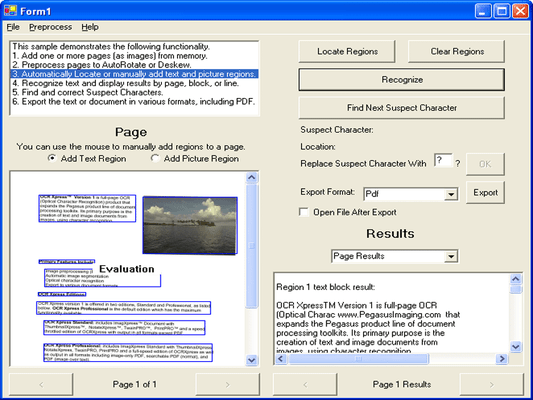
OCR Xpress - Professional - V1.0 - Sommario

di Pegasus Imaging Corporation - Tipo prodotto: Componente / Add-in / .NET WinForms / .NET Class / .NET WF / ActiveX DLL / VCL

Sommario

OCR Xpress Professional by Pegasus Imaging Corporation

Add full-page text recognition, OCR, automatic image rotation and searchable document creation to your application. OCR Xpress delivers fast and accurate full-page optical character recognition (OCR) to software developers in .NET and ActiveX COM toolkits. OCR Xpress also supports deskew, binarization, and segmentation of documents into image and text elements. It supports output to multiple text and text plus image formats including Microsoft Word-compatible RTF files and standard Adobe PDF files. The Professional Edition includes PDF output.

Text and Font Style Recognition

Perform OCR on a digital image, delivering the text in:

The appropriate Serif, Sans Serif, or Monospace font style

A font that is closest in form to the recognized font in normal, bold, italic, or bold italic

Scaled over a wide range of font sizes

Language Recognition

Recognize text in English, French, German, Italian, Spanish, Portuguese, Danish, Dutch, Swedish, Norwegian, Hungarian, Polish, and Finnish

Recognize one language at a time

Includes dictionaries for all supported languages

Accepts and applies user-defined words in a custom dictionary

Text Correction Capability

Identify characters recognized with low confidence

Make corrections to text prior to outputting to the document

Build text proofing and character replacement functions into applications

Auto Rotation

Accepts input images in any orientation and automatically rotates 0, 90, 180, or 270 degrees

Returns the amount of rotation applied

Uses the text to determine orientation

Highly optimized for speed

Image Binarization

Create black and white images from 24 bit color and 8 bit grayscale image file formats, with image input and conversion support provided by ImagXpress Document

Retain non-text color regions for reinsertion into the output document

Deskew

Full-page deskew on images with up to 15 degrees of skew

Image Input

OCR Xpress includes ImagXpress Document for image input (including TIFF, JPEG, JBIG2, and more)

Input uncompressed in-memory image data

File Output Formats

The output from OCR Xpress is a digital file containing unformatted text, formatted text, or formatted text plus image data, delivered in a variety of file formats. OCR Xpress Professional outputs all file types listed below, INCLUDING PDF. OCR Xpress Standard outputs all file types listed below, EXCEPT PDF.

ASCII

ASCII with no line breaks

ASCII with line breaks

ASCII with smart formatting (positioned with spaces)

ASCII, comma-delimited (one line per field)

ASCII, tab-delimited

Excel v2.x (compatible with later versions)

HTML, with a sub-folder of the same name containing images

PDF

PDF - Searchable Image (Original Image with Hidden Text), PDF version 1.4 file (Professional edition only)

PDF - Formatted Text and Graphics (Normal), PDF version 1.4 file (Professional edition only)

PDF - Image only, PDF version 1.4 file (Professional edition only)

RTF - Used for import to Word, WordPerfect, etc.

WordPerfect 5.0, WordPerfect 5.1

All image-only file formats supported by ImagXpress

Segmentation

Automatically or manually locate regions of the input image and identify them as either images (whose color can be preserved) or areas containing recognizable text

Access various regions separately, or recombine into fully-formatted documents such as RTF or PDF files

Edition Descriptions

The Standard Edition is a full-featured full-page OCR toolkit that supports many different export formats. The Professional Edition adds support for exporting PDF formats.

PartNumbers: PC-517580-108685 517580-108685 PC-517580-108686 517580-108686 PC-517580-108687 517580-108687 PC-517580-108688 517580-108688 PC-517580-108689 517580-108689 PC-517580-108690 517580-108690 PC-517580-108691 517580-108691

PurchaseOptions: OCR Xpress Professional Edition V1.0 1 Developer License , OCR Xpress Professional Edition V1.0 - Runtime Licenses 1-4 Installations (per CPU) , OCR Xpress Professional Edition V1.0 - Runtime Licenses 5-9 Installations (per CPU) , OCR Xpress Professional Edition V1.0 - Runtime Licenses 10-24 Installations (per CPU) , OCR Xpress Professional Edition V1.0 - Runtime Licenses 25-49 Installations (per CPU) , OCR Xpress Professional Edition V1.0 - Runtime Licenses 50-99 Installations (per CPU) , OCR Xpress Professional Edition V1.0 - Server License 1 Server (CPU) License

Resources: Read the OCR Xpress help file, Read the Pegasus Licensing Information, Download the OCR Xpress V1.0 for ActiveX evaluation on to your computer - Displays Evaluation Messages, Download the OCR Xpress V1.0 for .NET evaluation on to your computer - Displays Evaluation Messages

Operating System for Deployment: Windows Vista, Windows XP, Windows 2000

Architecture of Product: 32Bit

Product Type: Component, Add-In

Component Type: .NET WinForms, .NET Class, .NET WF, ActiveX DLL, VCL

Built Using: ActiveX Template Library (ATL)

Compatible Containers: Microsoft Visual Studio 2005, Microsoft Visual Studio .NET 2003, Microsoft Visual Studio .NET, Microsoft Visual Studio 6.0, Microsoft Visual Studio 97, Microsoft Visual Basic 2005, Microsoft Visual Basic .NET 2003, Microsoft Visual Basic .NET, Microsoft Visual Basic 6.0, Microsoft Visual C++ 2005, Microsoft Visual C++ .NET 2003, Microsoft Visual C++ .NET, Microsoft Visual C++ 6.0, Microsoft Visual C# 2005, Microsoft Visual C# .NET 2003, Microsoft Visual C# .NET, Delphi 8.0, Delphi 7.0, .NET Framework 2.0, .NET Framework 1.1, .NET Framework 1.0

Keywords: Scan scanning scanned scanner scans OCR optical character recognition Pegasus Image Imaging Imaging image images Professional Partner form suite pegasus imaging OCR xpress OCRXpress OCRExpress ocr express

Ricerca prodotti

Inserisci le tue parole chiave:

Award