par PEERNET - Type de produit : Application
Veuillez noter que les informations sur les produits ne sont pas disponibles en français.
Convert documents and more into quality images or PDF files. PEERNET File Conversion Center is a Microsoft Windows application that enables you to quickly and easily convert documents, spreadsheets, Web pages, PostScript files, and more into images (such as TIFF, JPG, BMP, and GIF) or Adobe PDF files. You can also use File Conversion Center to convert files from one image type to another or print files to one or more printers, all at the same time.
Nos prix standard sont montrés ci-dessous. Veuillez vous connecter pour voir vos prix.
| Ajouter au Caddie | $ 186.15 | 1 User License | Téléchargement (10.6 Mo) | |
| Ajouter au Caddie | $ 744.60 | 5 User License | Téléchargement (10.6 Mo) | |
| Ajouter au Caddie | $ 1,303.06 | 10 User License | Téléchargement (10.6 Mo) | |
| Ajouter au Caddie | $ 2,792.27 | 25 User License | Téléchargement (10.6 Mo) |
| Ajouter au Caddie | $ 121.00 | 1 User Upgrade License from V2.x | Vérifier | Téléchargement (10.6 Mo) |
| Ajouter au Caddie | $ 483.99 | 5 User Upgrade License from V2.x | Vérifier | Téléchargement (10.6 Mo) |
| Ajouter au Caddie | $ 846.98 | 10 User Upgrade License from V2.x | Vérifier | Téléchargement (10.6 Mo) |
| Ajouter au Caddie | $ 1,814.97 | 25 User Upgrade License from V2.x | Vérifier | Téléchargement (10.6 Mo) |
| Ajouter au Caddie | $ 260.61 | 1 User License | Téléchargement (10.7 Mo) | |
| Ajouter au Caddie | $ 1,042.45 | 5 User License | Téléchargement (10.7 Mo) | |
| Ajouter au Caddie | $ 1,824.28 | 10 User License | Téléchargement (10.7 Mo) | |
| Ajouter au Caddie | $ 3,909.17 | 25 User License | Téléchargement (10.7 Mo) |
| Ajouter au Caddie | $ 195.46 | 1 User Upgrade License from V2.x | Vérifier | Téléchargement (10.7 Mo) |
| Ajouter au Caddie | $ 781.83 | 5 User Upgrade License from V2.x | Téléchargement (10.7 Mo) | |
| Ajouter au Caddie | $ 1,368.21 | 10 User Upgrade License from V2.x | Vérifier | Téléchargement (10.7 Mo) |
| Ajouter au Caddie | $ 2,931.88 | 25 User Upgrade License from V2.x | Vérifier | Téléchargement (10.7 Mo) |
| Ajouter au Caddie | $ 74.46 | Support renewal for 1 User License | Vérifier | Téléchargement (29 Ko) |
| Ajouter au Caddie | $ 297.84 | Support renewal for 5 User License | Vérifier | Téléchargement (29 Ko) |
| Ajouter au Caddie | $ 521.22 | Support renewal for 10 User License | Vérifier | Téléchargement (29 Ko) |
| Ajouter au Caddie | $ 1,116.91 | Support renewal for 25 User License | Vérifier | Téléchargement (29 Ko) |
Nos prix comprennent le support technique ComponentSource et, pour la majorité des produits téléchargeables, une sauvegarde en ligne ainsi qu'une mise à niveau GRATUITE si la nouvelle version est parue pendant les 30 jours consécutifs à votre achat. Toutes les ventes sont sujettes à nos Termes et Conditions standard à notre Politique de renvoi. Veuillez nous contacter si vous avez besoin d'une option de licence (licence de volume et versions précédentes) qui ne figure pas sur la liste ci-dessus.
Nos prix standard sont montrés ci-dessus. Veuillez vous connecter pour voir vos prix.
What's New in V4.0?
What's New in V3.0?
File Conversion Center features are integrated into both your desktop and your Windows Explorer application, enabling you to convert files and folders as easily as you would copy, paste, and delete them. Either right-click on a file or folder in Windows Explorer and select a conversion option from the Convert To menu.
Alternatively, drag and drop the files and folders onto a desktop converter bin (one of the Convert To icons installed on your desktop).
It's that simple.
You can use the File Conversion Center to convert files to various image formats, convert files to Adobe PDF documents, or print files to one or more printers. You can even convert your documents to image or Adobe PDF files and print the documents to your favorite printer(s), all at the same time.
With File Conversion Center you can convert any of the supported input formats to any one of the supported output formats as listed below. As well, any of the supported input formats can be printed directly to any number of printers.
You can use the File Conversion Center to convert any of the following file types . . .
. . . into any of these image file types . . .
Note that PEERNET File Conversion Center requires the appropriate applications be installed on your system in order to handle the selected input format. For example, Microsoft Word 95 or higher is required to convert Word documents, Internet Explorer 4.0 or higher is required to convert HTML files or Web addresses, and Adobe Reader 4.0 or higher is required to convert Adobe PDF documents.
PEERNET File Conversion Center Product Features include the following:
Integrated with your desktop
File Conversion Center features are integrated into both your desktop and your Windows Explorer application, enabling you to convert files and folders as easily as you would copy, paste, and delete them. Either right-click on a file or folder in Windows Explorer and select a conversion option, or drag and drop files and folders onto a desktop converter bin icon. The conversion begins processing in seconds.
Extensive list of supported file types
Most popular document and image file formats are supported by the PEERNET File Conversion Center. Convert Microsoft Office documents and spreadsheets, Adobe PDF files, PostScript files, and Web pages into such image file formats as TIFF, JPG, GIF, PNG, and BMP. As well, you can convert from one image file type to another, making File Conversion Center a complete conversion solution.
Optimize your converted image files
Converted image files can be optimized for use in archiving, faxing, displaying on screen, displaying in a Web browser, or customized to best suit your specific requirements.
Convert and print at the same time
You can convert documents into image files and send them to your office printer with the same mouse click, simplifying your workflow process and saving you time.
Powerful batch-processing utility
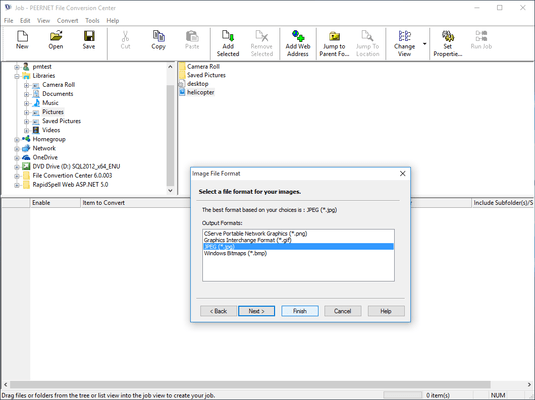
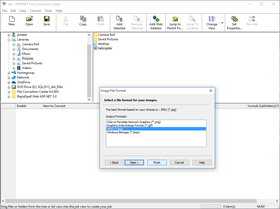
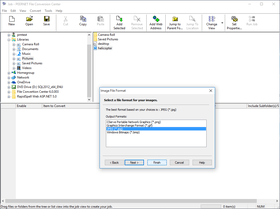
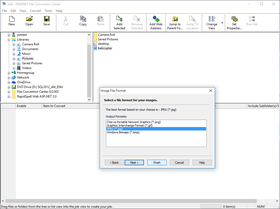
The File Conversion Center application interface can be used to convert batch jobs of files, folders, and web addresses, both save and load jobs, and perform other advanced tasks. As well, File Conversion Center supports the conversion of files and folders from your system command line.
User-friendly application interface
Step-by-step video tours, online Help, and extensive product documentation guide you through the conversion process, from creating context menu items and converter bins, to selecting your output type, and through more advanced tasks.
Éditeur
Catégorie principale
Produits similaires
Catégories similaires